web
You’re offline. This is a read only version of the page.
close
Skip to main content

Announcements

No record found.

News and Announcements icon
Community site session details

Community site session details

Session Id :
Microsoft Dynamics CRM (Archived)

Is it out of the Box ?

(0) ShareShare
ReportReport
Posted on by 365

Dears,

I was working on a virtual PC CRM Machine from Microsoft, this machine is developed for demonstration purposes and contains a sample data and customized entities,

Now, I made a fresh CRM installation, But there is a lot of things exist in the VPC machine and do not exist in my fresh installation.

My question is: How do I get the following records, Fields, views ? aren’t out of the box ? third party tools ?
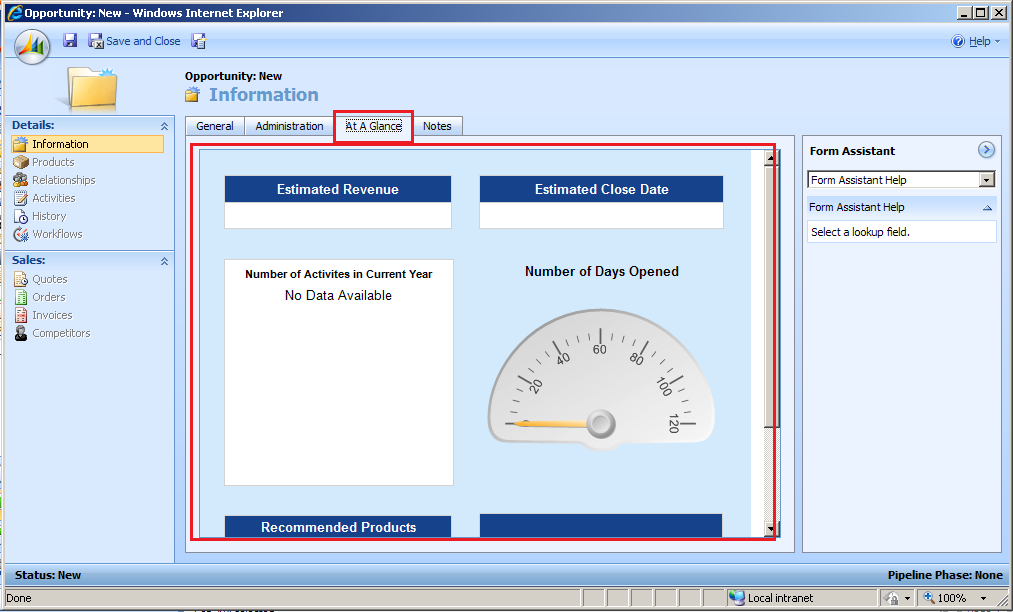


In this picture: "At a Glance" does not appear in my installation.
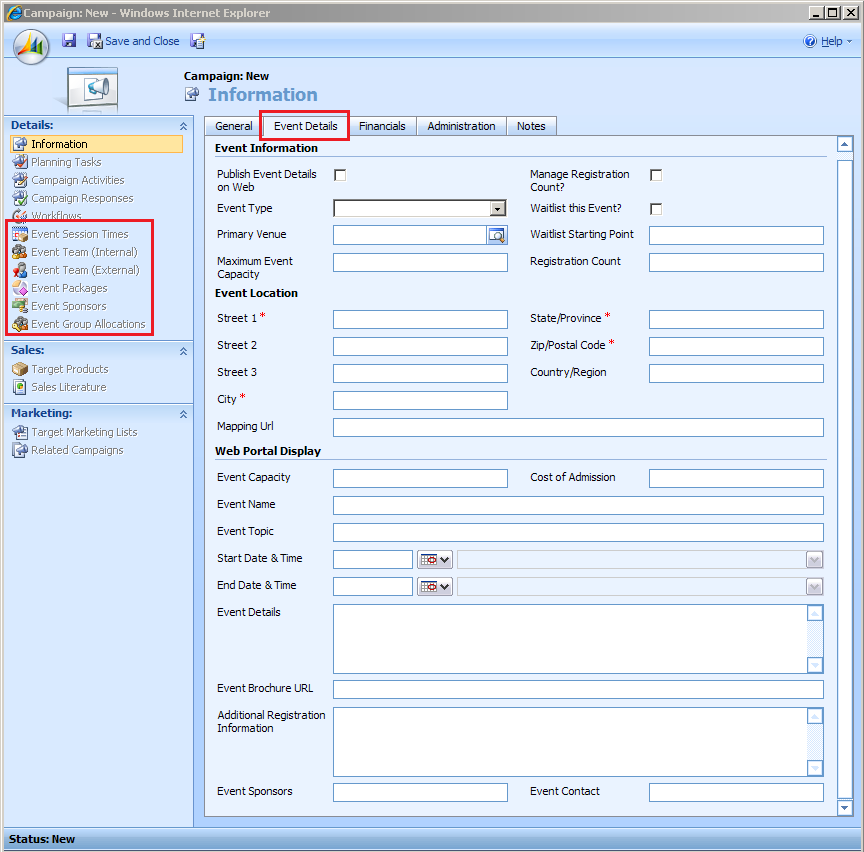


What about the "Event Details" in this picture ? and the right menu pane ?


Any Help in this is really appreciated

thanks in advance

*This post is locked for comments

I have the same question (0)
  • Verified answer
    a33ik Profile Picture
    84,331 Most Valuable Professional on at

    Hello, Saed.

    This is not out of box entities and customizations. To move this changes to your CRM you should export all the customizations from VPC and import on your fresh installed CRM and publish customizations. Regarding At A Glance - it seems that this CRM contains custom pages which you should move too.

  • Saed Salman Profile Picture
    365 on at

    Thank You Andriy,

    Many thanks for your time, efforts, and your greate motions.

    At A Glance is an IFrame Container, contains a report of type Chart report. I guess.

    I am now facing another problem: I am not able to send email to CRM Teams !!!

    Only Lead, Opportunity, Contact and users are listed but not Teams.

    Another little question please :)

    Do you deploy CRM as Backup/Restore or what?

  • Verified answer
    a33ik Profile Picture
    84,331 Most Valuable Professional on at

    Hello, Saed.

    Regarding At A Glance you just should check the URL of Iframe for better understanding how it works and what is under the IFrame.

    Regarding Teams - yes. It is impossible send the emails to Teams but following custom workflow action can help you to do it if you want to do it from WorkFlows - a33ik.blogspot.com/.../custom-workflow-action-team-members-and.html

    Regarding CRM Deploy - it depends on many reasons. But usually I just Export/Import customizations, Export/Import plugins and custom workflow actions, copy and register website extensions and Import/Export reports.

  • Saed Salman Profile Picture
    365 on at

    Hello Mr. Andriy,

    How do I deploy the code ? (I will compile it as DLL, then what ? )

    and what does the code suppose to do ? Does it enrich the lookup menu of the "To" email so I could choose a team rather than Lead, Opportinuty, contact, account, and users ?

    I notice that the code is yours, and this really great :)

    Sorry for many questions i already asked, but I am beginner to CRM.

    Thanks in advance

  • Saed Salman Profile Picture
    365 on at

    Export/Import Customization and workflows are okay, But

    How do I export  plugins, copy and register website extensions, and Import/Export reports ?

    I do not know how should thank you for all these, Indeed :o)

  • a33ik Profile Picture
    84,331 Most Valuable Professional on at

    Hello, Saed.

    From my point of view it is better for you to read literature about customization and development for Microsoft Dynamics CRM before starting development.

  • Saed Salman Profile Picture
    365 on at

    Totally agreed with you Andriy,

    I am going to master Costumizations/Workflows/ and Extension. (Just a little bit of time)

    But now, I am requested finish something :(

    It is okay for Reports and workflows Import/Export, I read something now and it is okay.

    About the Plugins I will check this later.

    For now, Just guide me to deploy your code to send email to a Team, Please Andriy.

    That is what I need at this instance. (a quick brief steps will be enough)

    Thanks in advance,

    Saed

  • Verified answer
    a33ik Profile Picture
    84,331 Most Valuable Professional on at

    Hi, Saed.

    You should check following URL regarding registration of custom workflow activity - msdn.microsoft.com/.../ee704600.aspx

  • Saed Salman Profile Picture
    365 on at

    Thank you very much,

    I also got this link:

    msdn.microsoft.com/.../aa685987.aspx

    It seems to me that your code a workflow itself, if this is the case:

    Could we add the "Team" items to "TO" lookup view, So when I am going to send email I will click on "To" then I will select Team rather than users or leads or ...

    is this possible Andriy ?

  • Saed Salman Profile Picture
    365 on at

    aha, sorry we points to the same artical :(

Under review

Thank you for your reply! To ensure a great experience for everyone, your content is awaiting approval by our Community Managers. Please check back later.

Helpful resources

Quick Links

Introducing the 2026 Season 1 community Super Users

Congratulations to our 2026 Super Stars!

Meet the Microsoft Dynamics 365 Contact Center Champions

We are thrilled to have these Champions in our Community!

Congratulations to the March Top 10 Community Leaders

These are the community rock stars!

Leaderboard > 🔒一 Microsoft Dynamics CRM (Archived)

#1
JS-09031509-0 Profile Picture

JS-09031509-0 3

#2
AS-17030037-0 Profile Picture

AS-17030037-0 2

#2
Mark Eckert Profile Picture

Mark Eckert 2

Last 30 days Overall leaderboard

Featured topics

Product updates

Dynamics 365 release plans
