web
You’re offline. This is a read only version of the page.
close
Skip to main content

Announcements

No record found.

News and Announcements icon
Community site session details

Community site session details

Session Id :
Small and medium business | Business Central, N...
Answered

Accessing Code coverage page on Business central 17 On premises version

(0) ShareShare
ReportReport
Posted on by 115

Hi Community,

I was opening code coverage page on BC 17, but I got following error 'You can only run code coverage in a sandbox environment'. Previously on BC 16 and 15, I was able to open this page. Can anyone share some knowledge why its showing this error ?
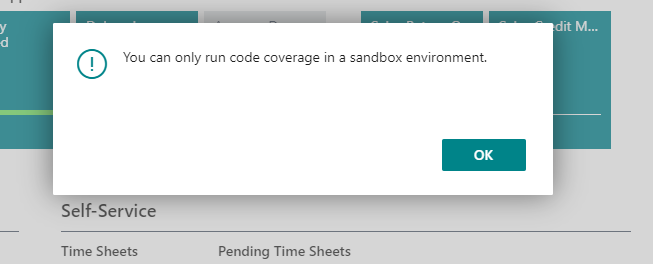
Code-coverage-error.PNG

I have the same question (0)
  • Suggested answer
    jerome77 Profile Picture
    Microsoft Employee on at

    Hi

    I believe this is a bug that will be corrected with 17.1

    Kind regards

    Jerome

  • borjaRuiz Profile Picture
    35 on at

    Code coverage page seems not to be working correctly. I am not able to analyze the elements of my extension, I cant only see the business central standard elements.

    Anybody knows something about that?

  • faran1 Profile Picture
    115 on at

    Yes, recently one of my colleague was experiencing the very same issue, we did not find out why its happening, after a lot of tries we just created a new AL project for our extension and copy/paste the objects and it started to show in code coverage page, thanks.  

  • Verified answer
    borjaRuiz Profile Picture
    35 on at

    Thank you so much Faran.

    Investigating a little bit further with your answer we´ve reached to the origin of the issue.

    It is the following parameter in the App.json of our extensin:

    "showMyCode": false,

    setting the parameter to true we can now see our elements in the code coverage page.

Under review

Thank you for your reply! To ensure a great experience for everyone, your content is awaiting approval by our Community Managers. Please check back later.

Helpful resources

Quick Links

Introducing the 2026 Season 1 community Super Users

Congratulations to our 2026 Super Stars!

Meet the Microsoft Dynamics 365 Contact Center Champions

We are thrilled to have these Champions in our Community!

Congratulations to the March Top 10 Community Leaders

These are the community rock stars!

Leaderboard > Small and medium business | Business Central, NAV, RMS

#1
OussamaSabbouh Profile Picture

OussamaSabbouh 1,717 Super User 2026 Season 1

#2
YUN ZHU Profile Picture

YUN ZHU 995 Super User 2026 Season 1

#3
Khushbu Rajvi. Profile Picture

Khushbu Rajvi. 628 Super User 2026 Season 1

Last 30 days Overall leaderboard

Featured topics

Product updates

Dynamics 365 release plans
