web
You’re offline. This is a read only version of the page.
close
Skip to main content

Notifications

Announcements

No record found.

Community site session details

Community site session details

Session Id :
Small and medium business | Business Central, N...
Answered

Import Item Pictures - cannot overwrite existing pictures?

(0) ShareShare
ReportReport
Posted on by 191

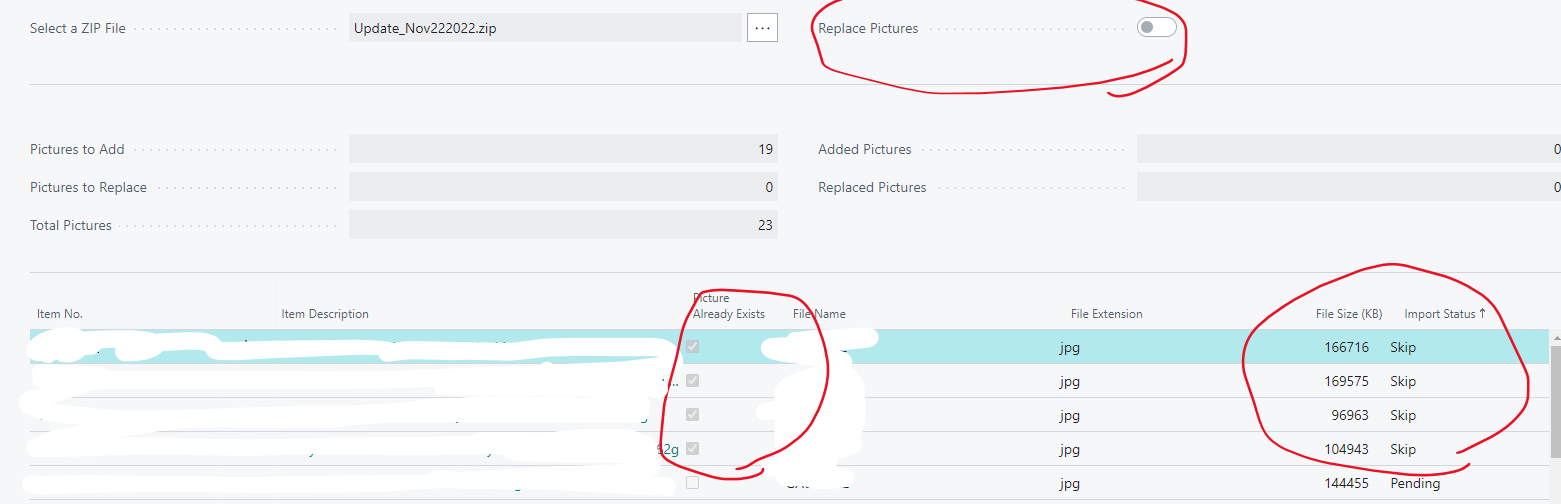
I'm trying to bulk upload photos. 

I believe I used to be able to click on "Replace Pictures" previously and update existing photos but now 

Replace Pictures option is Greyed out and I cannot get this to click on to replace. I had to remove the photos and update them for older batches yesterday and today I have more and I'm encountering same issue. What am I missing here?

Thanks,
 pastedimage1669309303331v2.png

I have the same question (0)
  • Kristoffer Ruyeras Profile Picture
    35 on at

    Just checking the check list of things I would check. How’s your permission sets configured?

  • Suggested answer
    YUN ZHU Profile Picture
    95,754 Super User 2025 Season 2 on at

    Hi, I just tested it and it seems to work fine. Replace Picture can be enabled after selecting Zip File.

    pastedimage1669335062980v1.png

    pastedimage1669335098314v2.png

    pastedimage1669335109198v3.png

    pastedimage1669335124254v4.png

    PS: If Item No. is not found in BC, Skip will be displayed.

    pastedimage1669335229256v5.png

    pastedimage1669335238787v6.png

    Hope this helps.

    Thanks.

    ZHU

  • Suggested answer
    DAnny3211 Profile Picture
    11,397 on at

    hi

    look this

    learn.microsoft.com/.../inventory-how-import-item-pictures

    DAniele

  • LizHK Profile Picture
    191 on at

    Thanks! that's what I remember what I used to do. but if you look at my screenshot I uploaded 23 photos, among 4 were replacements. (Says Image already exists) However, it doesn't show up as Replace qty (It says 0 instead of 4) and just skips. I cannot click on 'Replace' and it is greyed out as well. My version is Version: CA Business Central 21.1 (Platform 21.0.48357.49378 + Application 21.1.48363.48789) and I only started to have this issue after this update.

  • LizHK Profile Picture
    191 on at

    Thanks I did - and I have been using this upload method quite a few times. It's something that is not the same after the update.

  • Suggested answer
    YUN ZHU Profile Picture
    95,754 Super User 2025 Season 2 on at

    Hi, If you don't have any customizations in your environment, this may be a standard issue with the CA version.

    My test version: Version: W1 21.1 (Platform 21.0.48357.49602 + Application 21.1.48363.48789)

    pastedimage1669850257126v1.png

  • LizHK Profile Picture
    191 on at
    Does anybody experience the same issue with me at all? I was hoping with update to 22 I'd be okay but it is still the same case - I get no option for Replace and I am Super User - I'm guessing I should have all the permissions?
     
    Thanks,
  • Community member Profile Picture
    2 on at
    I have the same problem. The "Replace image" is not possible to click. 

    I'm Super User in BC.
    Is this about permissions in BC or what kind of role I have choosed ?

    Versjon: NO Business Central 23.5 (plattform 23.0.18033.0 + program 23.5.16502.16589)
    ​​​​​​​

  • Verified answer
    LizHK Profile Picture
    191 on at
    Just for an update - mine is okay now. Nothing changed except that I'm using V24 now so I'm guessing it was some kind of a bug.
     

Under review

Thank you for your reply! To ensure a great experience for everyone, your content is awaiting approval by our Community Managers. Please check back later.

Helpful resources

Quick Links

Responsible AI policies

As AI tools become more common, we’re introducing a Responsible AI Use…

Neeraj Kumar – Community Spotlight

We are honored to recognize Neeraj Kumar as our Community Spotlight honoree for…

Leaderboard > Small and medium business | Business Central, NAV, RMS

#1
OussamaSabbouh Profile Picture

OussamaSabbouh 2,132

#2
Khushbu Rajvi. Profile Picture

Khushbu Rajvi. 675 Super User 2025 Season 2

#3
YUN ZHU Profile Picture

YUN ZHU 665 Super User 2025 Season 2

Last 30 days Overall leaderboard

Featured topics

Product updates

Dynamics 365 release plans
