web
You’re offline. This is a read only version of the page.
close
Skip to main content

Notifications

Announcements

No record found.

Community site session details

Community site session details

Session Id :
Supply chain | Supply Chain Management, Commerce
Suggested Answer

Error message prompt when running the Close Inventory

(0) ShareShare
ReportReport
Posted on by 283

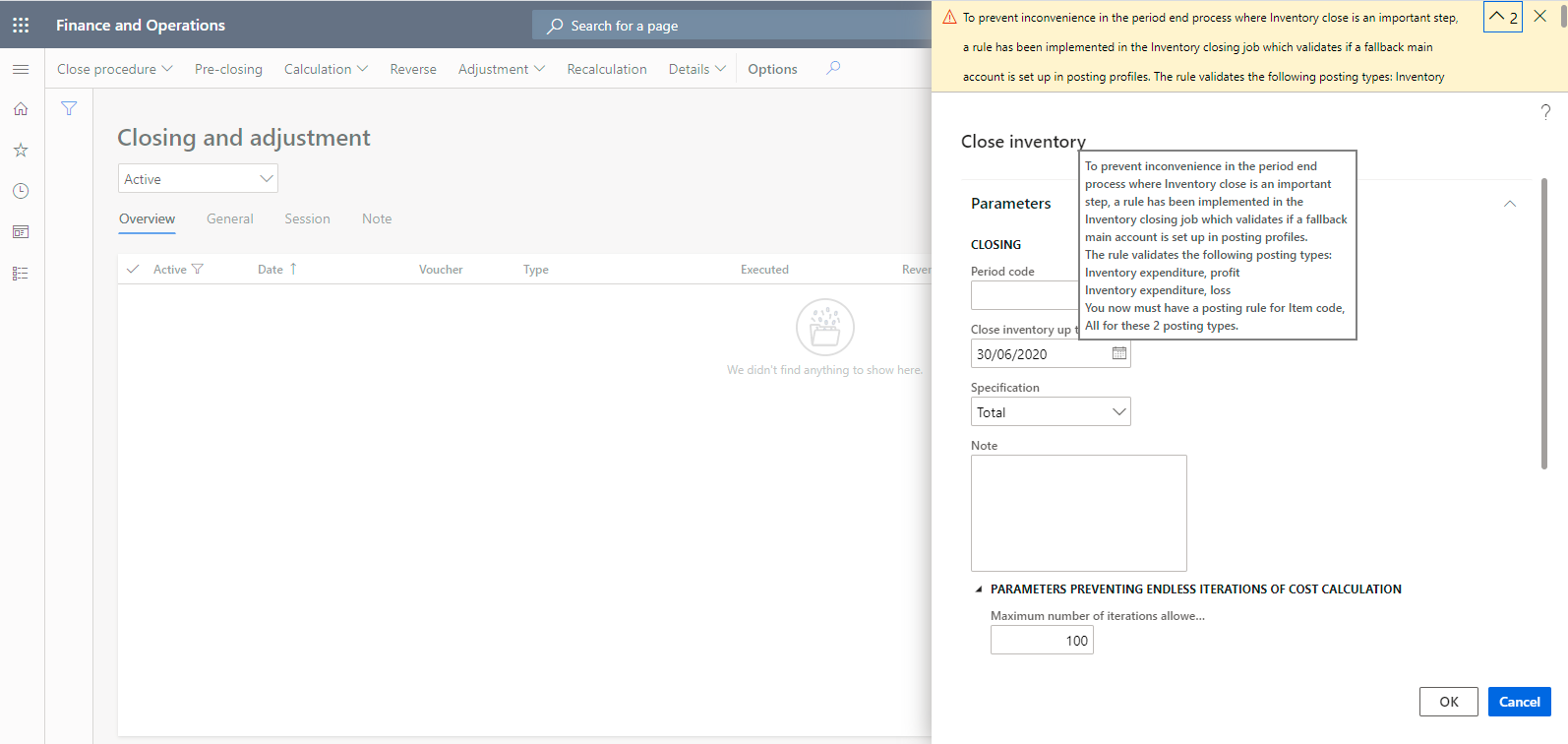
When I do the "Close Inventory", error message prompt as follow:

"To prevent inconvenience in the period end process where Inventory close is an important step, a rule has been implemented in the Inventory closing job which validates if a fallback main account is set up in posting profiles. The rule validates the following posting types: Inventory expenditure, profit Inventory expenditure, loss You now must have a posting rule for Item code, All for these 2 posting types"

But I've already set the ledger account for "Inventory expenditure, profit" and "Inventory expenditure, loss" in Inventory Posting Profile

anyone knows that what else I missed in settings or what's any other action I should take before start the Inventory Close?  Pls. advise, thanks 
pastedimage1611821950712v1.png

pastedimage1611822193780v2.png

I have the same question (0)
  • Suggested answer
    Akshay Profile Picture
    54 on at

    The error message is from a validation to check for a catch all account. Did you try entering a setup line with Item Code All and enter another generic account for Profit/Loss? The actual posting should still take the specific account assigned for the item group at higher priority.

  • Suggested answer
    phyllispang Profile Picture
    283 on at

    Hi Akshay Ramgopal,

    thanks for your information, after add Item Code = All for "inventory expenditure, loss" & "inventory expenditure, profit", i can run the Close Inventory now, thanks.

  • phyllispang Profile Picture
    283 on at

    Hi,

    after run the "Close Inventory", it show OK = "X" ; but there is NO any error message, anyone knows how to check why failed ?  Please advise, thanks 

    pastedimage1611889818203v1.png

  • Suggested answer
    Akshay Profile Picture
    54 on at

    This is the default error (pending warning) that you will see until the inventory close completes execution. Refreshing the screen after a short while will show that the closing process is complete. It really depends on how many inventory transactions are being closed in the environment that you're working on.

    However, if the inventory close is still pending, you'll need to check your batch process and see if the process is stuck there.

    If you are seeing any other symptoms, please share what you're seeing.

Under review

Thank you for your reply! To ensure a great experience for everyone, your content is awaiting approval by our Community Managers. Please check back later.

Helpful resources

Quick Links

Responsible AI policies

As AI tools become more common, we’re introducing a Responsible AI Use…

Neeraj Kumar – Community Spotlight

We are honored to recognize Neeraj Kumar as our Community Spotlight honoree for…

Leaderboard > Supply chain | Supply Chain Management, Commerce

#1
Laurens vd Tang Profile Picture

Laurens vd Tang 271 Super User 2025 Season 2

#2
Siv Sagar Profile Picture

Siv Sagar 171 Super User 2025 Season 2

#3
André Arnaud de Calavon Profile Picture

André Arnaud de Cal... 130 Super User 2025 Season 2

Last 30 days Overall leaderboard

Featured topics

Product updates

Dynamics 365 release plans
