web
You’re offline. This is a read only version of the page.
close
Skip to main content

Notifications

Announcements

No record found.

Community site session details

Community site session details

Session Id :
Small and medium business | Business Central, N...
Answered

You do not have the following permissions on TableData...: Read.

(0) ShareShare
ReportReport
Posted on by 120

Hi All,

We are using BC Dynamics 365 web client .We have developed an extension. Extension has a one table called " Location Dimension code setup".

We have created 2 Users, say User 1 and User 2.With regarding permissions, Only the difference between 2 users is, User 1 has 'SUPER' Permission and User 2 don't have that permission.

The issue is, Extension works only for User 1. User 2 get the error message  "You do not have the following permissions on TableData Location Dimension Code Setup: Read. To view details about your permissions, see the Effective permissions page."

Following is the user permission page and effective permissions page for User 1.

user-permn.png

user-permn2.png

** User 2 have no 'SUPER' Permission. and following is User 2 Effective Permissions page.
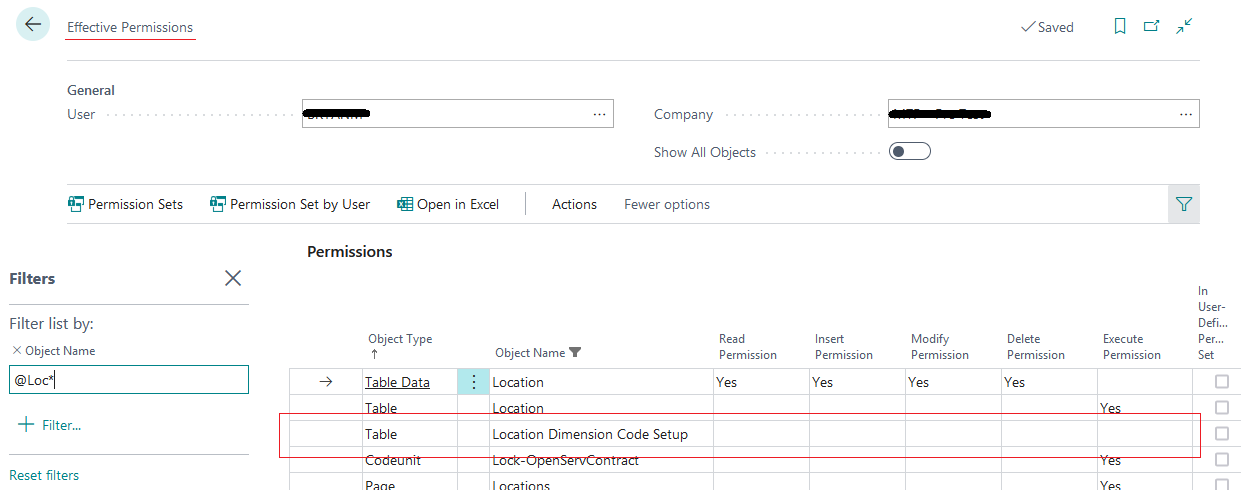
user-permn3.png

When compared with User 1 effective permissions , there is only Table, no TableData object created for User 2. If  "SUPER" permission is assigned to User 2, He gets the TableData object and can access to the Extension table.

Could someone please explain

  1. why Extension table can be accesses only with super permission ?
  2. What are the possible ways to fix this issue and Is there a way to fix this issue without assigning 'SUPER' permission to User 2?

Thanks,

Nalin.

I have the same question (0)
  • Suggested answer
    Inge M. Bruvik Profile Picture
    1,105 Moderator on at

    To follow best practice you should define a permission set for the extension app and add that permission set to the users / usergroups that needs access to your extention.

    docs.microsoft.com/.../devenv-permissionset-object

    The other option is to modify an existing permission set and add the objects from your extension app into that permission set.

    The reason it works for the super user is that they normally have full access to all objects in the solution.

  • Nalin.karu Profile Picture
    120 on at

    Hi NorthW,

    Thanks for your valuable quick answer. It resolved our problem. thanks again.

    Nalin.

Under review

Thank you for your reply! To ensure a great experience for everyone, your content is awaiting approval by our Community Managers. Please check back later.

Helpful resources

Quick Links

Responsible AI policies

As AI tools become more common, we’re introducing a Responsible AI Use…

Neeraj Kumar – Community Spotlight

We are honored to recognize Neeraj Kumar as our Community Spotlight honoree for…

Leaderboard > Small and medium business | Business Central, NAV, RMS

#1
OussamaSabbouh Profile Picture

OussamaSabbouh 3,143

#2
Jainam M. Kothari Profile Picture

Jainam M. Kothari 1,694 Super User 2025 Season 2

#3
YUN ZHU Profile Picture

YUN ZHU 1,067 Super User 2025 Season 2

Last 30 days Overall leaderboard

Featured topics

Product updates

Dynamics 365 release plans
