web
You’re offline. This is a read only version of the page.
close
Skip to main content

Announcements

No record found.

News and Announcements icon
Community site session details

Community site session details

Session Id :
Supply chain | Supply Chain Management, Commerce
Active Discussion

Adding Expiry date to batches created automatically

(0) ShareShare
ReportReport
Posted on by 50

I have created a product with its batch number and serial number automated. Now is there any way to add Manufacturing and expiry date to the batches created automatically? If so kindly let me know. I have placed a Po for 130 items with 20 items per batch.

Thanks

  • Ashish Upadhyay79 Profile Picture
    Microsoft Employee on at

    Hello Dhinesh,

    You can use Shelf life day setup in Released Product > Manage Inventory Tab to auto calculate Expiry Dates

    To reset the dates, you can open the Batches list page > Action Pane Menu  >Reset , here you can reset all the dates including Manufacturing
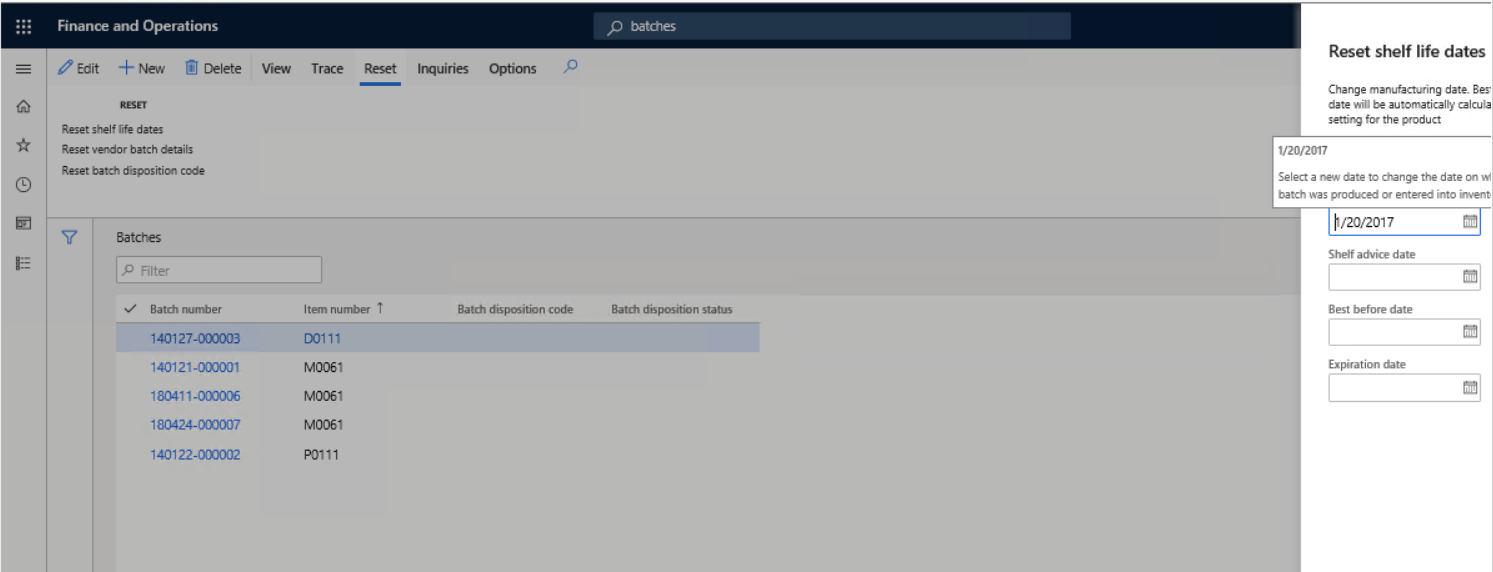
    pastedimage1594136968801v1.png

    Kindly let me know if this answers your query, kindly let me know if you have any further query

    Regards,

    Ashish

    If this answer your query kindly request to mark the thread as answered.

  • Dhinesh DT Profile Picture
    50 on at

    Thank you Ashish worked fine. I also have one more doubt, Is there any way I can Export the batch number with Expiry date and other details such as serial number and manufacturing date?

    Thanks in advance

  • Christoph Thaler Profile Picture
    5,442 on at

    Hi,

    You can use the data entities with filter or use a odata query with filter

Under review

Thank you for your reply! To ensure a great experience for everyone, your content is awaiting approval by our Community Managers. Please check back later.

Helpful resources

Quick Links

Introducing the 2026 Season 1 community Super Users

Congratulations to our 2026 Super Stars!

Meet the Microsoft Dynamics 365 Contact Center Champions

We are thrilled to have these Champions in our Community!

Congratulations to the April Top 10 Community Leaders

These are the community rock stars!

Leaderboard > Supply chain | Supply Chain Management, Commerce

#1
André Arnaud de Calavon Profile Picture

André Arnaud de Cal... 152 Super User 2026 Season 1

#2
Laurens vd Tang Profile Picture

Laurens vd Tang 116 Super User 2026 Season 1

#3
Zain Mehmood Profile Picture

Zain Mehmood 89 Most Valuable Professional

Last 30 days Overall leaderboard

Product updates

Dynamics 365 release plans
