web
You’re offline. This is a read only version of the page.
close
Skip to main content

Notifications

Announcements

No record found.

Community site session details

Community site session details

Session Id :
Microsoft Dynamics CRM (Archived)

Business Process Error. SecLib::AccessCheckEx failed

(0) ShareShare
ReportReport
Posted on by 410

Hi,

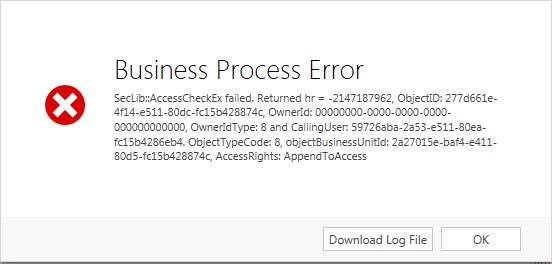
One of our users is getting an error when trying to save information to a new opportunity and is unable to save (not always and if she removed a certain fields, it allowed her to continue).

She gets the following error:
Business-process-error.jpg

I've tried to look up some issues and they all say it has to do with my user not having permissions to the ObjectTypeCode: 8. This points to "System User".

When I go to change the security roles, my users do have access to "Append to" to basically everything related to the opportunities, user, accounts, process....

Any thoughts? I haven't seen any issues for many others and can't replicate the issue myself.

*This post is locked for comments

I have the same question (0)
  • Community Member Profile Picture
    on at

    Check append to privilege on System User Entity.

  • Suggested answer
    Abhishek_Sinha Profile Picture
    665 on at

    Hi,

    Download log file and check for error detail . Is it something like below  , if there is insufficient privilege  then  check append and append to privilege for all lookup for that user.  I  got this error last week , you can compare with below error.

    SecLib::AccessCheckEx failed.

    Returned hr = –2147187962,

    ObjectID: 13b77782–e8a5–4402–baa8–c12c23e24b9d,

    OwnerId: 00000000–0000–0000–0000–000000000000,

    OwnerIdType: 8 and

    CallingUser: bdac31ae–f274–e011–8720–00155da5304e.

    ObjectTypeCode: 4003,

    objectBusinessUnitId: 2fe76a43–4473–e011–8720–00155da5304e,

    AccessRights: ReadAccess

    Principal user (Id=bdac31ae–f274–e011–8720–00155da5304e, type=8)is missing

    prvWriteCalendar privilege (Id=6c21bd41–8a34–4a01–ad17–4f706ddf6f70)

  • Suggested answer
    Abhishek_Sinha Profile Picture
    665 on at

    I had  aapend , aapend to error . Three months back i checked the privilege and it worked. Please find below blog about append and append to

    inogic.com/.../append-vs-append-to

  • HodgesW Profile Picture
    410 on at

    Well I changed the security level from "user" to "organization" and that seems to have fixed it. Weird because she was only doing it on an opportunity that she owned.

Under review

Thank you for your reply! To ensure a great experience for everyone, your content is awaiting approval by our Community Managers. Please check back later.

Helpful resources

Quick Links

Responsible AI policies

As AI tools become more common, we’re introducing a Responsible AI Use…

Neeraj Kumar – Community Spotlight

We are honored to recognize Neeraj Kumar as our Community Spotlight honoree for…

Leaderboard > 🔒一 Microsoft Dynamics CRM (Archived)

#1
SA-08121319-0 Profile Picture

SA-08121319-0 4

#1
Calum MacFarlane Profile Picture

Calum MacFarlane 4

#3
Alex Fun Wei Jie Profile Picture

Alex Fun Wei Jie 2

Last 30 days Overall leaderboard

Featured topics

Product updates

Dynamics 365 release plans
