web
You’re offline. This is a read only version of the page.
close
Skip to main content

Announcements

No record found.

News and Announcements icon
Community site session details

Community site session details

Session Id :
Small and medium business | Business Central, N...
Answered

Modify a record through ODATAV4

(0) ShareShare
ReportReport
Posted on by 4,009

Hi All,

I have a record created in Business Central and is pulled to CDS Correctly. After modifyingthe record in CDS, I want to update my record in Business Central.

The issue is that the table consists 3 key fields Time Sheet No., Time Sheet Line No. and Date.

When I call the url through GET method, I'm precisely getting that single record.

GET.png

When I try to modify the record using PATCH, I'm getting the following error

'Could not validate the client concurrency token required by the service. Please provide a valid token in the client request'
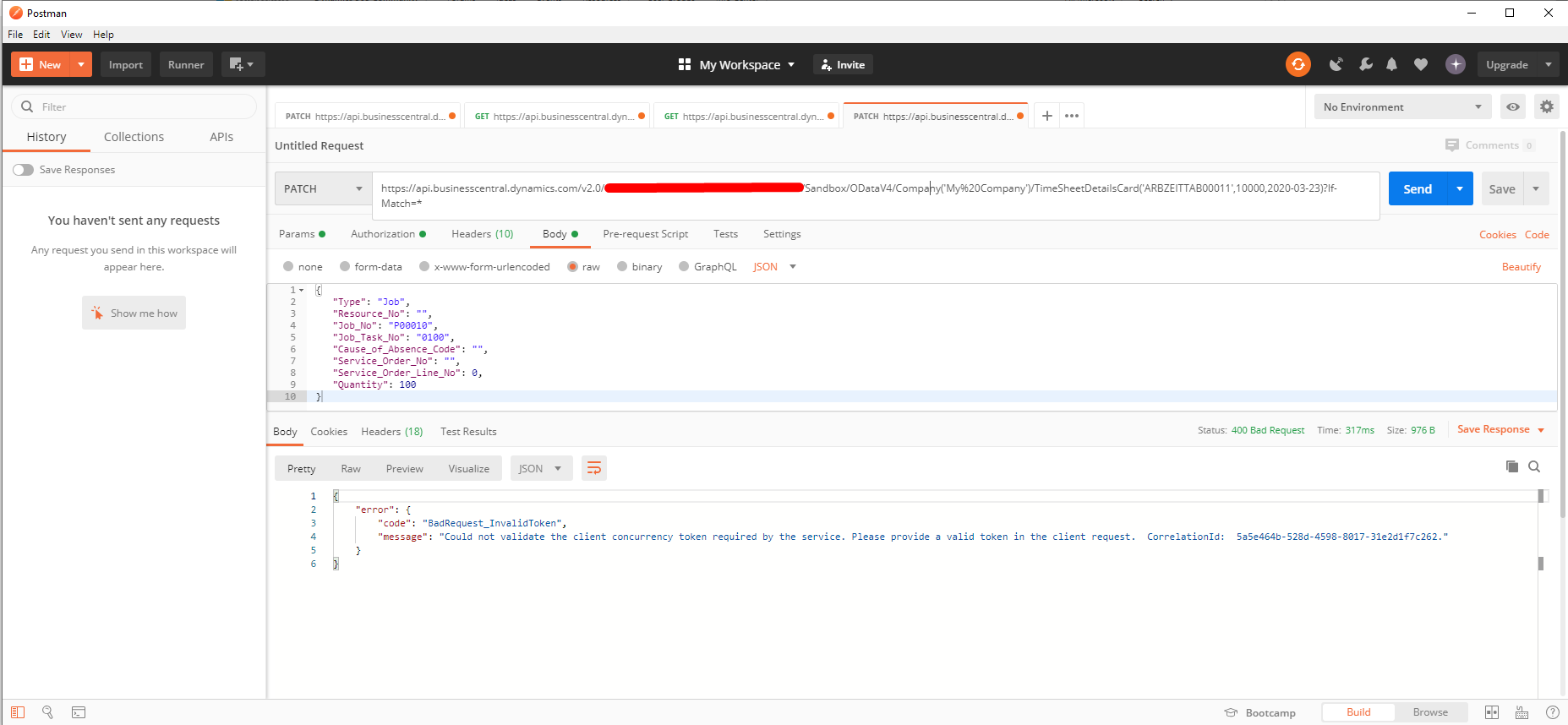
PATCH.png

I have followed this url

https://docs.microsoft.com/en-us/dynamics365/business-central/dev-itpro/webservices/use-odata-to-modify-data

I have also passed the Etag as a part of If-Match but that just gives the same result.

Kindly advise!

I have the same question (0)
  • Verified answer
    gert-jan.terschure Profile Picture
    206 on at

    You need to provide the If-Match header in the PUT request. When you get the result you get the "@odata.etag" property, this is the concurrency token.

  • Suggested answer
    Olister Rumao Profile Picture
    4,009 on at

    Hi,

    Yes I have also tried that but it gives the same result.

  • Verified answer
    gert-jan.terschure Profile Picture
    206 on at

    From the screenshots the If-Match seems to be placed in the url. It needs to be placed in the header. Please note that the @odata.etag that's provided by Business Central/NAV is "escaped json", so you'll need to remove the "\" that are placed in front of the double quotes.

    pastedimage1585805687917v1.png

  • Suggested answer
    Olister Rumao Profile Picture
    4,009 on at

    Hi Gert,

    Thank you I appreciate your help, but I'm getting the same error.

    I do not understand why If-Match becomes a part of the URL
    PUT.png

    Also, I'm showing the body of the call

    PUIT-BODY.png

    I hope this makes it clear.
    Let me know if you need any more details or we can have a call to understand it further.

  • Verified answer
    gert-jan.terschure Profile Picture
    206 on at

    From the screenshots I can see you're adding the If-Match and Content-Type to the tab "Params", these will be added to the url. This is intended behavior as the params could contain items such as "$filter" and "$select".

    Please place them in tab "Headers" (3rd tab from the left), that is where the headers that are being sent as part of the request are added.

  • Verified answer
    Olister Rumao Profile Picture
    4,009 on at

    Aaahh....

    You are right.. I made a silly mistake...

    Yes I have confirmed that things are working as desired.

    FYI If-Match = * also works perfectly

    Thanks a lot man.. I guess I needed a second pair of eyes :)

Under review

Thank you for your reply! To ensure a great experience for everyone, your content is awaiting approval by our Community Managers. Please check back later.

Helpful resources

Quick Links

Introducing the 2026 Season 1 community Super Users

Congratulations to our 2026 Super Stars!

Congratulations to our 2025 Community Spotlights

Thanks to all of our 2025 Community Spotlight stars!

Leaderboard > Small and medium business | Business Central, NAV, RMS

#1
OussamaSabbouh Profile Picture

OussamaSabbouh 1,850 Super User 2026 Season 1

#2
YUN ZHU Profile Picture

YUN ZHU 1,084 Super User 2026 Season 1

#3
Dhiren Nagar Profile Picture

Dhiren Nagar 959 Super User 2026 Season 1

Last 30 days Overall leaderboard

Featured topics

Product updates

Dynamics 365 release plans
