web
You’re offline. This is a read only version of the page.
close
Skip to main content

Announcements

No record found.

News and Announcements icon
Community site session details

Community site session details

Session Id :
Small and medium business | Business Central, N...
Suggested Answer

Clear filter cache of the page

(0) ShareShare
ReportReport
Posted on by 307

I had an error when trying to open a customized page, other users have not faced with this

It seems that I set some filter on the page then when I am click the function again, it shows error
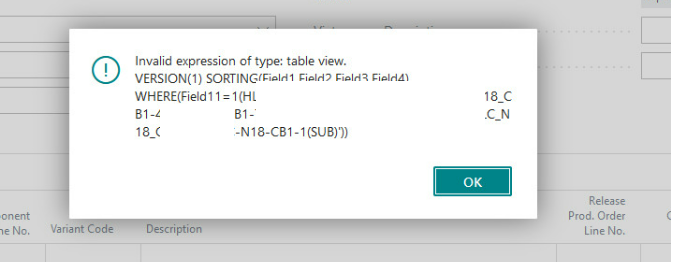
pastedimage1680848383259v3.png

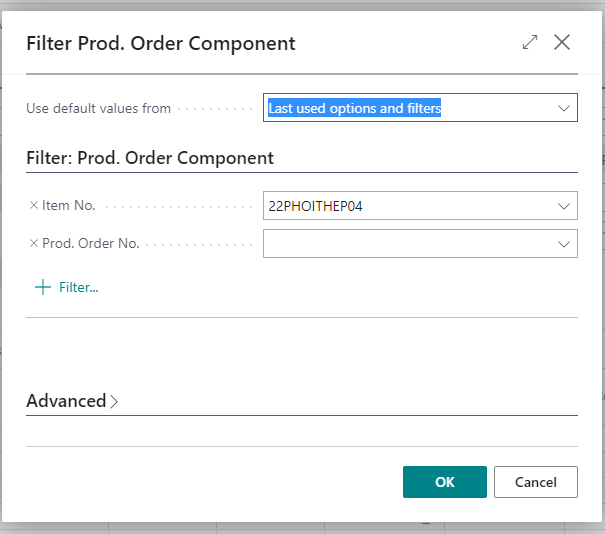
Other User can open the filter page:

pastedimage1680848218088v2.png

How to clear the filter of above window ?

I have the same question (0)
  • Suggested answer
    NAV_with_Narang Profile Picture
    2,374 Moderator on at

    Seems like the formula applied in the Report's AL code is incorrect, by any chance if you have access to Report's AL code please share the TableView property

  • Hoang Ng Profile Picture
    307 on at

    Hi Nurang,

    It is not the report

    It is a page

    When user click menu (my error happens after this), it shows filter 

    pastedimage1680850041323v1.png 

    When you click OK, It show a grid

    pastedimage1680850141850v3.png

    Thanks.

  • Suggested answer
    Nitin Verma Profile Picture
    21,812 Moderator on at

    There are possible two reasons,

    1. Check if this code does not have a specific user id,

    2. Try to Incognito Mode in browser.

  • Suggested answer
    Hoang Ng Profile Picture
    307 on at

    Thanks Nitin

    I tried use Mode Incognito but the error is still there.

    But I finally found the solution:

    - Go to Report Settings

    - Select the Report ID linked to User

    - Delete the line

    pastedimage1680853426188v1.png

  • Suggested answer
    Nitin Verma Profile Picture
    21,812 Moderator on at

    Thanks for Update.

  • Gianfranco C. Profile Picture
    374 on at

    hello, please consider setting the 'SaveValues' property in the report requestpage to false: this will not save the filters you set.

    Don't forget to help the community by Verifying the answer and Like it if your question has been answered. It will let others know that the topic has verified answer.

    Thanks & Regards,

Under review

Thank you for your reply! To ensure a great experience for everyone, your content is awaiting approval by our Community Managers. Please check back later.

Helpful resources

Quick Links

Introducing the 2026 Season 1 community Super Users

Congratulations to our 2026 Super Stars!

Meet the Microsoft Dynamics 365 Contact Center Champions

We are thrilled to have these Champions in our Community!

Congratulations to the April Top 10 Community Leaders

These are the community rock stars!

Leaderboard > Small and medium business | Business Central, NAV, RMS

#1
OussamaSabbouh Profile Picture

OussamaSabbouh 2,138 Super User 2026 Season 1

#2
YUN ZHU Profile Picture

YUN ZHU 1,279 Super User 2026 Season 1

#3
AndrewThomas81 Profile Picture

AndrewThomas81 1,192

Last 30 days Overall leaderboard

Featured topics

Product updates

Dynamics 365 release plans