web
You’re offline. This is a read only version of the page.
close
Skip to main content

Notifications

Announcements

No record found.

Community site session details

Community site session details

Session Id :
Small and medium business | Business Central, N...
Answered

How to fix the capacity limit on item bins in business central under warehouse management.

(0) ShareShare
ReportReport
Posted on by 135

I  want to restrict the BC to store item quantities greater than specified bin qty in warehouse management, for this i used max qty in item bin contents , but system still allowed to store item qty greater than max qty. so how I can achieve the desire  result, means not allow to store qty greater than capacity limit of bin while register warehouse put-away entry against warehouse entries.

I have the same question (0)
  • Suggested answer
    Bilal Haider Profile Picture
    412 on at

    Hi,

    Max Qty is used in the put-away and bin replenishment processes to prevent bins from overflowing. Otherwise not.

  • Suggested answer
    Community Member Profile Picture
    on at

    Happy New Year,

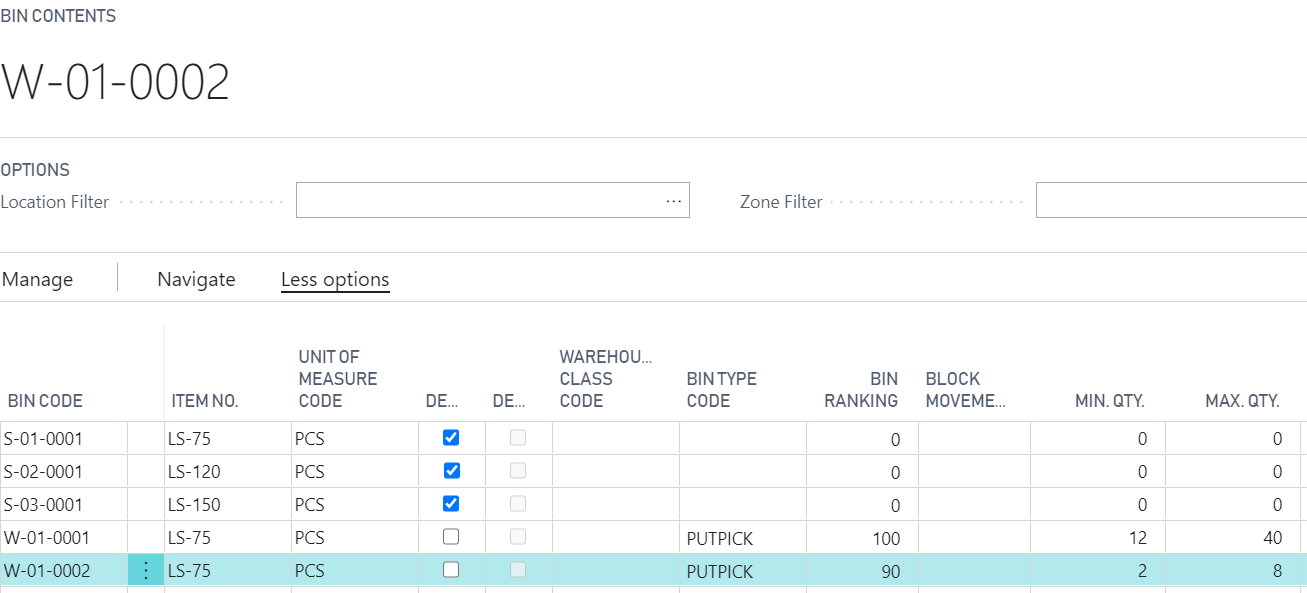
    Let me expand further what is possible with Bin Contents. When you create a Bin you can setup various information about the Bin, like:

    1. Warehouse Class Type
    2. Min. Qty.
    3. Max. Qty.
    4. Fixed
    5. Cross-Dock Bin
    6. Default
    7. Dedicated
    8. Bin Ranking

    pastedimage1609356313277v1.png

    Now using my screen shot if I tried to put Item LS-75, as a put-away, into Bin W-01-0002, I would get an error message like this:
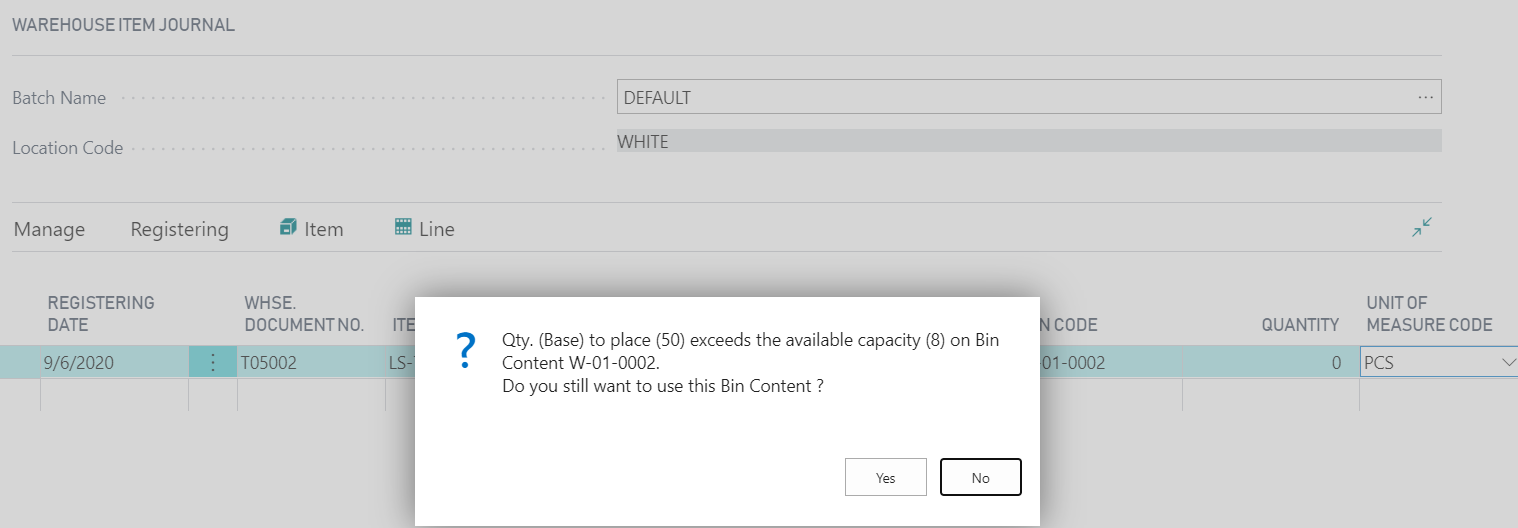
    pastedimage1609356697304v2.png

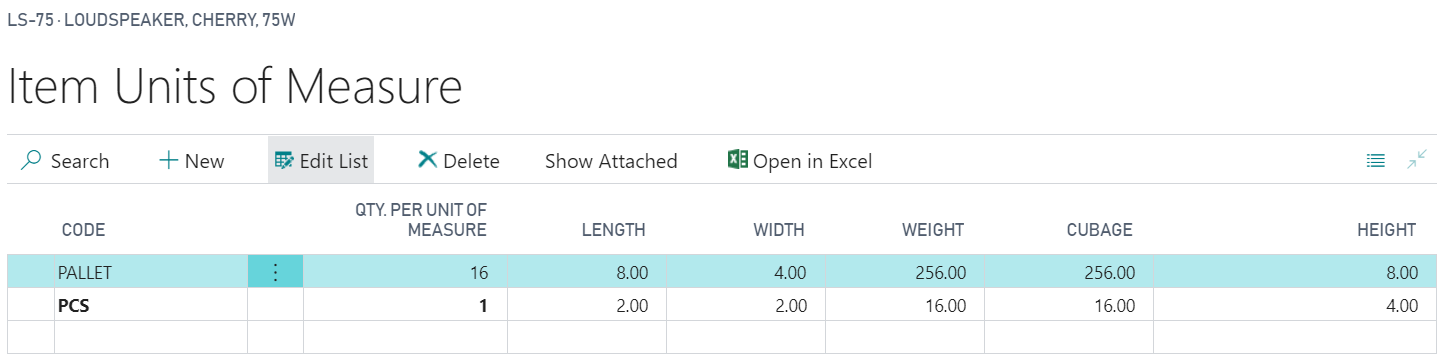
    Again, I am using Advanced Warehouse with Bin Mandatory. One more piece of information that helps with Bin capacity. On the Item Unit of Measure page, there is Cubage field. If you set this up, this field contains the volume (cubage) of one item unit in the unit of measure in the Code field. The program uses the cubage during all processes that involve placing items in a bin: put-away, movements, receipts, shipments, picks and adjustments. The program checks the sum of the cubage of the items being put away and the items already in the bin against the maximum cubage that can fit into a bin, according to the bin capacity policy you selected on the location card.

    The cubage is calculated from the width, length and height parameters against the items unit of measure, and is predominantly used in WMS to ascertain if putaways can be placed in a bin and then suggest the correct bin. 
    pastedimage1609356915808v3.png

    I hope this helps to understanding what is possible with Bins and WMS.

    Thanks,

    Steve

  • Afazal Profile Picture
    135 on at

    Hi,

    Thanks for such a handy reply, but I am still stuck on one issue, if I specified cubage volume on bin, then system give alert message of capacity limit on put-away document, that is fine for me.

    Consider this scenario e.g.

    Bin (cubage) volume= 1000

    item (cubage) Volume per PCS =100

    Item bin content, Max Qty = 2

    if I put away 11 pcs, then system will give alert for (cubage) capacity warning that Bin has 1000 (cubage) volume and exceeds by 100 (cubage) vol. t

    But my observation is that why system not restrict on basis of Max Qty because I only want to put-away 2 Pcs on particular Bin, I only want to allow 200 (cubage) volume for this item. Rest of 800 (cubage) volume want to assign to second item in this Bin.

    screen shot attached.

    bin.PNG

  • Suggested answer
    Bilal Haider Profile Picture
    412 on at

    Hi,

    May be then you have missed the setup on location card. Check on Location card WHITE in bin policies tab the field "Bin Capacity Policy" 

  • Afazal Profile Picture
    135 on at

    yes, i worked on same location WHITE, but system allow me to put away qty greater than max qty in item bin content.

    0815.Capture.PNG

  • Suggested answer
    Bilal Haider Profile Picture
    412 on at

    See I have recreated scenario:

    Setup on Location card:

    Location-1.PNG

    Max Qty on Bin:

    Location-2.PNG

    Warning when registering item more than capacity in Qty:

    Location-3.PNG

Under review

Thank you for your reply! To ensure a great experience for everyone, your content is awaiting approval by our Community Managers. Please check back later.

Helpful resources

Quick Links

Responsible AI policies

As AI tools become more common, we’re introducing a Responsible AI Use…

Neeraj Kumar – Community Spotlight

We are honored to recognize Neeraj Kumar as our Community Spotlight honoree for…

Leaderboard > Small and medium business | Business Central, NAV, RMS

#1
OussamaSabbouh Profile Picture

OussamaSabbouh 3,229

#2
Jainam M. Kothari Profile Picture

Jainam M. Kothari 1,867 Super User 2025 Season 2

#3
YUN ZHU Profile Picture

YUN ZHU 1,153 Super User 2025 Season 2

Last 30 days Overall leaderboard

Featured topics

Product updates

Dynamics 365 release plans