web
You’re offline. This is a read only version of the page.
close
Skip to main content

Announcements

No record found.

News and Announcements icon
Community site session details

Community site session details

Session Id :
Microsoft Dynamics GP (Archived)

management reporter header names from reporting tree

(0) ShareShare
ReportReport
Posted on by 4,150

hi folks


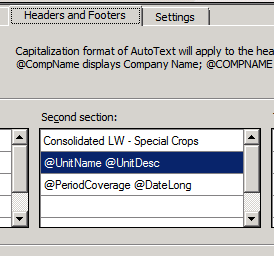
I am trying to use the Unit Name and Unit Description from the reporting tree as header titles in my Management Reporter report.

 

1423.result-header.png


in the report header I have


Running the report for the first couple of rows of the tree where the unit description is blank results in the unit name repeating.


Is there a check box or setting somewhere that says if the unit description is blank use the unit name instead?


any help is appreciated as always.


thanks


ian


*This post is locked for comments

I have the same question (0)
  • Greg Byer Profile Picture
    2,588 on at

    Hi Ian,

    What build of MR are you using?  I tested this on CU8 and was not able to re-create it.  If your version is lower than 2.1.8001.0, you may want to apply CU8.

  • Ian Richardson Profile Picture
    4,150 on at

    hi Greg

    thanks for looking at this.

    We are definitely not on RU 8.

    help shows 2.1.7044.43, is that RU 6 or 7?

    Does not re-creatable in RU8 imply a bug in lower versions, or does it imply there is a check box or setting I can change?

    thanks

  • Greg Byer Profile Picture
    2,588 on at

    Hi Ian,

    That version is CU7.  There is not a setting you can check that will use the unit name if the description is blank.  It is possible this was a bug in the lower builds.  We don't see the Unit Description blank very often, so it is possible it was a bug and we just never encountered it.  But, when I set up the tree and header like you have, the units with the blank Unit Description display the text for the Unit Name.  

Under review

Thank you for your reply! To ensure a great experience for everyone, your content is awaiting approval by our Community Managers. Please check back later.

Helpful resources

Quick Links

Introducing the 2026 Season 1 community Super Users

Congratulations to our 2026 Super Stars!

Meet the Microsoft Dynamics 365 Contact Center Champions

We are thrilled to have these Champions in our Community!

Congratulations to the April Top 10 Community Leaders

These are the community rock stars!

Leaderboard > 🔒一 Microsoft Dynamics GP (Archived)

#1
Shravan Attelli Profile Picture

Shravan Attelli 1

Last 30 days Overall leaderboard

Featured topics

Product updates

Dynamics 365 release plans