web
You’re offline. This is a read only version of the page.
close
Skip to main content

Announcements

No record found.

News and Announcements icon
Community site session details

Community site session details

Session Id :
Supply chain | Supply Chain Management, Commerce
Answered

Mobile Warehouse Device. Received status for PO not showing.

(0) ShareShare
ReportReport
Posted on by 215

Good day, 

I wonder if anyone could help with this matter. I am trying to get the app to change the PO status to received when the product is picked and put into the desired locations from the mobile app. 

 PO-status.png

I have the mobile warehouse device linked to FNO and it works. From a PO it takes the stock and puts it in the receiving and bulk locations that I set up, the on hand list also reflects this. However the PO status wont change to received.  I dont know if im missing anything?  

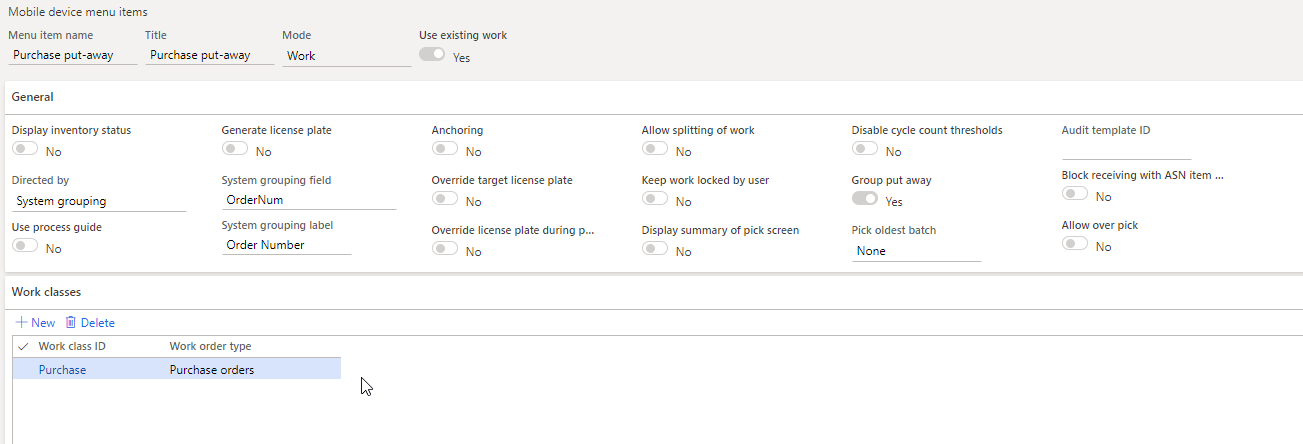
Below is the set up for the device menu items that i am using for the pic and put process for the PO: 

Pick/ rec process: 

PO-Rec.png

Put process. Product storage: 

PO-Put-away.png

I have the same question (0)
  • Verified answer
    Alina Lica Profile Picture
    Microsoft Employee on at

    Hello Rui,

    Receiving the purchase order on whs app does not change the status of the order to Received.

    You still need to post Product receipt from the PO form or by batch.

    Take a look at the following blog:

    timsaxblog.wordpress.com/.../

    Thank you,

    Alina

  • Imran Mustafa Profile Picture
    160 on at

    Rui Gomes da Silva I am facing same issue if you resolve this issue then please tell me how you resolve this issue

  • Rui Gomes da Silva Profile Picture
    215 on at

    Hi Imran,

    From the last time I implemented this the conclusion was as follows:

    -The status won’t change when you use the WMS app but will only change once done manually on the system or by batch. I can follow up to see if this functionality has changed.

Under review

Thank you for your reply! To ensure a great experience for everyone, your content is awaiting approval by our Community Managers. Please check back later.

Helpful resources

Quick Links

Introducing the 2026 Season 1 community Super Users

Congratulations to our 2026 Super Stars!

Congratulations to our 2025 Community Spotlights

Thanks to all of our 2025 Community Spotlight stars!

Leaderboard > Supply chain | Supply Chain Management, Commerce

#1
Mallesh Deshapaga Profile Picture

Mallesh Deshapaga 254

#2
Laurens vd Tang Profile Picture

Laurens vd Tang 188 Super User 2026 Season 1

#3
André Arnaud de Calavon Profile Picture

André Arnaud de Cal... 131 Super User 2026 Season 1

Last 30 days Overall leaderboard

Product updates

Dynamics 365 release plans