web
You’re offline. This is a read only version of the page.
close
Skip to main content

Announcements

No record found.

News and Announcements icon
Community site session details

Community site session details

Session Id :
Microsoft Dynamics CRM (Archived)

About removing multiple CASES links

(0) ShareShare
ReportReport
Posted on by 27

I'm having a problem in removing an empty CASE from the common view.Have no idea how to remove it.Multiple CASES icons shown in common view under a particular client.Screenshot is attached.
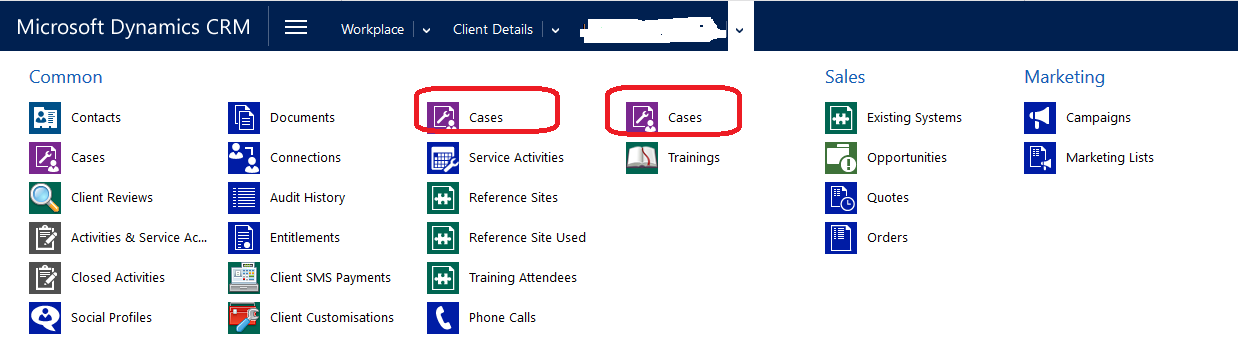
CRM-Cases.png

*This post is locked for comments

I have the same question (0)
  • Verified answer
    Kalpavruksh D365 CoE Profile Picture
    2,545 on at

    Hi,

    Go to "Client Details" main forms and open left navigation area and remove Case relationship from Common area.

    6557.MicrosoftTeams_2D00_image.png

    If found useful, please mark this answer as verified.

  • Suggested answer
    denprash Profile Picture
    27 on at

    Thanks mate...this worked !!

Under review

Thank you for your reply! To ensure a great experience for everyone, your content is awaiting approval by our Community Managers. Please check back later.

Helpful resources

Quick Links

Introducing the 2026 Season 1 community Super Users

Congratulations to our 2026 Super Stars!

Congratulations to our 2025 Community Spotlights

Thanks to all of our 2025 Community Spotlight stars!

Leaderboard > 🔒一 Microsoft Dynamics CRM (Archived)

#1
JS-09031509-0 Profile Picture

JS-09031509-0 3

#2
AS-17030037-0 Profile Picture

AS-17030037-0 2

#2
Mark Eckert Profile Picture

Mark Eckert 2

Last 30 days Overall leaderboard

Featured topics

Product updates

Dynamics 365 release plans
