web
You’re offline. This is a read only version of the page.
close
Skip to main content

Notifications

Announcements

No record found.

Community site session details

Community site session details

Session Id :
Small and medium business | Business Central, N...
Answered

Can't download the license from License Key Configuration page from partner site

(4) ShareShare
ReportReport
Posted on by 128
Dear All,

I already contacted MBS support via email, but perhaps someone else has same issues as I have.

I cannot download the developers (BC OnPRem) license file from PartnerSource Business Central page, not for any License configuration that I created in the past and I created one yesterday.
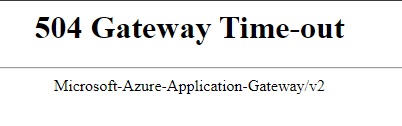
Error I get is this:
 
504 Gateway Time-out
Microsoft-Azure-Application-Gateway/v2
 
Thank you
BR Damjan
I have the same question (0)
  • Gerardo Rentería García Profile Picture
    25,225 Most Valuable Professional on at
    Hi
    I advise you to try in another browser, and as private or incognito
    Best regards
    Gerardo
  • Bilal Fazrin Profile Picture
    84 on at
    Hi, Im having the same issue, Do you already found the solution?
    I tried gdrenteria suggestion but not working.


    BR. 
    Bilal
  • Gerardo Rentería García Profile Picture
    25,225 Most Valuable Professional on at
    Hi
    I advise you to generate a support ticket from the same "PartnerSource Business Center" portal.
    Best regards
    Gerardo
  • Verified answer
    DamjanZ_SP Profile Picture
    128 on at
    Hi,
     
    I tried to clear the internet browser cache and with incognito mode, but still same issue is present. I still cannot download the license file.
    I sent the email to the support team.
     
    Thank you
    BR Damjan
  • Bilal Fazrin Profile Picture
    84 on at
    Hi,

    Just want to inform by now I already able to download the license.

    BR 
    Bilal.
  • FH-02120843-0 Profile Picture
    19 on at
    Hi,
    Same issue since this morning. Tried from 2 different browsers. Can someone confirm he can download a license right now ? Just to know if the problem is related to Microsoft's server or to my account.
    Thanks.
    Fred
  • PV-19052146-0 Profile Picture
    9 on at
    I have the same problem today .. 
  • Suggested answer
    YUN ZHU Profile Picture
    95,550 Super User 2025 Season 2 on at
    Unfortunately, this can only be resolved by submitting a Support Request....
     
     
    Thanks.
    ZHU
  • Verified answer
    DamjanZ_SP Profile Picture
    128 on at
    Everybode who has issues with downloading the license files, just try again. I was able to download "Permission Report Detailed.txt" and also licence file as we speak.
     
  • FH-02120843-0 Profile Picture
    19 on at
    Thanks for the answers, means that the problem is not on my side.
     
    I tried every hour since this morning and now it is working again. Didn't change anything on my setup. Didn't create a support request. Made some knitting instead of development and added some patience and perseverance. Maybe the solution. Everything is fine again.

Under review

Thank you for your reply! To ensure a great experience for everyone, your content is awaiting approval by our Community Managers. Please check back later.

Helpful resources

Quick Links

Responsible AI policies

As AI tools become more common, we’re introducing a Responsible AI Use…

Neeraj Kumar – Community Spotlight

We are honored to recognize Neeraj Kumar as our Community Spotlight honoree for…

Leaderboard > Small and medium business | Business Central, NAV, RMS

#1
OussamaSabbouh Profile Picture

OussamaSabbouh 3,151

#2
Jainam M. Kothari Profile Picture

Jainam M. Kothari 1,443 Super User 2025 Season 2

#3
YUN ZHU Profile Picture

YUN ZHU 1,092 Super User 2025 Season 2

Last 30 days Overall leaderboard

Featured topics

Product updates

Dynamics 365 release plans
