web
You’re offline. This is a read only version of the page.
close
Skip to main content
Community site session details

Community site session details

Session Id :
Small and medium business | Business Central, N...
Suggested answer

Modify custom field on Posted Sales invoice?

(0) ShareShare
ReportReport
Posted on by

We have a custom field that was created for sales document entries. We have a need to update the record once it has reached the Sales Invoice Header (112). Is there any way to do that?

Thanks,

Kevin

I have the same question (0)
  • FJR Profile Picture
    75 on at
    RE: Modify custom field on Posted Sales invoice?

    It seems like a partner or some developer created this for you. If that's the case, then you would have to reach back out to them to modify this extension for you. Unfortunately, it is not something that can be changed in the settings or configured. Custom fields usually require code to create.

  • kjjson Profile Picture
    on at
    RE: Modify custom field on Posted Sales invoice?

    Yes, it is a custom field that we created so I figure there is coding that will need to happen to change that, it is what needs to change to that field in order to modify it that I am looking for.

  • Suggested answer
    DAnny3211 Profile Picture
    11,391 on at
    RE: Modify custom field on Posted Sales invoice?

    Hi

    Your request is not very clear

    where was this custom field created?

    If you have created the field in the Sales Header table, then all you have to do is assign the same ID to the field in 112, and the field will update automatically.

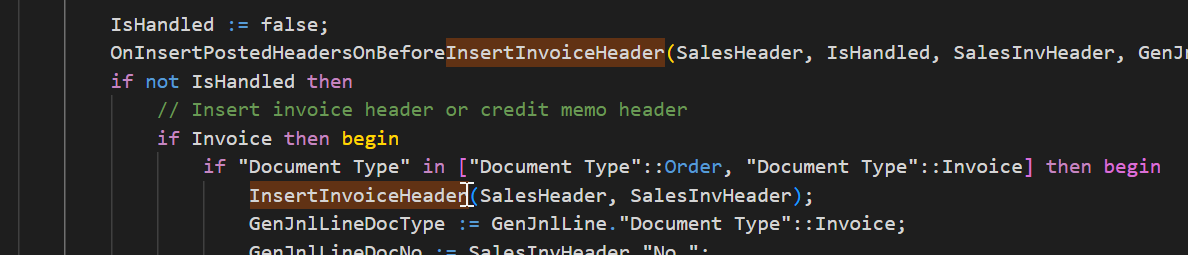
    If, on the other hand, you need to update the Sales Header field once the invoice has been registered, you will need a customisation in Codeunit 80.
    pastedimage1668797950018v1.png

    check my answer if it helped you, thanks

    DAniele

  • kjjson Profile Picture
    on at
    RE: Modify custom field on Posted Sales invoice?

    Daniele,

    The custom field was created on the Sales Header table so that it could be entered in as part of the sales order process/entry. It was also created on the Sales Invoice Header table so that it would carry through to the posted invoice. Now we are needing to update that record in the Sales Invoice Header, so I believe we are at the second need for a customization in CodeUnit 80?

    pastedimage1668798250495v1.png

  • Suggested answer
    Inge M. Bruvik Profile Picture
    1,067 Moderator on at
    RE: Modify custom field on Posted Sales invoice?

    If the field was added with the same field no. , and data type in both the sales header and sales invoice header table the system should populate the sales header field automatically during posting.

    That is considered best practice for adding fields to both sales header and sales invoice header tables.

    So i would make sure the fields have the same number and data definition in both tables. And if some partner have done this for you they should fix it for you and convert the existing data.

  • Suggested answer
    DAnny3211 Profile Picture
    11,391 on at
    RE: Modify custom field on Posted Sales invoice?

    Hi

    you have to assign the field in the sales header the same id as 112, i.e. 50320, and the system will update it automatically

    DAniele

  • Suggested answer
    Shathika Karunaratne Profile Picture
    on at
    RE: Modify custom field on Posted Sales invoice?

    Hi kjjson,

    Sales Order converted to a Sales Invoice by transferring fields from Sales Header to Sales Invoice Header. Please do check for TransferFields

    Therefore, please do use the same field ID that you defined in Sales Header for the Sales Invoice Header field with the Same ID.

    For Example, I have used the ID 50000 for both field IDs in Sales Header and Sales Invoice Header Tables.

    pastedimage1669011602014v2.png

    pastedimage1669011644962v4.png

    Thanks.

    Please do verify this answer if it helps you

Under review

Thank you for your reply! To ensure a great experience for everyone, your content is awaiting approval by our Community Managers. Please check back later.

Helpful resources

Quick Links

Responsible AI policies

As AI tools become more common, we’re introducing a Responsible AI Use…

Pallavi Phade – Community Spotlight

We are honored to recognize Pallavi Phade as our Community Spotlight honoree for…

Leaderboard > Small and medium business | Business Central, NAV, RMS

#1
OussamaSabbouh Profile Picture

OussamaSabbouh 2,267

#2
Sumit Singh Profile Picture

Sumit Singh 2,098

#3
YUN ZHU Profile Picture

YUN ZHU 1,766 Super User 2025 Season 2

Last 30 days Overall leaderboard

Featured topics

Product updates

Dynamics 365 release plans
