web
You’re offline. This is a read only version of the page.
close
Skip to main content

Announcements

No record found.

News and Announcements icon
Community site session details

Community site session details

Session Id :
Small and medium business | Business Central, N...
Answered

Cloud Migration Management error

(0) ShareShare
ReportReport
Posted on by 338

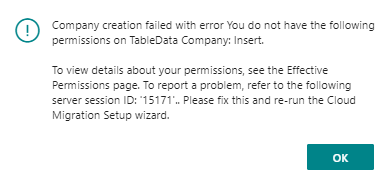
I'm receiving the following error when attempting to run the Cloud Migration from GP to Business Central (Saas).

I have the Cloud Migration setup in a Sandbox environment.

I go to Cloud Migration Management and click 'Run Migration Now'.

pastedimage1632932410923v3.png

pastedimage1632932129866v1.png

I have tried this from a Internal Administrator and from a standard Business Central user with
'SUPER' Permission Set with the Company blank.
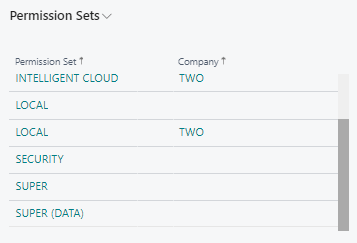
pastedimage1632932381845v2.png

I have the same question (0)
  • Horia Micu Profile Picture
    Microsoft Employee on at

    Hello,

    Most probably you are logged to BC environment with a CSP user account.

    This is not supported, user has to have a full license to be able to run the cloud migration.

    docs.microsoft.com/.../delegated-admin

  • SMS Profile Picture
    338 on at

    Horia, Thanks for the reply.  I'm not logged in through Partner Center.  I'm logged in with normal user credentials and a Full BC Essentials license.  

  • SMS Profile Picture
    338 on at

    Here are a few more screen shots if it helps:

    pastedimage1633001341941v1.png

    pastedimage1633001377228v2.png

  • MahGah Profile Picture
    15,593 on at

    Hi

    I could be wrong here but I see "Super" and then "Super (Data). Do you have Super or Super(Data) in your user permission set. If it is Super(Data) can you please try and add Super as well? Also make sure it set to system in your user permission sets. 

    pastedimage1633009001533v1.png

    Thanks

  • Verified answer
    SMS Profile Picture
    338 on at

    Resolved!!  Thanks to Horia!!

    We had to do the following steps to resolve the issue.

    1) We 'Disabled Cloud Migration' and rebuilt it.

    2) Removed 'SUPER(Data) from User Permission Sets.

    3) Removed all the User Group Memberships and re-added them.

Under review

Thank you for your reply! To ensure a great experience for everyone, your content is awaiting approval by our Community Managers. Please check back later.

Helpful resources

Quick Links

Introducing the 2026 Season 1 community Super Users

Congratulations to our 2026 Super Stars!

Meet the Microsoft Dynamics 365 Contact Center Champions

We are thrilled to have these Champions in our Community!

Congratulations to the March Top 10 Community Leaders

These are the community rock stars!

Leaderboard > Small and medium business | Business Central, NAV, RMS

#1
OussamaSabbouh Profile Picture

OussamaSabbouh 1,993 Super User 2026 Season 1

#2
YUN ZHU Profile Picture

YUN ZHU 1,116 Super User 2026 Season 1

#3
Khushbu Rajvi. Profile Picture

Khushbu Rajvi. 557 Super User 2026 Season 1

Last 30 days Overall leaderboard

Featured topics

Product updates

Dynamics 365 release plans