web
You’re offline. This is a read only version of the page.
close
Skip to main content

Notifications

Announcements

No record found.

Community site session details

Community site session details

Session Id :
Small and medium business | Business Central, N...
Suggested Answer

Power Automate - Automated cloud flow on modified record, not showing up in Power Automate (custom API page)

(0) ShareShare
ReportReport
Posted on by 321

Hi All,

I'm having trouble with using a custom API in Business Central to trigger an automated PowerAutomate cloud flow and cant' figure out what I'm doing wrong/missing. 

Basic idea is I want to run this flow when a Production Order is created/modified, to sync the data over to a dataverse table. 

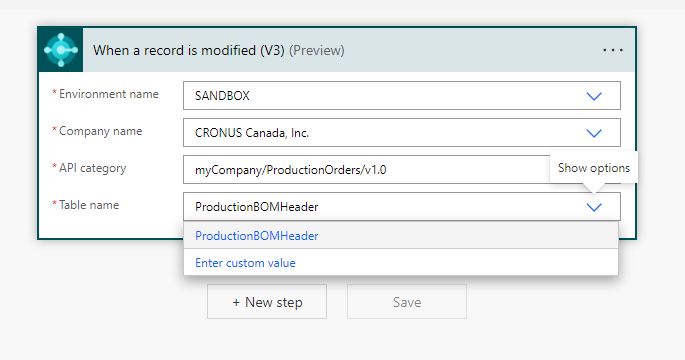
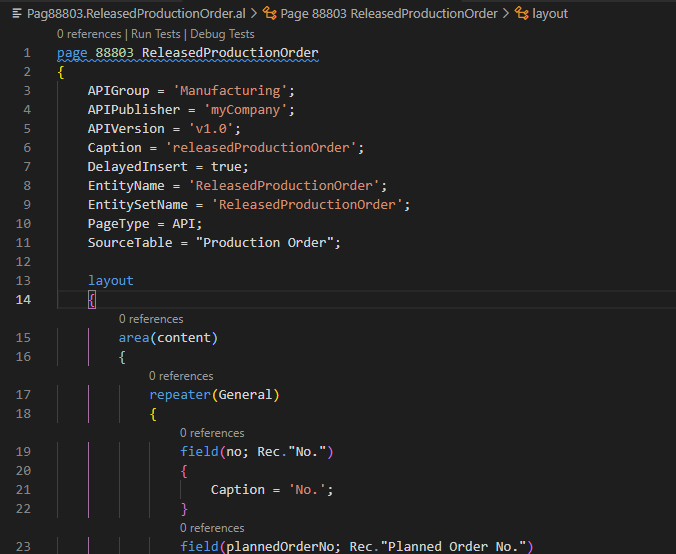
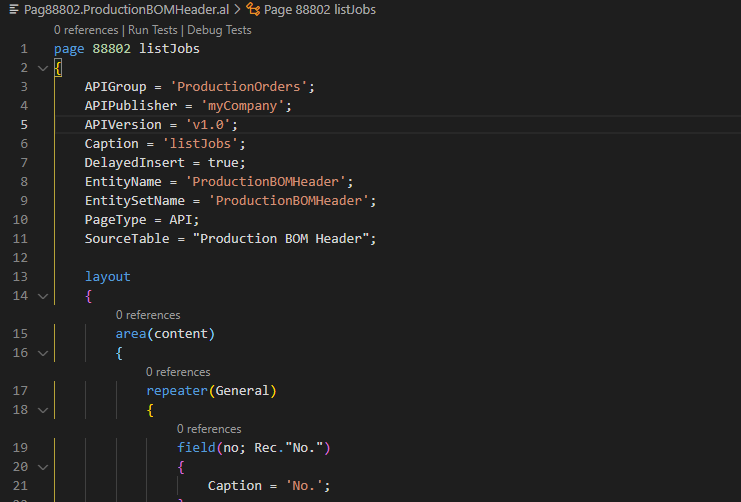
I've created the API and published it to my sandbox environment, but I can't see the table in PowerAutomate. Another one I published on a different table shows up, and I can't figure out the difference, and can't find any documentation that is helping me to understand what I'm missing. Screenshots below, any help is appreciated. I'm assuming I'm missing something very basic, but just can't find it. 

Thanks in advance for any help/pointers/ideas/documentation/anything that might help!

Garrett

This one works:
pastedimage1644540875554v1.png

pastedimage1644540897650v2.png

This one does not:


pastedimage1644540949356v3.png

pastedimage1644541012469v4.png

I have the same question (0)
  • Suggested answer
    Andy Sather Profile Picture
    on at

    Hello  - We currently do not have dedicated Dev support via the Dynamics 365 Business Central forums, but I wanted to provide you some additional resources to assist.  If you need assistance with debugging or coding I would recommend discussing this on one of our communities.

    www.yammer.com/dynamicsnavdev

    I will open this up to the community in case they have something to add.

  • Suggested answer
    JAngle Profile Picture
    133 on at

    And if you place them in the same api group? I’d also be using v2

  • Suggested answer
    YUN ZHU Profile Picture
    95,329 Super User 2025 Season 2 on at

    Hi, While not exactly the same, there is an example in the link below that hopefully will give you some inspiration.

    https://yzhums.com/20111/

    Thanks.

    ZHU

  • David_WF Profile Picture
    5 on at

    Did you ever resolve this please ? We are having exactly the same problem.  What we've noticed is when using  the 'When records is changed (v3); the API is missing but if you use 'Get Record (V3)' it shows. All very frustrating

  • aleksandra_w Profile Picture
    35 on at

    Hi,

    Did you find the reason why custom API page is visible for 'Get Record (V3)', but for 'When record is changed (V3)' it is not? I have the same problem and can't find the cause.

  • SS-06021917-0 Profile Picture
    2 on at
    In my case it helped to add the property ODataKeyFields:
     

Under review

Thank you for your reply! To ensure a great experience for everyone, your content is awaiting approval by our Community Managers. Please check back later.

Helpful resources

Quick Links

Responsible AI policies

As AI tools become more common, we’re introducing a Responsible AI Use…

Neeraj Kumar – Community Spotlight

We are honored to recognize Neeraj Kumar as our Community Spotlight honoree for…

Leaderboard > Small and medium business | Business Central, NAV, RMS

#1
OussamaSabbouh Profile Picture

OussamaSabbouh 3,229

#2
Jainam M. Kothari Profile Picture

Jainam M. Kothari 1,867 Super User 2025 Season 2

#3
YUN ZHU Profile Picture

YUN ZHU 1,153 Super User 2025 Season 2

Last 30 days Overall leaderboard

Featured topics

Product updates

Dynamics 365 release plans