web
You’re offline. This is a read only version of the page.
close
Skip to main content

Announcements

No record found.

News and Announcements icon
Community site session details

Community site session details

Session Id :
Microsoft Dynamics 365 | Integration, Dataverse...
Unanswered

Debug Code activity used in Action

(0) ShareShare
ReportReport
Posted on by 425

Hi,

I can't see some of the code activities using Plug-in profiler when i wanted to debug, i can see some which are part of the same assembly though, not sure what is missing. Tried changing the ownership of the process, using latest plug-in reg tool. The one i want to debug is used in an action.

Any thoughts please?

I have the same question (0)
  • Ankit Sabharwal Profile Picture
    Microsoft Employee on at

    Hy Jeevan,

    I have tried to reproduce the same behavior in Vanilla organization but behavior is not reproducible. Steps which I followed as below :-

    - Created the Custom Workflow 

    - Download the Plugin Registration tool(PRT)

    - Logged into the PRT with the same user who is the owner of the workflow.

    - Install the profiler

    - Right click on Profile Plugin and Select Strat Profiling workflows

    - Cklick on drop down and check above created workflow is present.

    - Also created the new user

    - Provide him system admin credentials 

    - Ask to log in PRT and check 

    - Different user is also able to see above created workflow.

    Plugin registration tool version which I have used is as below :-
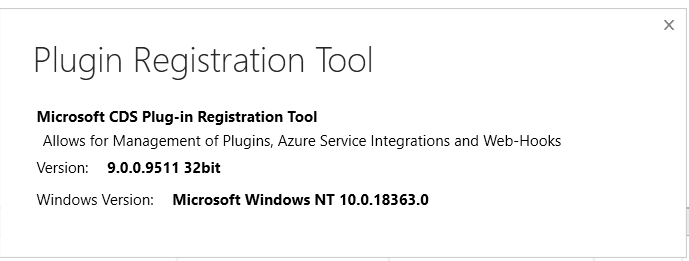
    pastedimage1577783880442v1.png

    Next action which you can try:-

    - Create a new workflow and check 

    - Download above PRT tool and check with that.

  • Ankit Sabharwal Profile Picture
    Microsoft Employee on at

    Hy Jeevan,

    Can you please provide your inputs on it.

    Thanks,

    Ankit Sabharwal

Under review

Thank you for your reply! To ensure a great experience for everyone, your content is awaiting approval by our Community Managers. Please check back later.

Helpful resources

Quick Links

Introducing the 2026 Season 1 community Super Users

Congratulations to our 2026 Super Stars!

Meet the Microsoft Dynamics 365 Contact Center Champions

We are thrilled to have these Champions in our Community!

Congratulations to the March Top 10 Community Leaders

These are the community rock stars!

Leaderboard > Microsoft Dynamics 365 | Integration, Dataverse, and general topics

#1
11manish Profile Picture

11manish 153

#2
André Arnaud de Calavon Profile Picture

André Arnaud de Cal... 67 Super User 2026 Season 1

#3
ManoVerse Profile Picture

ManoVerse 61 Super User 2026 Season 1

Last 30 days Overall leaderboard

Product updates

Dynamics 365 release plans
