web
You’re offline. This is a read only version of the page.
close
Skip to main content

Notifications

Announcements

No record found.

Community site session details

Community site session details

Session Id :
Small and medium business | Business Central, N...
Suggested Answer

FactBox not populating with values

(0) ShareShare
ReportReport
Posted on by 140

Howdy

Not sure if I'm doing something wrong.

What I want to do seems straight forward but I'm having difficulty and wondering if others have encountered the same problem.

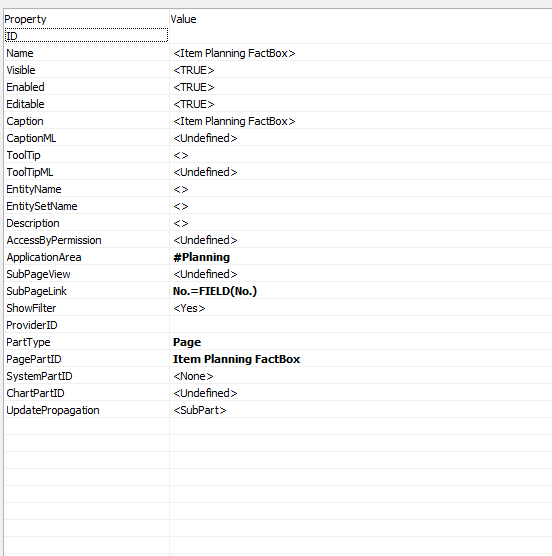
I've created a FactBox. It works as intended on multiple pages. I'm trying to add the same FactBox to another page. I go into NAV Development Environment and simply copy the line (including the properties) and paste it to to the page that I want to add it to.

The FactBox shows up on the new page and looks fine except for the fact that the rows are not pulling any data.

Am I missing a step somewhere? I've read the documentation on FactBoxes not sure what I'm missing

Any guidance would be greatly appreciated
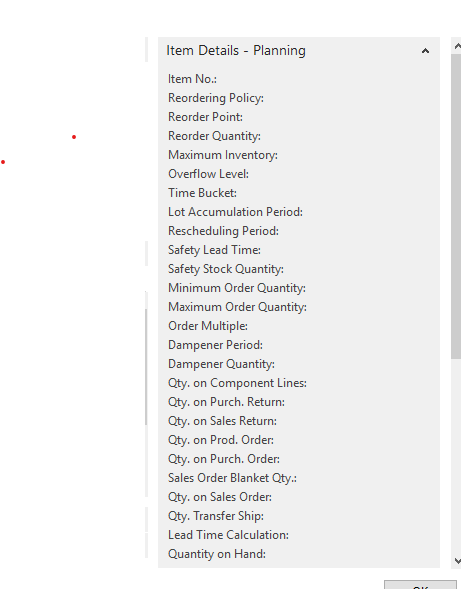
2158.FactBox.png

8787.Properties.png

I have the same question (0)
  • Suggested answer
    divyeshchitte Profile Picture
    968 on at

    Kindly Check

    1) You have selected an item in Subform where you are trying to display this fact box.

    2) Where are you adding this factbox?

  • Suggested answer
    Suresh Kulla Profile Picture
    50,243 Super User 2025 Season 2 on at

    Please check the provider ID, if you are adding the factbox to a page where the source table is different you need to find the provider ID of the subform page and set that on the factbox.

  • drew777777 Profile Picture
    140 on at

    Yes a null provider ID seems to be the issue. Not sure how to find the provider ID of the subform page perhaps you have written about this in your blog

  • Suggested answer
    Suresh Kulla Profile Picture
    50,243 Super User 2025 Season 2 on at

    Go to the Document page, and select the Part where you added the Subform, and check the properties, the ID of that will be the Provider ID of the Factbox Part Page.

    For example, Check Page 42, the Part Sales Order Subform ID is 58 and it is used as the provider ID for the Sales Line Factbox.

Under review

Thank you for your reply! To ensure a great experience for everyone, your content is awaiting approval by our Community Managers. Please check back later.

Helpful resources

Quick Links

Responsible AI policies

As AI tools become more common, we’re introducing a Responsible AI Use…

Neeraj Kumar – Community Spotlight

We are honored to recognize Neeraj Kumar as our Community Spotlight honoree for…

Leaderboard > Small and medium business | Business Central, NAV, RMS

#1
OussamaSabbouh Profile Picture

OussamaSabbouh 3,229

#2
Jainam M. Kothari Profile Picture

Jainam M. Kothari 1,867 Super User 2025 Season 2

#3
YUN ZHU Profile Picture

YUN ZHU 1,153 Super User 2025 Season 2

Last 30 days Overall leaderboard

Featured topics

Product updates

Dynamics 365 release plans