web
You’re offline. This is a read only version of the page.
close
Skip to main content

Notifications

Announcements

No record found.

Community site session details

Community site session details

Session Id :
Microsoft Dynamics CRM (Archived)

Can Business Unit level email templates be created?

(0) ShareShare
ReportReport
Posted on by

I've created an email template on Dynamics Online 2015. As a Sales user via - Settings -> Templates -> Email Templates -> New.

But when I create the template it sets it to "Individual". There doesn't seem to be a setting to change it to - "Business Unit" or share it with my business unit.


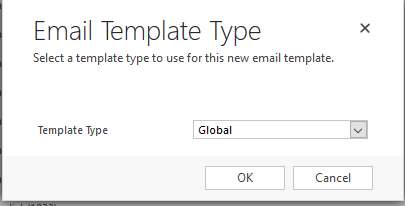
I specified the template as Global type,  also the email template permission is set to Business Unit level on each CRUD permission of the email template role assigned to the template creator.

So I'm not sure why I can't share the template with users in my business unit and it defaults to individual when created.

Email template record in CRM:

7142.2.PNG

Email Template Role Assigned to the user:

1856.4.PNG

Template set to Global Type:

23271.Capture.PNG

My question is, Is there a specific permission level required in order to create an "Business Unit" level template?

Or is there a setting I can change on my permission set above the template to make it available to other users and not just the creator?

*This post is locked for comments

I have the same question (0)
  • Suggested answer
    a33ik Profile Picture
    84,331 Most Valuable Professional on at

    Hello,

    To create global available template you should go a bit other way. Here it is:

    Settings > Custommizations > Customize System > in appeared window (Default solution) in left part choose email templates > New.

    After you finished building of template click "Publish all customization" on top of Default solution form.

  • KylieKiser Profile Picture
    2,174 on at

    Global Template type just means that is available for all entities. So it can be added to an email regarding any record. This also has less insert fields available because it does not know what record you will want to pull data from.

    To set it as viewable by the organization, open the template and click Actions. There should be an option to Set to Organization Template or Revert to Personal Template.

    This will only be available if you have permission to publish templates to the organization. This privileges is on the Core Records Miscellaneous Privileges section as "Publish E-mail Templates".

    I hope this helps

  • Community Member Profile Picture
    on at

    Hi Kylie,

    My current permission setting that I have highlighted in my question above has only business unit level for all CRUD settings on the role.

    To clarify, do you mean that if I change the level to Organization in the Create of the role. That will make allow me to make that email template Organization level?

    My aim is to make the email template available at a business unit level and not the whole organization? Is that possible or is are individual and organization level the only valid types for an email template?

    Thanks again for the response.

  • KylieKiser Profile Picture
    2,174 on at

    In addition to the access to e-mail templates you will need the Miscellaneous Privilege to "Publish E-mail Templates"

    I believe you will also need Organization Create to e-mail templates. I am not sure of a way to restrict these by Business Unit.

    Here is a Microsoft article about the permission: msdn.microsoft.com/.../gg328124.aspx

  • Verified answer
    Community Member Profile Picture
    on at

    Hi Kylie,

    I was missing the "Publish E-mail Templates" permission on my Email Template Management Role, which prevented me from creating organization templates.

    Adding this extra permission has allowed me to publish business unit level templates along with setting the "Email Template" permission to business unit across the CRUD access levels.

    For anyone else looking for the same setup, refer to the below security role setup:


    1665.5.PNG

    1665.5.PNG

  • Suggested answer
    Community Member Profile Picture
    on at

    I hope the answer is still required for you.  The answer to this question is yes.  Even though the option isn't there out of the box to assign a template to a team, a team can own a template in the same way as any other record.  A team is associated to a BU so by giving someone access to a team, it gives them access to that BU.  You will need to create access teams against the other BUs if you want a user to have access to more than one BU.  In the scenario below, the templates must be owned by an "owner" BU.

    The solution I figured out uses a combination of teams, a dialog, security roles and the email template itself.

    Security Role

    Adjust the security role for your standard users to ensure BU / BU+Child for email templates read access.  Also give users the template assign permission for anyone who is allowed to assign templates.

    Team

    First create "owner" teams that you need for each BU (unless you already have the teams) and ensure the team security role has permission to at least own an email template.  Also create an access team for each BU you want other BU members to access.

    Dialog

    Create an on demand dialog against the email template entity with the first step being an input for the user to select a team

    Add a step to the dialog to assign the email template to the team that was input by the user.

    Email Template

    Create an email template, save it and select "Run Dialog" select the team from the drop down you created, when you get to finish the dialog, you should see that the template is now owned by a team.

    I hope that helps.  Let me know if you get stuck and I can help you out


    Dave Cockerham

Under review

Thank you for your reply! To ensure a great experience for everyone, your content is awaiting approval by our Community Managers. Please check back later.

Helpful resources

Quick Links

Responsible AI policies

As AI tools become more common, we’re introducing a Responsible AI Use…

Neeraj Kumar – Community Spotlight

We are honored to recognize Neeraj Kumar as our Community Spotlight honoree for…

Leaderboard > 🔒一 Microsoft Dynamics CRM (Archived)

#1
SA-08121319-0 Profile Picture

SA-08121319-0 4

#1
Calum MacFarlane Profile Picture

Calum MacFarlane 4

#3
Alex Fun Wei Jie Profile Picture

Alex Fun Wei Jie 2

Last 30 days Overall leaderboard

Featured topics

Product updates

Dynamics 365 release plans