web
You’re offline. This is a read only version of the page.
close
Skip to main content

Announcements

No record found.

News and Announcements icon
Community site session details

Community site session details

Session Id :
Microsoft Dynamics GP (Archived)

Corrupted Professional Service Tools Library?

(0) ShareShare
ReportReport
Posted on by

Currently using Dynamics GP 2010 SP3

We just applied SP3 about a month or so ago and I hadn't needed to use the PSTLuntil today.  However, when I go to PSTL, I do not get the "window" for PSTL.  I get the "Receivables Transaction Unapply" window.
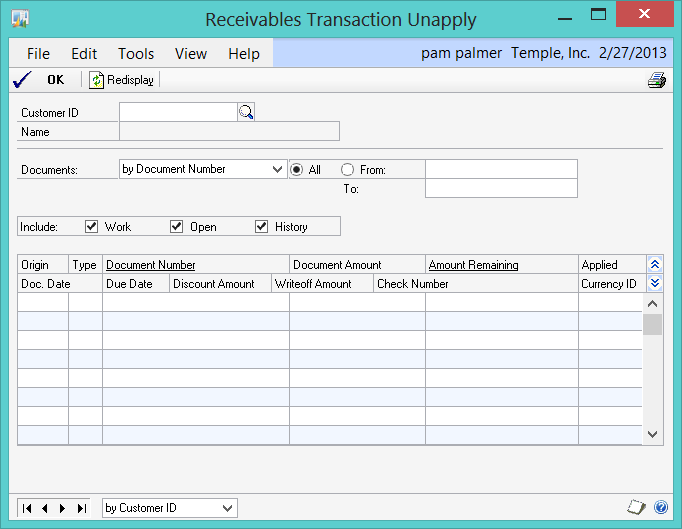
I went to my Add/remove programs and reinstalled PSTL but it is still happening.  What can I do to correct this?  I really need to use the PSTL.

Thank you,

*This post is locked for comments

I have the same question (0)
  • Suggested answer
    sandipdjadhav Profile Picture
    18,319 on at

    Pam,

    May I know whats wrong with this windo? You have to enter Customer # to get details and then unapply. I have several time you this screen to unapply payment.

    Thanks

    Sandip

  • baxter05 Profile Picture
    on at

    Sandip,

    Thank you for attempting to resolve my issue.

    The problem is not with the window posted above - no doubt it does work.

    The problem is that when I click on the PSTL on my dynamics so I can use ALL the tools available, I do not get the main PSTL window, I only get the window above.

     - there is NO WINDOW FOR THE PSTL for me to use.

    In other words, when I click on the Profession Services Tool Library in Dynamics, I want that PSTL window to come up so I can have the option to CHOOSE what tool I want to use - I do not want to use the Receivables TRX UNapply window.


    Pam


  • Verified answer
    Dave Dusek Profile Picture
    Microsoft Employee on at

    Pam,  

    Remove the window from the shortcut bar and re add it.  To add, right click, select Add Window.  Select Technical Services Tools > Project > Professional Services Tools Library.  That will put the main window on the shortcut bar and it should work.  

  • baxter05 Profile Picture
    on at

    Dave,

    Thank you so much for responding - this definitely resolved the issue.

    Appreciate it.  Have a great day.

Under review

Thank you for your reply! To ensure a great experience for everyone, your content is awaiting approval by our Community Managers. Please check back later.

Helpful resources

Quick Links

Introducing the 2026 Season 1 community Super Users

Congratulations to our 2026 Super Stars!

Congratulations to our 2025 Community Spotlights

Thanks to all of our 2025 Community Spotlight stars!

Leaderboard > 🔒一 Microsoft Dynamics GP (Archived)

Last 30 days Overall leaderboard

Featured topics

Product updates

Dynamics 365 release plans
