web
You’re offline. This is a read only version of the page.
close
Skip to main content

Notifications

Announcements

No record found.

Community site session details

Community site session details

Session Id :
Microsoft Dynamics RMS (Archived)

RMS POS Error 91- object block variable when try to scan an item (F2) or change the item quantity from POS

(0) ShareShare
ReportReport
Posted on by

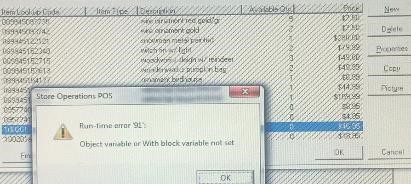
hi, we are using the 2.0.2014 rms version. we are going through this "Run-time error '91': Object variable or with block variable not set". Some suggested to rollback the hotfix#52 (which is in the last sp for 2.0.2014)., thus get back from 2.0.2014 to 2.0.2000 . I am wondering if there is an other way to get through this since then. Thanks for your replies.

attached the error screenshot
toto.jpg

*This post is locked for comments

I have the same question (0)
  • Community Member Profile Picture
    on at

    Try the 2.0.2017 hotfix from April. It seems a few run-time errors were fixed by then. You may have to request it from support as it does not appear to be in the hotfix documentation yet.

  • Community Member Profile Picture
    on at

    Thanks, I will try to request this version from ms support. I will let you know how it works out for me.

  • Community Member Profile Picture
    on at

    Hi, I went to partner portal but did not see the 2.0.2017 hotfix. Are you talking about the 2.0.2015? It seems the 2.0.2017was not yet released.

    Thanks

  • Suggested answer
    Community Member Profile Picture
    on at

    I think its related to an item not there no more,

    example, some one deletes item from HQ, but still in stores, etc.

    If you have DB access lookup HQID in the store and see if it exists.. same for store only ops.

    the items is bad, one way is delete and recreate and use that one.

  • Community Member Profile Picture
    on at

    Thanks, for all your answers. I finally opened a case with Microsoft support. They are in directly touch with my customer and are working on. (as usually, they don't give details about causes, i Will keep you posted about how M.S support troubleshoot the case.

  • Suggested answer
    Community Member Profile Picture
    on at

    If they have access to the updates once you apply the most recent one which I believe is #60 2.0.2022 that will likely be the end of that error. I believe you also may have opened a bookmarked link to the portal as the most recent hotfix is definitely not 2017.

Under review

Thank you for your reply! To ensure a great experience for everyone, your content is awaiting approval by our Community Managers. Please check back later.

Helpful resources

Quick Links

Responsible AI policies

As AI tools become more common, we’re introducing a Responsible AI Use…

Neeraj Kumar – Community Spotlight

We are honored to recognize Neeraj Kumar as our Community Spotlight honoree for…

Leaderboard > 🔒一 Microsoft Dynamics RMS (Archived)

Last 30 days Overall leaderboard

Featured topics

Product updates

Dynamics 365 release plans
