web
You’re offline. This is a read only version of the page.
close
Skip to main content

Announcements

No record found.

News and Announcements icon
Community site session details

Community site session details

Session Id :
Microsoft Dynamics CRM (Archived)

Activity - Due Date

(0) ShareShare
ReportReport
Posted on by 365

Dear All,

I think I found another bug in Dynamics.

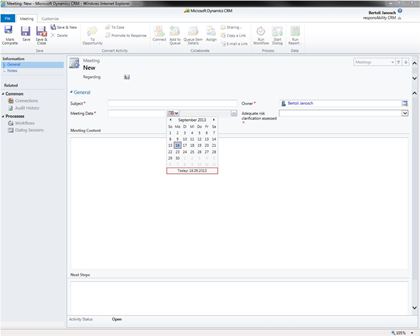
We have one user which can't select a date from the due date calendar (print screen down below). But, it is possible to write it in manually. Does anyone of you have the same problem?

We don’t think that it is a mistake by us, because we didn’t chance anything recently and the problem is only affecting one user.
Best,

Janosch

*This post is locked for comments

I have the same question (0)
  • Robinson Moses Profile Picture
    Microsoft Employee on at

    Hello,

    Is this a custom Entity called as Meeting. And if it is only affecting one user I do not think it is a Bug in CRM. I would recommend you to try it out in another IE version and use the compatibility view to see if you are able to select the Due date.

    Please let me know.

    Thanks & Regards,

    Rob Moses

  • Janosch Profile Picture
    365 on at

    Hi,

    We do have the problem not only with the custom entities, we do have it with all entities (including the default ones). Should I still go with you suggestion?

    Thank you in advance.

    Best,

    Janosch

  • Mohya Profile Picture
    on at

    Hi,

    We get this too, when upgraded from CRM 4 to CRM 2011. And have been tested in IE 8, 9 with different compt. with same result.

  • AJW17 Profile Picture
    5 on at

    I have tried this, with any web browser there is not problem when selecting a date. Unfortunately, the company i work at all have the Internet exp 8 synced to outlook so it would be a pain to swap on to any other browsers. Is there a way of tackling this so i can stay using to same browser? ( It is affecting 5+ of us)

    Is this possibly an IE setting that has been accidentally changed or reset in an update?

    Regards

    AW

  • ruis Profile Picture
    5 on at

    Hi,

    Any update on this ?

    Is this a bug in CRM 2011 ?

    KR,

    Ruis

  • Janosch Profile Picture
    365 on at

    I would still say it is a bug due to the fact that it is not depending on the browser version or type (other people confirmed that). Maybe it is a Rollup related bug, but I can't confirm that because we still run on the same Rollup we did back when I posted the issue. Does anyone know?

    Thanks & Regards,

    Janosch

Under review

Thank you for your reply! To ensure a great experience for everyone, your content is awaiting approval by our Community Managers. Please check back later.

Helpful resources

Quick Links

Introducing the 2026 Season 1 community Super Users

Congratulations to our 2026 Super Stars!

Meet the Microsoft Dynamics 365 Contact Center Champions

We are thrilled to have these Champions in our Community!

Congratulations to the April Top 10 Community Leaders

These are the community rock stars!

Leaderboard > 🔒一 Microsoft Dynamics CRM (Archived)

Last 30 days Overall leaderboard

Featured topics

Product updates

Dynamics 365 release plans
