Hi,
I need to change order in chart, please find below screen sort and xml for same.
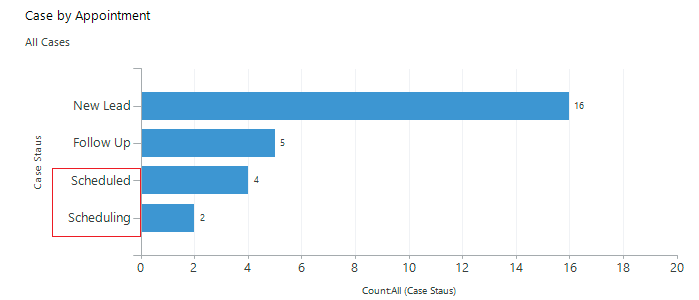
I want Schedulling should come up and schedule should come down, rest New Lead and Follow up will be same as shown.
<visualization>
<visualizationid>{D3591D1F-69DB-E711-80CF-000D3A91311A}</visualizationid>
<name>Case by Appointment</name>
<primaryentitytypecode>incident</primaryentitytypecode>
<datadescription>
<datadefinition>
<fetchcollection>
<fetch mapping="logical" aggregate="true">
<entity name="incident">
<attribute name="mzk_democasestatus" groupby="true" alias="_CRMAutoGen_groupby_column_Num_0" />
<attribute name="mzk_democasestatus" aggregate="count" alias="_CRMAutoGen_aggregate_column_Num_0" />
<order alias="_CRMAutoGen_aggregate_column_Num_0" descending="true" />
</entity>
</fetch>
</fetchcollection>
<categorycollection>
<category alias="_CRMAutoGen_groupby_column_Num_0">
<measurecollection>
<measure alias="_CRMAutoGen_aggregate_column_Num_0" />
</measurecollection>
</category>
</categorycollection>
</datadefinition>
</datadescription>
<presentationdescription>
<Chart Palette="None" PaletteCustomColors="91,151,213; 237,125,49; 160,116,166; 255,192,0; 68,114,196; 112,173,71; 37,94,145; 158,72,14; 117,55,125; 153,115,0; 38,68,120; 67,104,43; 124,175,221; 241,151,90; 186,144,192; 255,205,51; 105,142,208; 140,193,104; 50,125,194; 210,96,18; 150,83,159; 204,154,0; 51,90,161; 90,138,57;">
<Series>
<Series ChartType="Bar" IsValueShownAsLabel="True" Font="{0}, 9.5px" LabelForeColor="59, 59, 59" CustomProperties="PointWidth=0.75, MaxPixelPointWidth=40">
<SmartLabelStyle Enabled="True" />
</Series>
</Series>
<ChartAreas>
<ChartArea BorderColor="White" BorderDashStyle="Solid">
<AxisY LabelAutoFitMinFontSize="8" TitleForeColor="59, 59, 59" TitleFont="{0}, 10.5px" LineColor="165, 172, 181" IntervalAutoMode="VariableCount">
<MajorGrid LineColor="239, 242, 246" />
<MajorTickMark LineColor="165, 172, 181" />
<LabelStyle Font="{0}, 10.5px" ForeColor="59, 59, 59" />
</AxisY>
<AxisX LabelAutoFitMinFontSize="8" TitleForeColor="59, 59, 59" TitleFont="{0}, 10.5px" LineColor="165, 172, 181" IntervalAutoMode="VariableCount">
<MajorTickMark LineColor="165, 172, 181" />
<MajorGrid LineColor="Transparent" />
<LabelStyle Font="{0}, 10.5px" ForeColor="59, 59, 59" />
</AxisX>
</ChartArea>
</ChartAreas>
<Titles>
<Title Alignment="TopLeft" DockingOffset="-3" Font="{0}, 13px" ForeColor="59, 59, 59" />
</Titles>
</Chart>
</presentationdescription>
<isdefault>false</isdefault>
</visualization>
Bold highlighted I added, can you please help me ASAP.


