web
You’re offline. This is a read only version of the page.
close
Skip to main content

Notifications

Announcements

No record found.

Community site session details

Community site session details

Session Id :
Microsoft Dynamics CRM (Archived)

Trying to upgrade our on-premise CRM 2011 all the way to CRM 2016

(0) ShareShare
ReportReport
Posted on by

Hi there,

I did some reading before I set on this journey.  I elected to first do a test upgrade so I started with a new virtual server and CRM 2011 patched to Rollup 18.  Restored the DB's and it all worked smoothly.  Then I have created a second virtual server with CRM 2013 Rollup 4 SP1.

That's when I got stuck.  When I try to import the organizations i get this error:
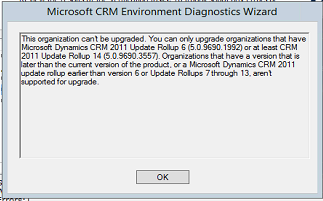
3364.error.png

I'm not sure if that is basically mean that my 2011 is upgraded to the point that the 2013 upgrade is unable to handle it.  Surely there is a fix or way to get pass this point.

Your help would be appreciated.

Thanks

Peter

*This post is locked for comments

I have the same question (0)
  • Suggested answer
    M I Mostafa Profile Picture
    4,257 on at

    Hi Peter,

    Have you tried to downgrade to rollup 6 or rollup 14? Depending on your version of Windows server, you should be able to remove rollup 18 using the Program and Features --> Installed Updates section.

    Once downgraded to rollup 6 or 14, try again.

    Alternatively, you can also do an "in-place" upgrade so rather than a database only upgrade. This is also known as "side-by-side full upgrade".

    Hope this helps.

  • Suggested answer
    M I Mostafa Profile Picture
    4,257 on at

    You can also read more about your options here:

    technet.microsoft.com/.../hh699716(v=crm.6).aspx

    Upgrade from rollup 6 is not recommended by Microsoft according to the above article. Check the section where it says: "The following Microsoft Dynamics CRM 2011 update rollup versions are supported for upgrade to Microsoft Dynamics CRM Server 2013. All other update rollup versions will receive an error message resembling the following and will not be upgraded. "

  • Community Member Profile Picture
    on at

    Thanks for a quick reply.  I will certainly try it.  

    I will keep you posted.

  • Community Member Profile Picture
    on at

    0763.error3.png

    When I try to uninstall the RU18 to go back to RU6 I get this error.

    Btw, 

    Before I go ahead and try to import my CRM 2011 RU14 org. to CRM 2013 SP1 I’d like to make sure that my import will not alter the original production CRM server.


    When I look in the Deployment manager in 2013 I already see my organization but when I look in the properties they are referring to the production server and sql server.  If I try to import my org. on my 2013 temp test server is that actually going to simply create that org on the 2013 crm and use the new sql server and reporting services and in no wat will change my original prod. Env.?

  • Suggested answer
    M I Mostafa Profile Picture
    4,257 on at

    If you copy the org DB and you import it into a completely separate temp test server as you call it, then I can't see how this can affect production (assuming I understood your question correctly). You should always stay away from testing anything on production and do not take any risks in this case.

  • Community Member Profile Picture
    on at

    Hi Mohamed,

    Thanks exactly what I'm planning to do.  I have a separate server with new crm and sql instance and I'm planning to restore the org db from the production server and then import it.  I get a warning from System Checks complaining about the version of the database: "The organization database selected for import is a different version than the organization database that is currently deployed." but I guess I can carry on since it is a warning.

  • Suggested answer
    M I Mostafa Profile Picture
    4,257 on at

    Let us know how you get on.

    Hope it helps! Please verify answer if you find the response helpful.

  • Community Member Profile Picture
    on at

    Hi Mohamed,

    I got stuck when trying to import my org to 2013 sp1.  My CRM vendor has developed some add-ons that we use and that is referring to the CRM 4.0 :

    "The JavaScript web resources in your system contain a reference to the Microsoft Dynamics CRM 4.0 (2007) Web service endpoint. The 2007 endpoints are not supported in this release. For information about how to upgrade custom code, refer to the Microsoft Dynamics CRM 2011 SDK topic "Upgrade Your Code from Microsoft Dynamics CRM 4.0 to Microsoft Dynamics CRM".

    The Legacy log file points to the add-on's mentioned above.  In order for me to move on I had to contact VAR that sold the original product to see if they have updated version of those apps.  I imagine I can just remove those and keep going but apparently we use them.

  • Verified answer
    M I Mostafa Profile Picture
    4,257 on at

    Hi again,

    Yes. It is common in upgrade projects that a number of code refactoring activities are required especially around custom dev work and scripts where the end points have changed.

    Your partner should be able to help and upgrade the code to work with Dynamics 365.

    Please mark response as verified answer if you got your question answered.

Under review

Thank you for your reply! To ensure a great experience for everyone, your content is awaiting approval by our Community Managers. Please check back later.

Helpful resources

Quick Links

Responsible AI policies

As AI tools become more common, we’re introducing a Responsible AI Use…

Neeraj Kumar – Community Spotlight

We are honored to recognize Neeraj Kumar as our Community Spotlight honoree for…

Leaderboard > 🔒一 Microsoft Dynamics CRM (Archived)

#1
SA-08121319-0 Profile Picture

SA-08121319-0 4

#1
Calum MacFarlane Profile Picture

Calum MacFarlane 4

#3
Alex Fun Wei Jie Profile Picture

Alex Fun Wei Jie 2

Last 30 days Overall leaderboard

Featured topics

Product updates

Dynamics 365 release plans
