web
You’re offline. This is a read only version of the page.
close
Skip to main content

Announcements

No record found.

News and Announcements icon
Community site session details

Community site session details

Session Id :
Small and medium business | Business Central, N...
Suggested Answer

NAV 2009 - SQL Server Accessibility

(1) ShareShare
ReportReport
Posted on by 22

Hello experts,

Have few queries regarding NAV 2009 SQL Server compatibility.

I have 2 SQL Server instances in my local.
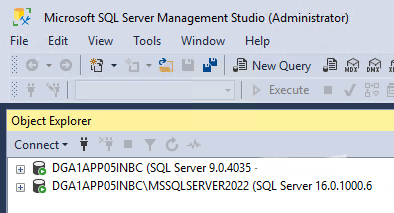
pastedimage1683737358462v1.png

When I installed NAV 2009 R2 - by default, the demo DB gets restored in 1st server.

But I have another DB restored in 2nd Server. I need to access that SQL Server in NAV 2009 development environment. The 2nd Server is not shown up in NAV 2009 development environment.

Attaching the NAV Dev Env. screenshot for reference.
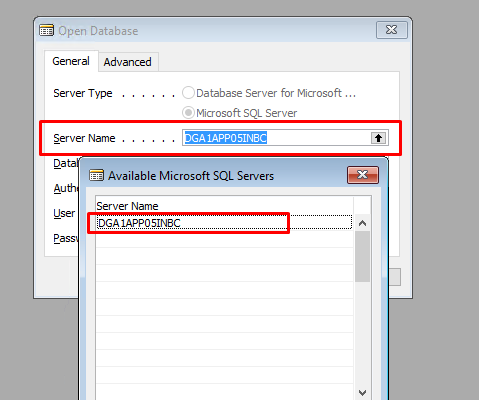
pastedimage1683737665862v2.png

Please suggest me a way to access the 2nd SQL Server from NAV 2009.

Thanks in advance.

I have the same question (0)
  • Suggested answer
    YUN ZHU Profile Picture
    99,090 Super User 2026 Season 1 on at

    It seems that you want to use the NAV2009 development environment to connect to the SQL Server 2022 database. . . .

    Sorry I haven't tested it, but NAV2009 has been out of support for over three years. If you try to connect, you can restore the server to the 9.0 instance above.

    https://learn.microsoft.com/en-us/lifecycle/products/dynamics-nav-2009-r2

    pastedimage1683766738686v1.png

    Hope this can give you some hints.

    Thanks.

    ZHU

  • Ron.McV Profile Picture
    98 on at

    I would check with your  SQL Server Configuration Manager  and ensure that Name pipes is enabled on the SQL Server Instance.  Of course assuming that this SQL instance reachable? (e.g., you can ping the server etc.).  

    Additionally with regards to that instance either in services or SQL Server Configuration Manager ensure that SQL Server Browser service for that instance is running.  

    so again check that the Second instance is configured in the SQL Server Configuration Manager the same way that the 1st instance is that is reachable.

    This points to an assumption that at the network layer everything is good.  

    ps. I hope this helpful

  • Ron.McV Profile Picture
    98 on at

    As mentioned the other replies, officially SQL support for NAV 2009 was through SQL Server 2014.  However I might not be fully convinced about that as I have heard some that do.  I would double check in the NAV Administrative tool and confirm the instance and that the port.

    I would confirm these three (3) things:

    1. Verify that the correct instance name and port have been specified in the NAV Development Environment settings for the second instance.

    2. Verify that the account being used to connect to the NAV database has the necessary permissions to access the database.

    3. Check to make sure that the appropriate ports are open on the firewall and that there are no network issues preventing communication between the NAV Development Environment and the SQL Server 2022 instance.

    ==================

    *******: Compatibility issues: While it is possible to use NAV 2009 with SQL Server 2022, it is an unsupported configuration, and there may be compatibility issues that prevent the NAV Development Environment from connecting to the database.

Under review

Thank you for your reply! To ensure a great experience for everyone, your content is awaiting approval by our Community Managers. Please check back later.

Helpful resources

Quick Links

Introducing the 2026 Season 1 community Super Users

Congratulations to our 2026 Super Stars!

Meet the Microsoft Dynamics 365 Contact Center Champions

We are thrilled to have these Champions in our Community!

Congratulations to the March Top 10 Community Leaders

These are the community rock stars!

Leaderboard > Small and medium business | Business Central, NAV, RMS

#1
OussamaSabbouh Profile Picture

OussamaSabbouh 1,949 Super User 2026 Season 1

#2
YUN ZHU Profile Picture

YUN ZHU 1,064 Super User 2026 Season 1

#3
Khushbu Rajvi. Profile Picture

Khushbu Rajvi. 559 Super User 2026 Season 1

Last 30 days Overall leaderboard

Featured topics

Product updates

Dynamics 365 release plans
