web
You’re offline. This is a read only version of the page.
close
Skip to main content

Announcements

No record found.

News and Announcements icon
Community site session details

Community site session details

Session Id :
Supply chain | Supply Chain Management, Commerce
Answered

Language isn't updating correctly

(0) ShareShare
ReportReport
Posted on by 253

Hi,

we are using two languages in the system en-US ( English ) and SL ( Slovenian ).

The issue is that in the Released products, the values don't change as they should.

Or I'm having a wrong overview of how the values need to change. Also please take into notice

that we have set in system parameters the system language to en-US.


Example A:

the language in the user options is set to en-US.

When we are looking at the Released products, the overview is like this:
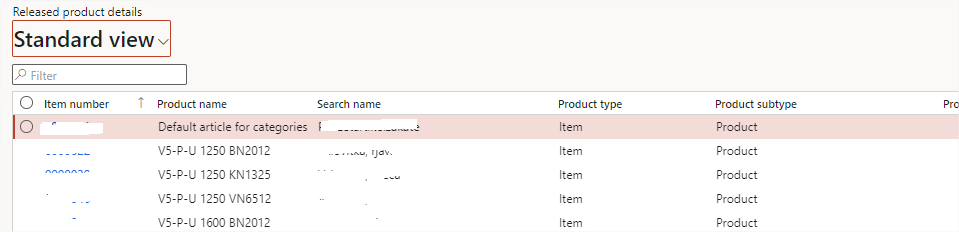
pastedimage1647343862406v1.png

Here is everything ok.

Example B:

the language in the user options is set to sl.

When we are looking at the Released products, the overview is like this:

pastedimage1647343983560v2.png

it's not ok, because the value of the Product name is not changing.

I found a solution for this, that I've created my own view, where I added the language and then filtered it by the language I want ti see but I'm not sure this is the right way.

Is this the normal behavior of the system?

Thank you for your comments!

Greetings,

David

I have the same question (0)
  • Verified answer
    Danny Bilodeau Profile Picture
    4,934 Super User 2026 Season 1 on at

    Hello DRR,

    You got it.

    Before the Saved Views feature was brought in, without personalisation, a user could only see Product Name in the system language. Translated Product Name was used only for external document printed in the Vendor or Customer language.

    With Saved Views, that has changed. Like you did, you can add the Language and Product Name from the Product Translations table and filter using the language to create views showing the Product Name in the chosen language.   If there is no traduction, the Product Name will display an empty field.

  • DRR Profile Picture
    253 on at

    Hi Danny,

    once again thank you for your fast feedback!

Under review

Thank you for your reply! To ensure a great experience for everyone, your content is awaiting approval by our Community Managers. Please check back later.

Helpful resources

Quick Links

Introducing the 2026 Season 1 community Super Users

Congratulations to our 2026 Super Stars!

Meet the Microsoft Dynamics 365 Contact Center Champions

We are thrilled to have these Champions in our Community!

Congratulations to the March Top 10 Community Leaders

These are the community rock stars!

Leaderboard > Supply chain | Supply Chain Management, Commerce

#1
Mallesh Deshapaga Profile Picture

Mallesh Deshapaga 306

#2
Laurens vd Tang Profile Picture

Laurens vd Tang 191 Super User 2026 Season 1

#3
André Arnaud de Calavon Profile Picture

André Arnaud de Cal... 134 Super User 2026 Season 1

Last 30 days Overall leaderboard

Product updates

Dynamics 365 release plans
