web
You’re offline. This is a read only version of the page.
close
Skip to main content

Notifications

Announcements

No record found.

Community site session details

Community site session details

Session Id :
Supply chain | Supply Chain Management, Commerce
Suggested Answer

How to run master planning for a single item

(0) ShareShare
ReportReport
Posted on by 168

Hello community members,

I have a requirement to run master planning for a single item using a specific master plan.

My scenario:

1. created a master plan called 30

pastedimage1615631626687v2.png

2. Created a coverage group called 30 and attached it to Item T0200 which is a production item.

pastedimage1615631681977v3.png

3. T0200 looks like this with, in red the on hand for each item within warehouse 11.

pastedimage1615631526222v1.png

4. I ran master planning by filtering on coverage group 30
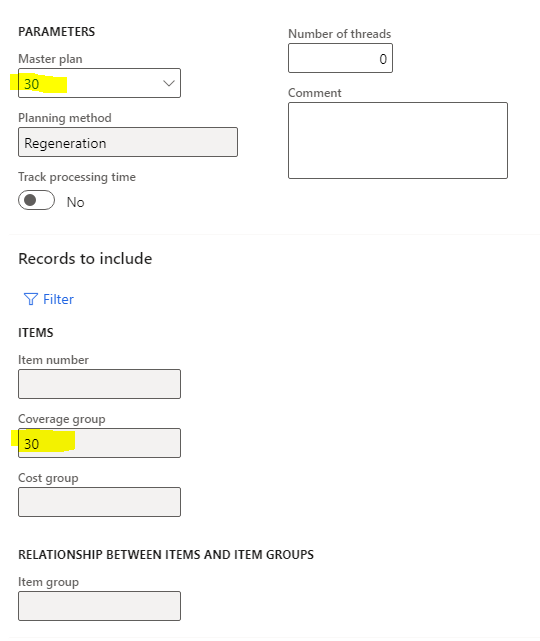
pastedimage1615631820885v4.png

5. I was expecting to have a planned production order for T0200 and a planned purchase order for A0001, but no, here's what I'm getting instead.

pastedimage1615631971428v5.png

Master planning is ignoring completely all the on hand on sub levels of my BOM item.

Is that a bug ? Is this scenario supported by master planning ? I'm just wondering.

If any feedback or any idea how I can do this, I'll appreciate your help.

Many thanks 

I have the same question (0)
  • AR-01121610-0 Profile Picture
    4,967 Moderator on at

    Hy Sidik,

    you are right, normaly I would also expect what you wrote. As the result is another there is anything we need to find out.

    Are any site and warehouse data inside the used BOM for T0200 and D0002?

    Are there any reservations on the stocked items?

    Are there any other requirememts for the items we expect not to be purchased?

    Did you delete all planned order before running master planning?

    Take a look to the planned order where the requirements are coming from?

    May be this is only the first step in the analyse of this behaviour, but we have to check multiple point.

    Hope this helps

  • Sidick Profile Picture
    168 on at

    Hi Andreas,

    Thanks for you help.

    Are any site and warehouse data inside the used BOM for T0200 and D0002? Yes I have setup warehouse 11 for all Boms and components

    Are there any reservations on the stocked items? No

    Are there any other requirememts for the items we expect not to be purchased? No

    Did you delete all planned order before running master planning? Yes

    Take a look to the planned order where the requirements are coming from?

    pastedimage1615636044451v1.png

    004737 and 004738 are coming from 004736

    004740 - 004741 and 004742 are coming from 004739

    I will add that this scenario can be played in a standard Contoso environment.

  • Suggested answer
    AR-01121610-0 Profile Picture
    4,967 Moderator on at

    Hy Sidik,

    I just did the setuo of T0200 (didn't fin that item) and sold one item.

    I had the same behavour with the standard MasterPlan in USMF, had exact the same result like you.

    So played around with item D0002 in a sales order, run mrp and master planing did NOT cretae a planned order as it is onhand available, thats correct.

    After that a run mpr again aganst T0200 and the result was as we both expected.

    5466.pastedimage1615642663516v1.png

    I don't know exactly why, I know there is there some behaouviar regarding the BOM Levels an item is used. This will be regulary calculated as part of master planning. In case we filter mrp through item number or coverage group may this part was not run for item D0002. I assum thi scould be the point.

    If you can reproduce still, please try this to

    - delete als planned orders

    - run BOM Level recalculation for all items

    0268.pastedimage1615643115256v2.png

    - run Mater planning

    - share your result there

    May be this is the root cause.


  • Sidick Profile Picture
    168 on at

    Still getting the same result

    pastedimage1615644663324v1.png

    However if i run a full MRP without any filter, it works fine, but not if I run with a filter.

  • AR-01121610-0 Profile Picture
    4,967 Moderator on at

    Hy,

    for me too, Created also new master plan and coverage group, regardless which filter I take at master planing (no filter, Coverage group or Item number), the result is as we expect. 

    pastedimage1615647543581v1.png

    So I don't know where the difference is and I can*t reproduce the behaviour any more. 


  • Sidick Profile Picture
    168 on at

Under review

Thank you for your reply! To ensure a great experience for everyone, your content is awaiting approval by our Community Managers. Please check back later.

Helpful resources

Quick Links

Responsible AI policies

As AI tools become more common, we’re introducing a Responsible AI Use…

Neeraj Kumar – Community Spotlight

We are honored to recognize Neeraj Kumar as our Community Spotlight honoree for…

Leaderboard > Supply chain | Supply Chain Management, Commerce

#1
Laurens vd Tang Profile Picture

Laurens vd Tang 302 Super User 2025 Season 2

#2
Siv Sagar Profile Picture

Siv Sagar 183 Super User 2025 Season 2

#3
André Arnaud de Calavon Profile Picture

André Arnaud de Cal... 120 Super User 2025 Season 2

Last 30 days Overall leaderboard

Product updates

Dynamics 365 release plans
