web
You’re offline. This is a read only version of the page.
close
Skip to main content

Announcements

No record found.

News and Announcements icon
Community site session details

Community site session details

Session Id :
Microsoft Dynamics CRM (Archived)

Workflow for a Case status change

(0) ShareShare
ReportReport
Posted on by 590

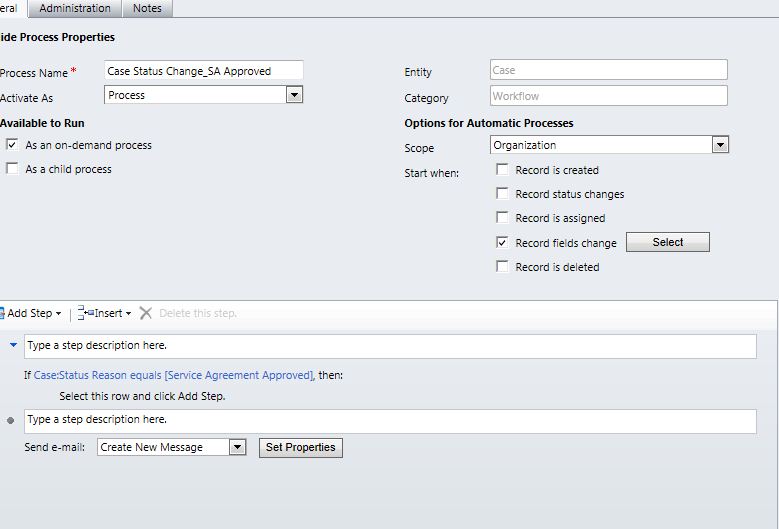
Within our Case entity we have setup the status with many different options in the pull down menu.  I have attempted to have a workflow send and email to a specific department\person upon the Case reaching a certain status.  The workflow works in that it sends the email but it's doing so with ALL status changes.  I checked the box next to Record Field Change and selected that field. 

I the added a Check Condition step that says If: Case:Status reason equals XXXXXX, then (send the new mail is the following step.

I realize this isn't the correct configuration but it is close.  How do I have a workflow that triggers WHEN the status reaches a specific step?
 

*This post is locked for comments

I have the same question (0)
  • Verified answer
    Neil Benson Profile Picture
    7,369 User Group Leader on at

    Your send e-mail step is a top-level step and is not nested within the conditional IF step. So it fires under all conditions.

    In your screenshot, where is says "Select this row and click Add Step", that's where you need to insert your e-mail step. When you do that you'll noticed that the e-mail step is indented and nested within the IF step.

  • Community Member Profile Picture
    on at

    your Step is out of if condition. you need to click on the wording Select this row and click Add Step then Add Step.

    best practice - after step to send email. again click on if condtion and default condition branch

    so otherwise you can set stop workflow step. and stop workflow as cancelled.

Under review

Thank you for your reply! To ensure a great experience for everyone, your content is awaiting approval by our Community Managers. Please check back later.

Helpful resources

Quick Links

Introducing the 2026 Season 1 community Super Users

Congratulations to our 2026 Super Stars!

Meet the Microsoft Dynamics 365 Contact Center Champions

We are thrilled to have these Champions in our Community!

Congratulations to the April Top 10 Community Leaders

These are the community rock stars!

Leaderboard > 🔒一 Microsoft Dynamics CRM (Archived)

Last 30 days Overall leaderboard

Featured topics

Product updates

Dynamics 365 release plans
