web
You’re offline. This is a read only version of the page.
close
Skip to main content

Announcements

No record found.

News and Announcements icon
Community site session details

Community site session details

Session Id :
Microsoft Dynamics 365 | Integration, Dataverse...
Suggested Answer

Custom Sorting in Charts

(1) ShareShare
ReportReport
Posted on by 34

Hi,

Is there any way to rearrange the values in a bar chart so that they are not in alphabetical order? I want the values to be in a specific series, like /Very difficult/ to /Very easy/.


I have the same question (0)
  • Suggested answer
    Dengliang Li Profile Picture
    Microsoft Employee on at
    Hi,
     
    I'm afraid that's not possible.
    You can arrange the values in the bars according to the labels of the option set fields.
    However, it is based on the alphabetical order of the label text.
     
    In my testing, I created an option set field.
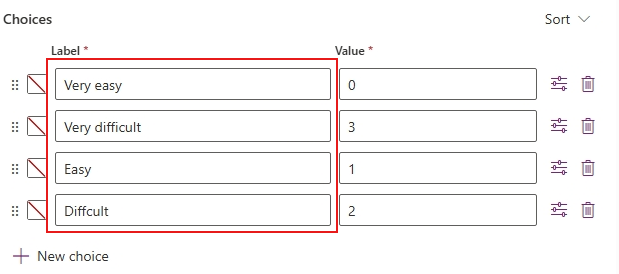
    Added these two lines of code to the XML of the chart to sort the bar values in positive order based on the label text of the option set.

    In the chart, records with the option set field labeled Empty (None) are in the first group, after which they are sorted into groups based on the alphabetical order of the label.
    Therefore, if all of your options begin with the letter V, the records will all be in the same group.
    Whereas before it was sorted by the value of the option set, now it is sorted alphabetically by the text label of the option set.
     
    If my answer was helpful, please click Like, and if it solved your problem, please mark it as verified to help other community members find more.
    If you have further questions, please feel free to contact me .
     
    Best Regards,
    Dengliang Li
     
     
  • TA-23051225-0 Profile Picture
    34 on at
    Thanks for the answer Dengliang Li.
     
    This chart is created from Customer Survey Question Responses(Customer Voice). 
     
    Is there any way I can use the option set value sorting in this. I am not able to find any Optionset field related to this in D365 entities. I want to arrange the chart according to this but it is set alphabetically by default.


    Thanks


Under review

Thank you for your reply! To ensure a great experience for everyone, your content is awaiting approval by our Community Managers. Please check back later.

Helpful resources

Quick Links

Introducing the 2026 Season 1 community Super Users

Congratulations to our 2026 Super Stars!

Congratulations to our 2025 Community Spotlights

Thanks to all of our 2025 Community Spotlight stars!

Leaderboard > Microsoft Dynamics 365 | Integration, Dataverse, and general topics

#1
Pallavi Phade Profile Picture

Pallavi Phade 102 Super User 2026 Season 1

#2
11manish Profile Picture

11manish 79

#3
Abhilash Warrier Profile Picture

Abhilash Warrier 55 Super User 2026 Season 1

Last 30 days Overall leaderboard

Product updates

Dynamics 365 release plans
