web
You’re offline. This is a read only version of the page.
close
Skip to main content

Announcements

No record found.

News and Announcements icon
Community site session details

Community site session details

Session Id :
Supply chain | Supply Chain Management, Commerce
Suggested Answer

Duplicate Trade Agreements created in D365 F & O

(2) ShareShare
ReportReport
Posted on by 9

Is there a way to remove duplicated Trade Agreements for items?

Also, is there a way to mass expire old trade agreements?

I have the same question (0)
  • Laurens vd Tang Profile Picture
    4,677 Super User 2026 Season 1 on at

    Hi Malarie,

    In a trade agreement journal you can click on 'select' 

    pastedimage1678216346800v1.png

    In the select form you set up your selection criteria, for example the prices for all items

    pastedimage1678216418142v2.png

    Via a data entity 'Open sales price journal lines' you can export and import trade agreement lines. In Excel you can add a 'To date'

    pastedimage1678216779727v3.png

    Regards,

    Laurens

  • Malarie Nelson Profile Picture
    9 on at

    Will this also help me remove duplicated Trade Agreements?

  • Suggested answer
    Dogan Adiyaman Profile Picture
    698 User Group Leader on at

    Hi Malarie,

    There is a button you can use to select journal lines to be deleted just before posting.

    You can see a simple practice below.

    1401.d1.png

    6303.d2.png

    5824.d3.png

    4454.d4.png

    If you don't want to do this one by one, create a journal, bring your trade agreement lines that you want to delete, select them all as "to be deleted". Post the journal. They will all disappear!

  • Malarie Nelson Profile Picture
    9 on at

    Thank you so much, you were both very helpful!

  • Dogan Adiyaman Profile Picture
    698 User Group Leader on at

    Could you please verify the answer you like so that it can guide other community members? Thank you

  • Kirk Anger Profile Picture
    50 on at

    Hi Malarie, 

    The select button mentioned previously does work, but there is another module that I personally find far easier to use. 

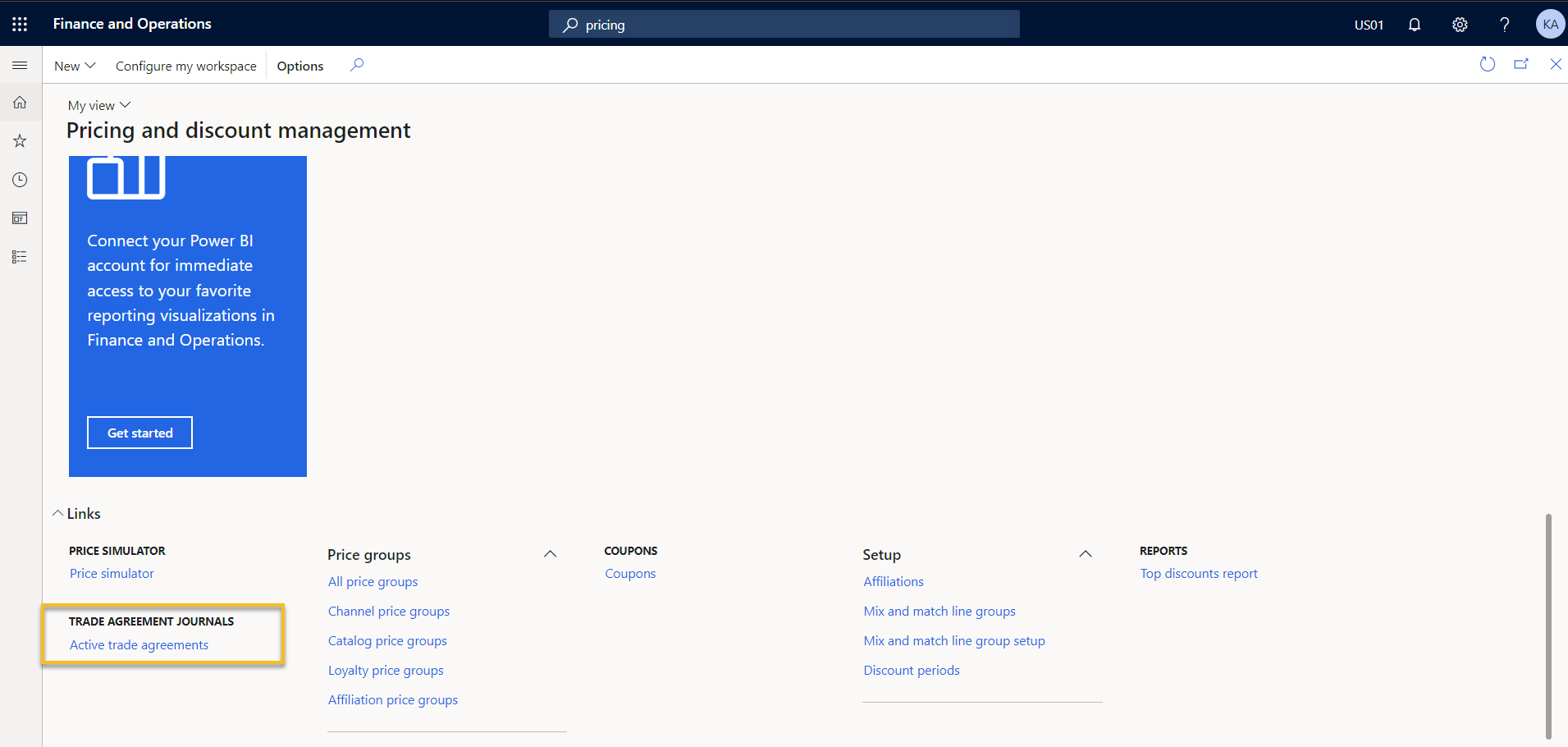
    Under the Pricing and discount management workspace, if you scroll down on the left side there is a link at the bottom called 'Active trade agreements' (unfortunately not available as a standard menu item. 

    Here you can see all active pricing (purchase, sales, etc) and sort / filter to the lines you need to correct. Once you've selected them, you can click the 'Edit selected lines' from the ribbon, which will pull them into a journal to then set an end date or make your required adjustments.

    pastedimage1678369911452v1.png

    pastedimage1678370100580v2.png

    Note that if you happen to be on 10.0.31, Microsoft adjusted the filter on this module to only show sales pricing and took away the ability to adjust the filter. Since we also use this regularly for purchase pricing updates, we reported this as a bug and there is a hotfix available that will unlock the filters again.

    Hope that helps, 

    Kirk

  • Suggested answer
    Malarie Nelson Profile Picture
    9 on at

    This definitely works as the "delete" Portion

  • Suggested answer
    Malarie Nelson Profile Picture
    9 on at

    Based on the access I have, and what is available in my version of D365, this will work the best for updating en mass

  • Majorjimjam Profile Picture
    47 on at
    We have created two SQL scripts for this problem. Where we can specify the Customer/Vendor or the Price Group and it expires the Duplicate Records with the Latest date in the From Date column.

    Other standard solution will be to use the Journals to select all the lines or lines that are duplicates and then post the expiry dates or delete the lines from the trade agreement.

    I don't know the reason why the system allows duplicate values in the first place, it should allow only one date to be active and not multiple dates as active for a single item and site.

Under review

Thank you for your reply! To ensure a great experience for everyone, your content is awaiting approval by our Community Managers. Please check back later.

Helpful resources

Quick Links

Introducing the 2026 Season 1 community Super Users

Congratulations to our 2026 Super Stars!

Meet the Microsoft Dynamics 365 Contact Center Champions

We are thrilled to have these Champions in our Community!

Congratulations to the March Top 10 Community Leaders

These are the community rock stars!

Leaderboard > Supply chain | Supply Chain Management, Commerce

#1
Mallesh Deshapaga Profile Picture

Mallesh Deshapaga 304

#2
Laurens vd Tang Profile Picture

Laurens vd Tang 189 Super User 2026 Season 1

#3
André Arnaud de Calavon Profile Picture

André Arnaud de Cal... 124 Super User 2026 Season 1

Last 30 days Overall leaderboard

Product updates

Dynamics 365 release plans
