web
You’re offline. This is a read only version of the page.
close
Skip to main content
Community site session details

Community site session details

Session Id :
Microsoft Dynamics CRM (Archived)

Getting Wrong Time while fetching dateTime field from plugin

(0) ShareShare
ReportReport
Posted on by 34

Hi Everyone,  I have an update plugin on Date and Time and I have to perform some operation from it.

As I am getting the DateTime field from Images, I am getting Wrong Time in it.

Can Anyone tell me how to get the appropriate time.
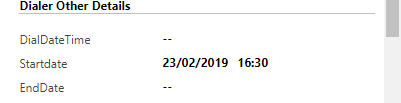
StartTime.PNG

DateTime StartTime = PostImage.Contains("ccs_dailer_startdate") ? (DateTime)PostImage.GetAttributeValue<DateTime>("ccs_dailer_startdate") : DateTime.MinValue;

As you can see in the screenshot we got the wrong time.

Output:

StartTime: 02/23/2019 11:00

*This post is locked for comments

I have the same question (0)
  • Suggested answer
    Radu Chiribelea Profile Picture
    6,667 on at
    RE: Getting Wrong Time while fetching dateTime field from plugin

    Hello,

    If the user under which the plug-in is executed and the one viewing the information on the form are different, then it could be to the TimeZone Conversion mechanism that is in place for CRM. If the field is defined as User Local: The field values are displayed in the user’s local time and formatted as per their current portal language/locale. The values are stored in UTC time zone format in Dynamics 365 for Customer Engagement. When a user in Dynamics 365 for Customer Engagement (or another portal user) in a different time zone views that value, they see it converted to their own time zone.

    Please see: docs.microsoft.com/.../behavior-format-date-time-field

    This means that if the user running the plugin and the one seeing the data in the UI are on different timezone, then this could explain the behavior

    Basically a time offset is added between the date displayed in the plugin and the one shown in the UI.

    I'd try changing in the personal options the timezone and see if this makes any difference - if not, then you'd need to calculate the time offset. Normally CRM does it for you.

    Regards,

    Radu

  • Suggested answer
    Kokulan Profile Picture
    18,054 on at
    RE: Getting Wrong Time while fetching dateTime field from plugin

    Hi

    As suggested by Radu, the time displayed and retrieved in the plugin are different.

    Time you see in the UI is the based on users time zone setting

    Time you see in you get in the plugin using the following line is in UTC

    DateTime StartTime = PostImage.Contains("ccs_dailer_startdate") ? (DateTime)PostImage.GetAttributeValue<DateTime>("ccs_dailer_startdate") : DateTime.MinValue;

    To get the correct time in plugin based on users timezone, please use the following

    DateTime StartTime = PostImage.Contains("ccs_dailer_startdate") ? (DateTime)PostImage.GetAttributeValue<DateTime>("ccs_dailer_startdate").ToLocalTime(): DateTime.MinValue;

    https://stackoverflow.com/questions/179940/convert-utc-gmt-time-to-local-time 

    If I am doing any calculation in the plugin or Workflow, I normally convert to ToLocalTime so that I don't have an issue of losing an hour or adding an extra hour.

    Hope this helps

  • Suggested answer
    Charles Abi Khirs Profile Picture
    3,569 on at
    RE: Getting Wrong Time while fetching dateTime field from plugin

    Hello,

    As Kokulan suggested, .ToLocalTime() function will give you the correct time value.

    Hope this helps!!

    Charles Abi Khirs.

Under review

Thank you for your reply! To ensure a great experience for everyone, your content is awaiting approval by our Community Managers. Please check back later.

Helpful resources

Quick Links

Responsible AI policies

As AI tools become more common, we’re introducing a Responsible AI Use…

Pallavi Phade – Community Spotlight

We are honored to recognize Pallavi Phade as our Community Spotlight honoree for…

Leaderboard > 🔒一 Microsoft Dynamics CRM (Archived)

#1
Wayne Walton Profile Picture

Wayne Walton 2

#2
Good.Panos Profile Picture

Good.Panos 1

Last 30 days Overall leaderboard

Featured topics

Product updates

Dynamics 365 release plans
