web
You’re offline. This is a read only version of the page.
close
Skip to main content

Announcements

No record found.

News and Announcements icon
Community site session details

Community site session details

Session Id :
Small and medium business | Business Central, N...
Answered

Workflow for PO:S that is stuck in "pending approval"

(8) ShareShare
ReportReport
Posted on by 27
Hi!

I can not wrap my head around this issue with regular workflows in BC.
We have set up a basic workflow to approve purchase orders with the help of workflow user groups. The group consists of the users which both should approve the PO.
The PO, is sent out for approval and both of the approvers in the group successfully approve the PO. However, the status on the PO is still "pending approval" despite that both of the users have approved it. It seems like the system won't release the PO which is very confusing. If I instead only runt the workflow with the Purchase Code, and thus only one user approves, it works fine and the PO is released.
 
 
Here is a screenshot of the approval:
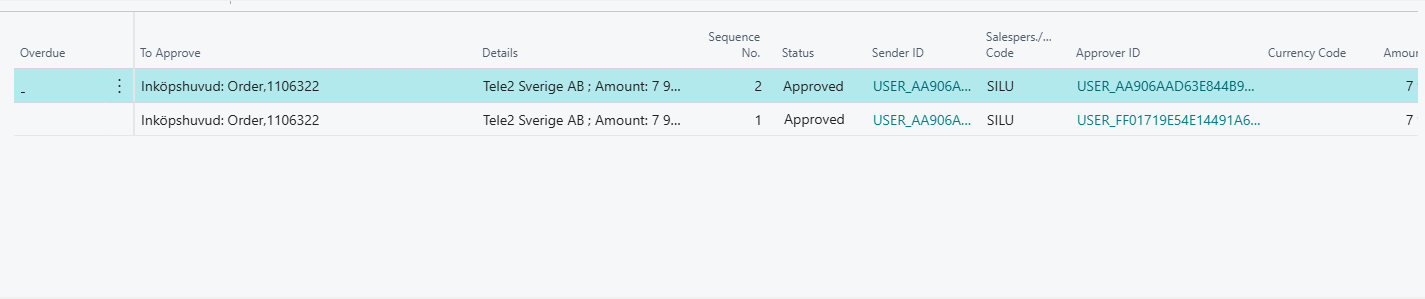
 
Here are some screenshots of the setup:

Workflow-groups:
 
Workflow settings:


Can it be the version of BC, the customer currently have the 25.5 version. I have tried this in other environments which are a later version than 25.5 (e.g. 26,4) and there it works, could it have anything to do with that specific version?
 
Would be greatfull if anyone could help me troubleshoot this.
 
Br,
Simon
 
 
I have the same question (2)
  • Verified answer
    Rishabh Kanaskar Profile Picture
    6,219 Super User 2026 Season 1 on at
    Hi,
     
    Yes, this is a known limitation/bug in earlier versions of Business Central 25.x (including 25.5).
    In v25.5, when you use Workflow User Groups with multiple approvers, the Purchase Order can remain stuck in Pending Approval even after all approvers have approved. The release step is not triggered automatically.
     
    What you can do:
    > Workaround: Manually release the PO after all approvals, or set the workflow response to explicitly include “Release Document” as the last step.
    > Recommended fix: Upgrade to BC v26.x or later, where this behavior was corrected. In newer versions, once all members of the workflow user group approve, the PO is automatically released as expected.
     
    Thanks
    Rishabh
  • Suggested answer
    Nimsara Jayathilaka. Profile Picture
    4,950 Super User 2026 Season 1 on at
    Hi Simon
     
    The “Pending Approval” issue in BC 25.5 is a known bug with Workflow User Groups.
    Upgrade to BC 26.3 or higher, or change the workflow to use individual approvers instead of user groups.
     
    Thanks
    Nimsara
  • SL-27092031-0 Profile Picture
    27 on at
    Hi,
     
    Thanks for your replys. We have now upgraded to 26,5. However, the issue still remains as the PO:s are not released after the approval. Could you give me som guidance regarding what to do?
     
     
    Rishabh, you mentioned that I could: "or set the workflow response to explicitly include “Release Document” as the last step."
    This is already implemented on the condition of "Pending approvals : 0". The responses to that condition is:

    Remove Post Restrictions
    Release Document
     
    Is that the correct way?
     
    Br,
    Simon
     
  • Suggested answer
    TarikJerkovich Profile Picture
    293 on at
    Hi Simon @SL-27092031-0
     
    I can share my worflow for purchase order that working correcly :


    I hope so it's helps to your situation
    KR
    Tarik Jerković
  • SL-27092031-0 Profile Picture
    27 on at
    Hi Tarik,
     
    Thanks for your response and instructions. Unfortunately the same issue remains even after changing to your setup. 
    We seem to have the same issue when using a traditional approval hierarchy as well, so even when not using approval groups but using standard approval flow for users.
     
    Br,
    Simon

Under review

Thank you for your reply! To ensure a great experience for everyone, your content is awaiting approval by our Community Managers. Please check back later.

Helpful resources

Quick Links

Introducing the 2026 Season 1 community Super Users

Congratulations to our 2026 Super Stars!

Meet the Microsoft Dynamics 365 Contact Center Champions

We are thrilled to have these Champions in our Community!

Congratulations to the March Top 10 Community Leaders

These are the community rock stars!

Leaderboard > Small and medium business | Business Central, NAV, RMS

#1
OussamaSabbouh Profile Picture

OussamaSabbouh 1,993 Super User 2026 Season 1

#2
YUN ZHU Profile Picture

YUN ZHU 1,116 Super User 2026 Season 1

#3
Khushbu Rajvi. Profile Picture

Khushbu Rajvi. 557 Super User 2026 Season 1

Last 30 days Overall leaderboard

Featured topics

Product updates

Dynamics 365 release plans
