web
You’re offline. This is a read only version of the page.
close
Skip to main content

Announcements

No record found.

News and Announcements icon
Community site session details

Community site session details

Session Id :
Microsoft Dynamics CRM (Archived)

Customer Case notification not working

(0) ShareShare
ReportReport
Posted on by 760

Hi,

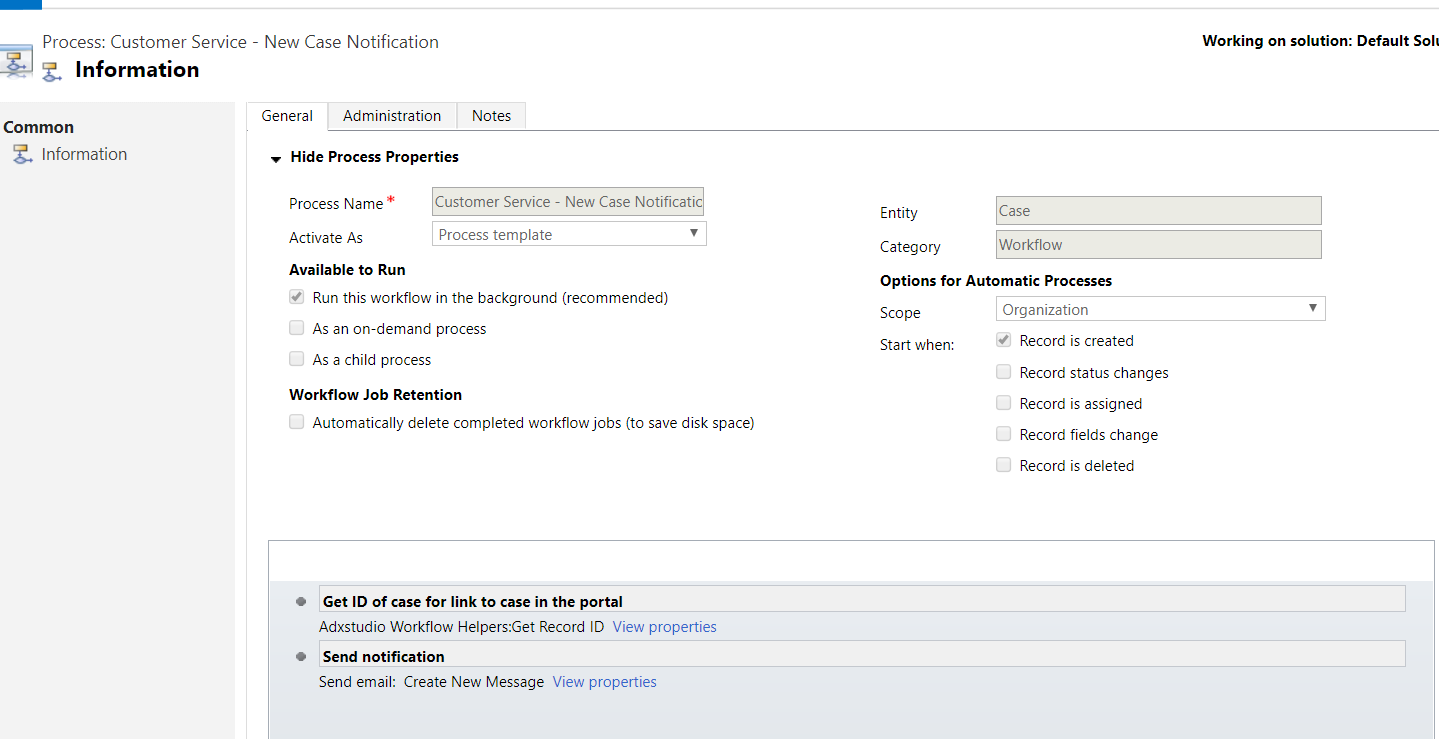
I've been trying to fix this workflow But I can't really make it work. I used the existing process for cases, I already activate it and change the scope to organization but still i have no luck in making it work
8737.case1.PNG

*This post is locked for comments

I have the same question (0)
  • Arpit Shrivastava Profile Picture
    7,518 User Group Leader on at

    Hi Jane,

    Are you facing any specific issue in workflow? or workflow is not even triggering?

    Did you check in System Jobs (Settings > System Jobs). Is there any failure records for your workflow?

    Thanks

  • Suggested answer
    Community Member Profile Picture
    on at

    Hi,

    You should update workflow step, if customer contains data, then you need to send the email.

    I think the step is misplaced in current workflow.

    Mansoor

  • Suggested answer
    Rawish Kumar Profile Picture
    13,758 on at

    last step doesnt look correct to me it should be the sequence of the 2nd step.

    deactivate the workflow > delete the last step and select the line in 2nd step where it says "then" and add the email send step.

  • Suggested answer
    RaviKashyap Profile Picture
    55,410 Moderator on at

    Hi Jane,

    You have selected to run this workflow in background which may take some time depending upon the resources. Create a case records and select the background processes to see if the workflow is actually triggered or not. From there you can also check the individual step execution.

    bakgroundprocess.png

    Hope this helps.

  • CRMexplorer Profile Picture
    760 on at

    Hi,

    I already edited the process still not working.please see the updated screenshot

  • CRMexplorer Profile Picture
    760 on at

    Hi,

    The workflow is not displayed in the system jobs

  • Verified answer
    RaviKashyap Profile Picture
    55,410 Moderator on at

    Hi Jane,

    As per the screenshot., you have activated the workflow as template and not as a process, can you deactivate and then change the activate as process and then try again please.

    Hope this helps.

  • CRMexplorer Profile Picture
    760 on at

    thank you. this solved the problem

Under review

Thank you for your reply! To ensure a great experience for everyone, your content is awaiting approval by our Community Managers. Please check back later.

Helpful resources

Quick Links

Introducing the 2026 Season 1 community Super Users

Congratulations to our 2026 Super Stars!

Meet the Microsoft Dynamics 365 Contact Center Champions

We are thrilled to have these Champions in our Community!

Congratulations to the April Top 10 Community Leaders

These are the community rock stars!

Leaderboard > 🔒一 Microsoft Dynamics CRM (Archived)

#1
ScottDurow Profile Picture

ScottDurow 2

#2
GJones Profile Picture

GJones 1

Last 30 days Overall leaderboard

Featured topics

Product updates

Dynamics 365 release plans
