web
You’re offline. This is a read only version of the page.
close
Skip to main content

Announcements

No record found.

News and Announcements icon
Community site session details

Community site session details

Session Id :
Small and medium business | Business Central, N...
Suggested Answer

BOM Cost Shares – Capacity Cost Calculation Issue with Work Center Unit of Measure

(5) ShareShare
ReportReport
Posted on by 28

Hi everyone,

I'm encountering an issue with the capacity cost calculation in the BOM Cost Shares when using a work center that has its Unit cost calculation set to "Time".

It seems that the cost is calculated correctly only when the work center's capacity unit of measure is set to "HOUR". However, if the unit of measure is set to something else, like "MINUTE", the system appears to multiply the capacity in minutes directly by the cost per hour, which results in an incorrect cost.

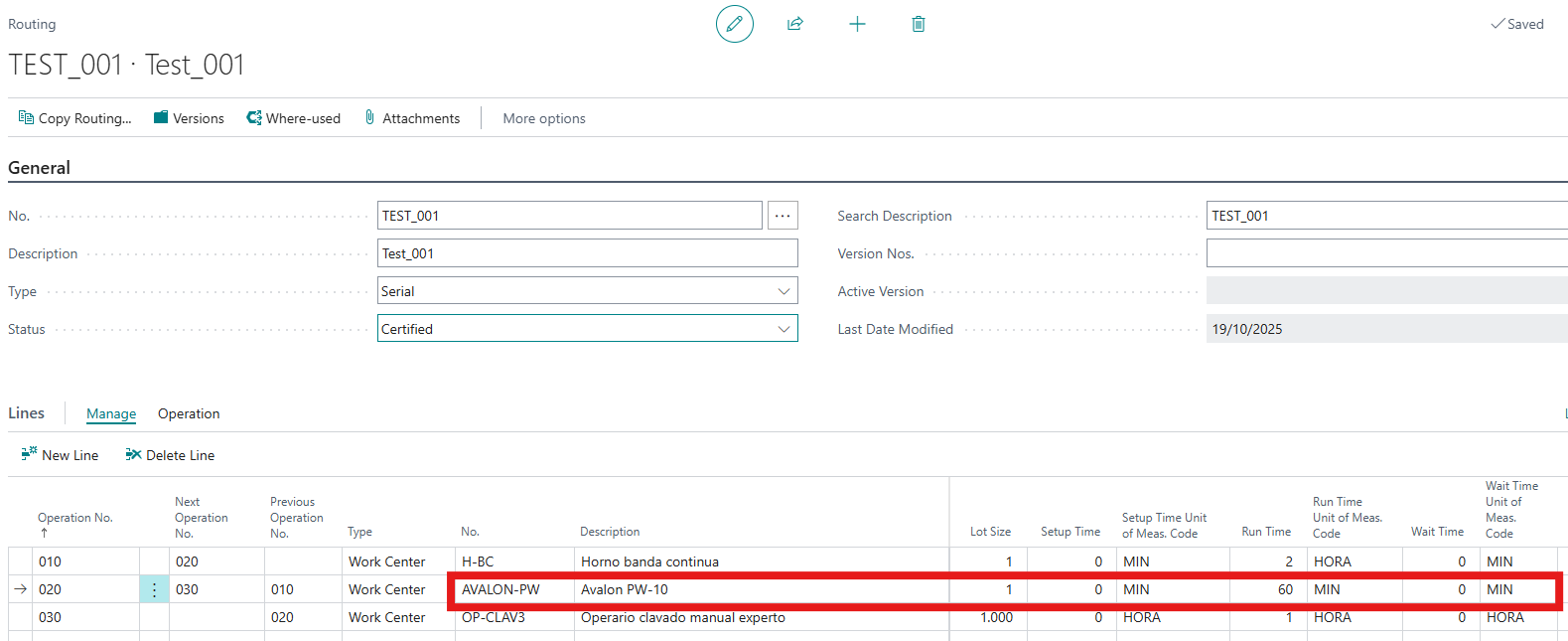
The production route of the product is as follows:
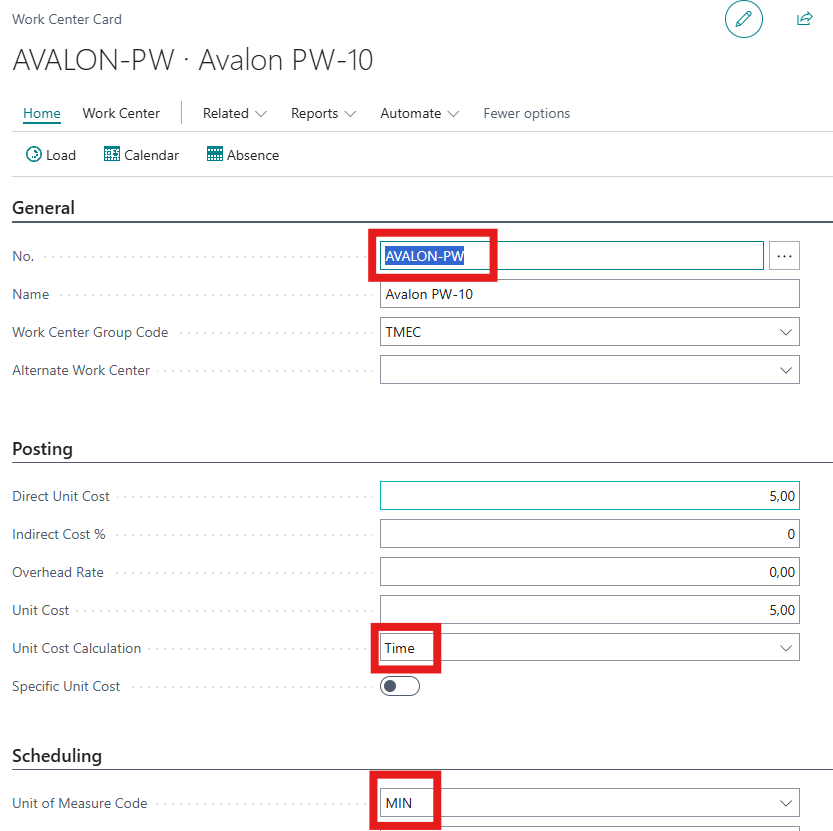
For operation 020, the work center card is as follows, where it can be seen that its capacity unit of measure is set to MIN and its direct unit cost is set to 5 € per hour.
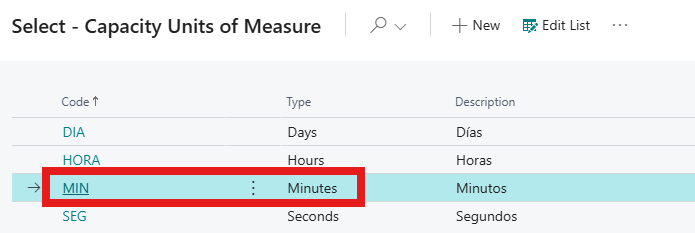
The capacity units of measure have been defined as follows:
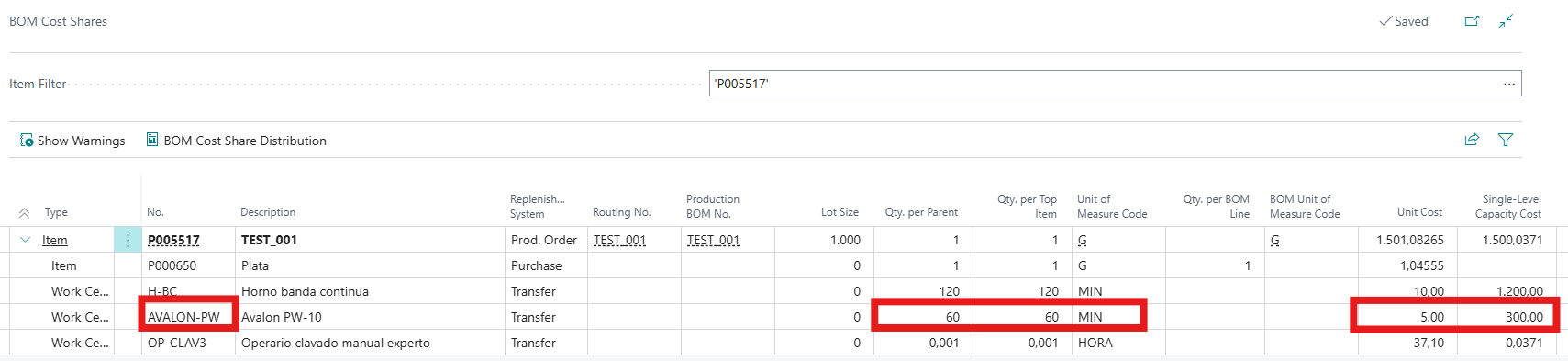
The BOM Cost Shares of the product are as follows, where it can be seen that the capacity cost for operation 020 is calculated as 60 MIN × 5 €/HOUR = 300 €, instead of 60 MIN × (5/60) €/MIN = 5 €, which would be the correct result.
 

Has anyone else experienced this behavior? Is this a known limitation or a configuration issue? Any insights or workarounds would be greatly appreciated.

Thanks in advance!

I have the same question (0)
  • Suggested answer
    Grigorios Mavrogeorgis Profile Picture
    1,483 Super User 2026 Season 1 on at
    Hi,
     
    you’ve run into a unit mismatch, not a bug.
    In BC, when a work/machine center’s Unit cost calculation = Time, the Direct Unit Cost is per the work center’s Capacity UoM.
    So if the work center’s Capacity UoM = MIN, BC expects the Direct Unit Cost in €/MIN.
    You entered 5 €/HOUR while the UoM is MIN, so Cost Shares does: 60 (MIN) × 5 (€/MIN) = 300 €.

    Fix options
    • Keep UoM = MIN → set Direct Unit Cost = 5 / 60 = 0.083333 €/MIN (and adjust Overhead Rate if you use it per minute). Recalculate Cost Shares.
    • Prefer hourly costing → change the work center’s Capacity UoM to HOUR and keep Direct Unit Cost = 5 €/HOUR. (BC will convert routing times from minutes to hours automatically.)
    Tips
    • Make sure all work/machine centers follow the same convention (all HOUR or all MIN) to avoid surprises.
    • After changing costs/units, run your Costing Version → Roll Up and re-open BOM Cost Shares.
    • Lot size and setup spreading can also affect totals, but the big driver here is aligning UoM ↔ cost.
     
    If you found this helpful please mark it as verified
  • MC-26061828-0 Profile Picture
    28 on at
    Thank you very much for your response, Gregory Mavrogeorgis.
     
    The issue seems to stem from the Spanish translation of "Unit Cost Calculation," where "Time" has been translated as "Hora" instead of "Tiempo." This creates confusion, as "Hora" refers specifically to an hour, while "Tiempo" more accurately reflects the intended meaning of "Time" in this context.
  • Suggested answer
    YUN ZHU Profile Picture
    100,974 Super User 2026 Season 1 on at
    Hi, You can submit this issue to Microsoft, which is responsible for translating the Spanish version.
    Or, you can make a small customization to modify the translation, like the one below.
    Dynamics 365 Business Central: How to change captions of standard Enum values
     
    Thanks.
    ZHU

Under review

Thank you for your reply! To ensure a great experience for everyone, your content is awaiting approval by our Community Managers. Please check back later.

Helpful resources

Quick Links

Introducing the 2026 Season 1 community Super Users

Congratulations to our 2026 Super Stars!

Meet the Microsoft Dynamics 365 Contact Center Champions

We are thrilled to have these Champions in our Community!

Congratulations to the April Top 10 Community Leaders

These are the community rock stars!

Leaderboard > Small and medium business | Business Central, NAV, RMS

#1
OussamaSabbouh Profile Picture

OussamaSabbouh 2,086 Super User 2026 Season 1

#2
YUN ZHU Profile Picture

YUN ZHU 1,290 Super User 2026 Season 1

#3
AndrewThomas81 Profile Picture

AndrewThomas81 1,218

Last 30 days Overall leaderboard

Featured topics

Product updates

Dynamics 365 release plans
