web
You’re offline. This is a read only version of the page.
close
Skip to main content

Announcements

No record found.

News and Announcements icon
Community site session details

Community site session details

Session Id :
Small and medium business | Business Central, N...
Suggested Answer

Is it possible to assign timesheet approvers to jobs?

(0) ShareShare
ReportReport
Posted on by 10

Hi,

I was wondering if it was possible for the timesheet approver section from the resource be moved to jobs. So that the project manager for the job can be the one that approves the timesheets as opposed to a sole person being responsible?

Many thanks

I have the same question (0)
  • Suggested answer
    Mohana Yadav Profile Picture
    61,214 Super User 2026 Season 1 on at

    You can submit your idea below

    experience.dynamics.com/.../

    Or you could try customizing the standard solution.

    Or you can try 3rd party ISV solutions like below

    appsource.microsoft.com/.../PUBID.progressussoftware|AID.progressusus|PAPPID.770fc3a0-ddab-43aa-93a5-6430f34f1b77

  • Suggested answer
    Community Member Profile Picture
    on at

    Happy New Year,

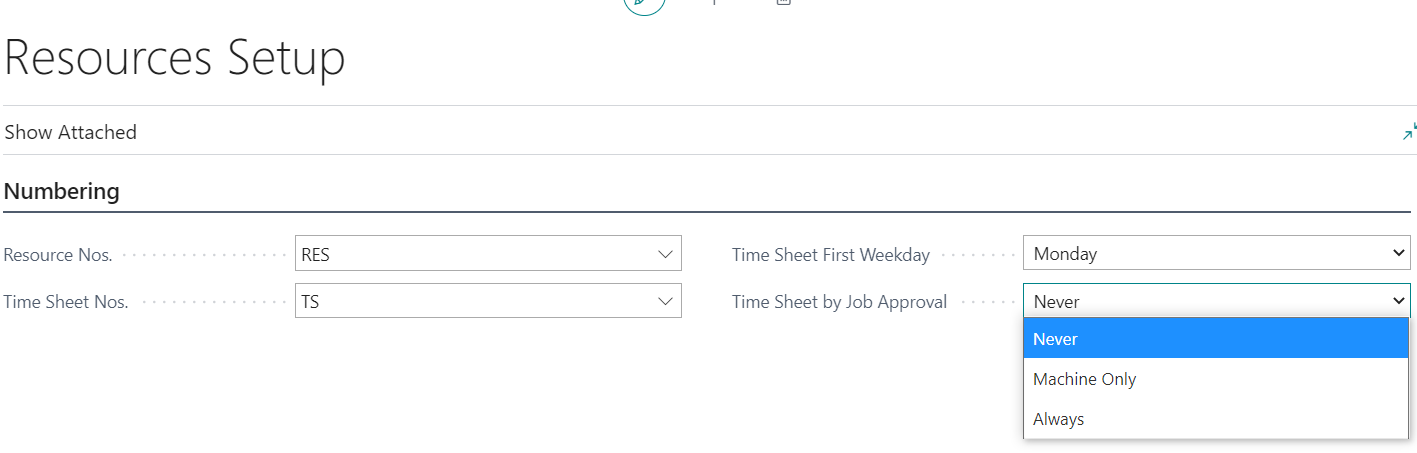
    When setting up Timesheets and their approval, an Approver can be 1) Timesheet Approver on Resource Card 2) Person Responsible on the Job Card. Note that the Resource Setup helps defines this. In the field Time Sheet by Job Approval if you select Never, it goes to the Resource Card Approver. If you select Always, it moves to the Job Card Person Responsible. Machine Only creates a fork in the road - If the machine timesheet relates to a Job, it goes to Person Responsible on Job Card, if linked to a Resource, it goes to Approve on Resource Card.
    pastedimage1609770652126v1.png

    Update your setup and if the PM is the Person Responsible on the Job Card, they will be the approver of time.

    pastedimage1609770822584v2.png

    Hope this helps and answers your question.

    Thanks,

    Steve

Under review

Thank you for your reply! To ensure a great experience for everyone, your content is awaiting approval by our Community Managers. Please check back later.

Helpful resources

Quick Links

Introducing the 2026 Season 1 community Super Users

Congratulations to our 2026 Super Stars!

Meet the Microsoft Dynamics 365 Contact Center Champions

We are thrilled to have these Champions in our Community!

Congratulations to the April Top 10 Community Leaders

These are the community rock stars!

Leaderboard > Small and medium business | Business Central, NAV, RMS

#1
OussamaSabbouh Profile Picture

OussamaSabbouh 2,138 Super User 2026 Season 1

#2
YUN ZHU Profile Picture

YUN ZHU 1,279 Super User 2026 Season 1

#3
AndrewThomas81 Profile Picture

AndrewThomas81 1,192

Last 30 days Overall leaderboard

Featured topics

Product updates

Dynamics 365 release plans
