web
You’re offline. This is a read only version of the page.
close
Skip to main content

Announcements

No record found.

News and Announcements icon
Community site session details

Community site session details

Session Id :
Microsoft Dynamics CRM (Archived)

emailaddress1 from Contacts

(0) ShareShare
ReportReport
Posted on by 608

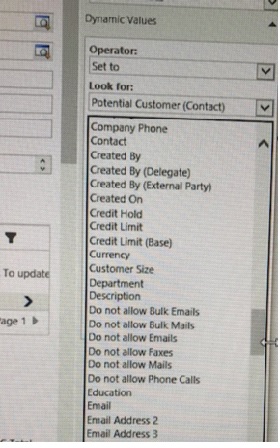
I want the Primary Contact's email address to appear on the printed quote form.  I'm working on a workflow to add this field (schema name; emailaddress1) to the Quote entity so I can easily use it in a Document Template for the Quote.  However, the email fields listed for use on the workflow do NOT include emailaddress1.  I'm expecting to see it in the list of fields for Potential Customer (Contact) in the attached screenshot.
Potential-Customer.jpg

Where is it?  "Email" in the list is not the same and results in an empty field.

Thanks in advance.

*This post is locked for comments

I have the same question (0)
  • Suggested answer
    Guido Preite Profile Picture
    54,086 Moderator on at

    it's "Email"

  • Barbara Forsman Profile Picture
    608 on at

    when I use email, it comes up blank

  • Verified answer
    Guido Preite Profile Picture
    54,086 Moderator on at

    "Email" field is emailaddress1, no doubts about this.

    Now you wrote you want the Primary Contact's email. Primary Contact of what? because in the workflow when you select "Potential Customer (Contact)" means that if inside the quote the "Potential Customer" field is a contact then you can access its values.

    if for Primary Contact you mean the primary contact of the account, and the account is set as "Potential Customer" than you can't do a double jump inside the workflow designer (quote -> account -> primary contact field)

    in this case if you want to keep using workflows, you need to first create a custom field inside account to hold the primary contact email, and after create a wf to copy the primary contact email from contact to the new account custom field.

    after inside this quote wf you will be able to access the account custom field (if the "Potential Customer" is set to an account)

  • Barbara Forsman Profile Picture
    608 on at

    Well shoot.  It's never simple, is it?

    Thank you Guido!  I appreciate the insight.

  • Barbara Forsman Profile Picture
    608 on at

    Can I ask one more question on this?  

    I created a custom field on the Opportunity called Primary Contact that is a lookup field to the Contact Entity.  I used this custom relationship in my wf to populate the Primary Contact and Primary Contact email address on a Quote.  I populated this field on the Opportunity, saved and created a quote.  The wf says it ran successfully, but neither field is populated on the Quote.

    Contacts are driving me crazy!!

  • Barbara Forsman Profile Picture
    608 on at

    Got it.  I mapped the Primary Contact fields between Opportunity and Quote.  Now the email address populates properly.

    Thank you

Under review

Thank you for your reply! To ensure a great experience for everyone, your content is awaiting approval by our Community Managers. Please check back later.

Helpful resources

Quick Links

Introducing the 2026 Season 1 community Super Users

Congratulations to our 2026 Super Stars!

Congratulations to our 2025 Community Spotlights

Thanks to all of our 2025 Community Spotlight stars!

Leaderboard > 🔒一 Microsoft Dynamics CRM (Archived)

#1
Varsha deshpande Profile Picture

Varsha deshpande 5

#2
JS-09031509-0 Profile Picture

JS-09031509-0 3

#3
Ciprian  P Profile Picture

Ciprian P 2

Last 30 days Overall leaderboard

Featured topics

Product updates

Dynamics 365 release plans
