Hi,
I'm running a Dynamics 365 CRM Online instance (fully updated) with the latest version of Field Service plugin and an error is literally driving me nuts.
Each time I'm modifying a Workflow in Production environment or a form linked to the Work Order Entity, all or some of my users will get the following issue:
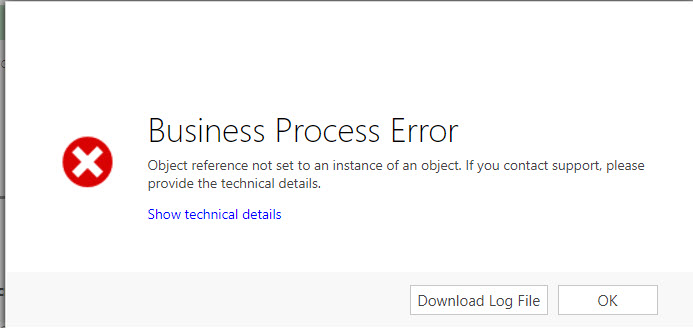
THis happens when:
- I try to create a Work Order.
- I try to access the Scheduling Board.
- I try to create a Ressource Requirement
There is nothing I can do to solve this, every time I need to wait for hours (usually the next day) and the error goes away.
Here's the error log I get. From what I can see it seems the issue comes from the Ressource requirement creation...
Thanks in advance for any idea on how I could at least unblock the users...
Unhandled Exception: System.ServiceModel.FaultException`1[[Microsoft.Xrm.Sdk.OrganizationServiceFault, Microsoft.Xrm.Sdk, Version=8.0.0.0, Culture=neutral, PublicKeyToken=31bf3856ad364e35]]: Object reference not set to an instance of an object.Detail:
<OrganizationServiceFault xmlns:i="www.w3.org/.../XMLSchema-instance" xmlns="schemas.microsoft.com/.../Contracts">
  <ActivityId>aa7eb45b-63de-471f-85ff-fb2379d34f97</ActivityId>
  <ErrorCode>-2147220891</ErrorCode>
  <ErrorDetails xmlns:d2p1="schemas.datacontract.org/.../System.Collections.Generic">
    <KeyValuePairOfstringanyType>
      <d2p1:key>OperationStatus</d2p1:key>
      <d2p1:value xmlns:d4p1="www.w3.org/.../XMLSchema" i:type="d4p1:string">0</d2p1:value>
    </KeyValuePairOfstringanyType>
    <KeyValuePairOfstringanyType>
      <d2p1:key>SubErrorCode</d2p1:key>
      <d2p1:value xmlns:d4p1="www.w3.org/.../XMLSchema" i:type="d4p1:string">-2146233088</d2p1:value>
    </KeyValuePairOfstringanyType>
  </ErrorDetails>
  <Message>Object reference not set to an instance of an object.</Message>
  <Timestamp>2017-07-04T08:04:47.1053037Z</Timestamp>
  <ExceptionRetriable>false</ExceptionRetriable>
  <ExceptionSource i:nil="true" />
  <InnerFault i:nil="true" />
  <OriginalException i:nil="true" />
  <TraceText>

[Microsoft.Dynamics.FieldService: Microsoft.Dynamics.FieldService.FieldServicePlugin]
[94f83cac-7732-4bb9-9cff-8f92992dd953: Field Service: Create (post-operation) for msdyn_workorder]
FieldServicePlugin: PluginLocal.Create, Depth: 1
FieldServicePlugin: PluginContext Start
FieldServicePlugin: MessageName: Create
FieldServicePlugin: PrimaryEntityName: msdyn_workorder
FieldServicePlugin: PrimaryEntityId: bcc85b69-8f60-e711-8103-e0071b6c3f11
FieldServicePlugin: SecondaryEntityName: none
FieldServicePlugin: Stage: 40
FieldServicePlugin: PreEntityImages.Count: 0
FieldServicePlugin: PostEntityImages.Count: 0
FieldServicePlugin: InputParameters:
	Target = Microsoft.Xrm.Sdk.Entity
FieldServicePlugin: OutputParameters:
	id = bcc85b69-8f60-e711-8103-e0071b6c3f11
FieldServicePlugin: SharedVariables:
	DefaultsAddedFlag = True
	BpfInjectProcessAttributes = False
FieldServicePlugin: UserId: e1d6ad82-235b-e611-80ec-5065f38bf451
FieldServicePlugin: InitiatingUserID: e1d6ad82-235b-e611-80ec-5065f38bf451
FieldServicePlugin: IsolationMode: 1
FieldServicePlugin: Mode: 0
FieldServicePlugin: IsInTransaction: True
FieldServicePlugin: Depth: 1
FieldServicePlugin: IsExecutingOffline: False
FieldServicePlugin: Parent PluginContext Start
FieldServicePlugin: 		PluginContext Start
FieldServicePlugin: 		MessageName: Create
FieldServicePlugin: 		PrimaryEntityName: msdyn_workorder
FieldServicePlugin: 		PrimaryEntityId: bcc85b69-8f60-e711-8103-e0071b6c3f11
FieldServicePlugin: 		SecondaryEntityName: none
FieldServicePlugin: 		Stage: 30
FieldServicePlugin: 		PreEntityImages.Count: 0
FieldServicePlugin: 		PostEntityImages.Count: 0
FieldServicePlugin: 		InputParameters:
	Target = Microsoft.Xrm.Sdk.Entity
	SuppressDuplicateDetection = False
FieldServicePlugin: 		OutputParameters:
FieldServicePlugin: 		SharedVariables:
	DefaultsAddedFlag = True
	BpfInjectProcessAttributes = False
	ChangedEntityTypes = System.Collections.Generic.Dictionary`2[System.String,System.String]
FieldServicePlugin: 		UserId: e1d6ad82-235b-e611-80ec-5065f38bf451
FieldServicePlugin: 		InitiatingUserID: e1d6ad82-235b-e611-80ec-5065f38bf451
FieldServicePlugin: 		IsolationMode: 1
FieldServicePlugin: 		Mode: 0
FieldServicePlugin: 		IsInTransaction: True
FieldServicePlugin: 		Depth: 1
FieldServicePlugin: 		IsExecutingOffline: False
FieldServicePlugin: 		PluginContext End
FieldServicePlugin: Parent PluginContext End
FieldServicePlugin: PluginContext End
FieldServicePlugin: PluginLocal.Create, Depth: 1
FieldServicePlugin: PluginLocal.Create, Depth: 1
FieldServicePlugin: InitializePlugin: local
FieldServicePlugin: ConfigurePluginFlagsSupportInternal()
FieldServicePlugin: CreateEntityOperation(msdyn_workorder)
FieldServicePlugin: Operation type: WorkOrderOperation
FieldServicePlugin: operation.Initialize()
FieldServicePlugin: InputEntity:

FieldServicePlugin: operation.Execute()
FieldServicePlugin: PluginStage: 40 MessageName: Create
FieldServicePlugin: Before calling message handler
FieldServicePlugin: After
FieldServicePlugin: AfterCreate
FieldServicePlugin: AfterCreateOrUpdate
FieldServicePlugin: PluginLocal.Create, Depth: 2
FieldServicePlugin: PluginLocal.Dispose, Depth: 2
FieldServicePlugin: PluginLocal.Dispose, Depth: 1
FieldServicePlugin: PluginLocal.Dispose, Depth: 1
FieldServicePlugin:
Object reference not set to an instance of an object.

System.ServiceModel.FaultException`1[Microsoft.Xrm.Sdk.OrganizationServiceFault]: Object reference not set to an instance of an object. (Fault Detail is equal to Microsoft.Xrm.Sdk.OrganizationServiceFault).


FieldServicePlugin: PluginLocal.Dispose, Depth: 1


	[Microsoft.Dynamics.Fps: Microsoft.Dynamics.ScheduleCommon.Fps.FpsPlugin]
	[f64c55bc-7402-4bcb-bf7e-3490ed16b0d4: Microsoft Dynamics Fps: Create (pre-operation) for msdyn_resourcerequirement]
	FpsPlugin: PluginLocal.Create, Depth: 1
	FpsPlugin: PluginLocal.Create, Depth: 1
	FpsPlugin: PluginContext Start
	FpsPlugin: MessageName: Create
	FpsPlugin: PrimaryEntityName: msdyn_resourcerequirement
	FpsPlugin: PrimaryEntityId: f0c85b69-8f60-e711-8103-e0071b6c3f11
	FpsPlugin: SecondaryEntityName: none
	FpsPlugin: Stage: 20
	FpsPlugin: PreEntityImages.Count: 0
	FpsPlugin: PostEntityImages.Count: 0
	FpsPlugin: InputParameters:
		Target = Microsoft.Xrm.Sdk.Entity
	FpsPlugin: OutputParameters:
	FpsPlugin: SharedVariables:
		DefaultsAddedFlag = True
	FpsPlugin: UserId: e1d6ad82-235b-e611-80ec-5065f38bf451
	FpsPlugin: InitiatingUserID: e1d6ad82-235b-e611-80ec-5065f38bf451
	FpsPlugin: IsolationMode: 1
	FpsPlugin: Mode: 0
	FpsPlugin: IsInTransaction: True
	FpsPlugin: Depth: 2
	FpsPlugin: IsExecutingOffline: False
	FpsPlugin: Parent PluginContext Start
	FpsPlugin: 		PluginContext Start
	FpsPlugin: 		MessageName: Create
	FpsPlugin: 		PrimaryEntityName: msdyn_resourcerequirement
	FpsPlugin: 		PrimaryEntityId: f0c85b69-8f60-e711-8103-e0071b6c3f11
	FpsPlugin: 		SecondaryEntityName: none
	FpsPlugin: 		Stage: 30
	FpsPlugin: 		PreEntityImages.Count: 0
	FpsPlugin: 		PostEntityImages.Count: 0
	FpsPlugin: 		InputParameters:
		Target = Microsoft.Xrm.Sdk.Entity
	FpsPlugin: 		OutputParameters:
	FpsPlugin: 		SharedVariables:
		DefaultsAddedFlag = True
		FieldServiceContext.ResourceRequirement_DisablePrimaryCheckValidation = True
	FpsPlugin: 		UserId: e1d6ad82-235b-e611-80ec-5065f38bf451
	FpsPlugin: 		InitiatingUserID: e1d6ad82-235b-e611-80ec-5065f38bf451
	FpsPlugin: 		IsolationMode: 1
	FpsPlugin: 		Mode: 0
	FpsPlugin: 		IsInTransaction: True
	FpsPlugin: 		Depth: 2
	FpsPlugin: 		IsExecutingOffline: False
	FpsPlugin: 		Parent PluginContext Start
	FpsPlugin: 				PluginContext Start
	FpsPlugin: 				MessageName: Create
	FpsPlugin: 				PrimaryEntityName: msdyn_workorder
	FpsPlugin: 				PrimaryEntityId: bcc85b69-8f60-e711-8103-e0071b6c3f11
	FpsPlugin: 				SecondaryEntityName: none
	FpsPlugin: 				Stage: 40
	FpsPlugin: 				PreEntityImages.Count: 0
	FpsPlugin: 				PostEntityImages.Count: 0
	FpsPlugin: 				InputParameters:
		Target = Microsoft.Xrm.Sdk.Entity
	FpsPlugin: 				OutputParameters:
		id = bcc85b69-8f60-e711-8103-e0071b6c3f11
	FpsPlugin: 				SharedVariables:
		DefaultsAddedFlag = True
		BpfInjectProcessAttributes = False
	FpsPlugin: 				UserId: e1d6ad82-235b-e611-80ec-5065f38bf451
	FpsPlugin: 				InitiatingUserID: e1d6ad82-235b-e611-80ec-5065f38bf451
	FpsPlugin: 				IsolationMode: 1
	FpsPlugin: 				Mode: 0
	FpsPlugin: 				IsInTransaction: True
	FpsPlugin: 				Depth: 2
	FpsPlugin: 				IsExecutingOffline: False
	FpsPlugin: 				Parent PluginContext Start
	FpsPlugin: 						PluginContext Start
	FpsPlugin: 						MessageName: Create
	FpsPlugin: 						PrimaryEntityName: msdyn_workorder
	FpsPlugin: 						PrimaryEntityId: bcc85b69-8f60-e711-8103-e0071b6c3f11
	FpsPlugin: 						SecondaryEntityName: none
	FpsPlugin: 						Stage: 30
	FpsPlugin: 						PreEntityImages.Count: 0
	FpsPlugin: 						PostEntityImages.Count: 0
	FpsPlugin: 						InputParameters:
		Target = Microsoft.Xrm.Sdk.Entity
		SuppressDuplicateDetection = False
	FpsPlugin: 						OutputParameters:
	FpsPlugin: 						SharedVariables:
		DefaultsAddedFlag = True
		BpfInjectProcessAttributes = False
		ChangedEntityTypes = System.Collections.Generic.Dictionary`2[System.String,System.String]
	FpsPlugin: 						UserId: e1d6ad82-235b-e611-80ec-5065f38bf451
	FpsPlugin: 						InitiatingUserID: e1d6ad82-235b-e611-80ec-5065f38bf451
	FpsPlugin: 						IsolationMode: 1
	FpsPlugin: 						Mode: 0
	FpsPlugin: 						IsInTransaction: True
	FpsPlugin: 						Depth: 2
	FpsPlugin: 						IsExecutingOffline: False
	FpsPlugin: 						PluginContext End
	FpsPlugin: 				Parent PluginContext End
	FpsPlugin: 				PluginContext End
	FpsPlugin: 		Parent PluginContext End
	FpsPlugin: 		PluginContext End
	FpsPlugin: Parent PluginContext End
	FpsPlugin: PluginContext End
	FpsPlugin: PluginLocal.Create, Depth: 1
	FpsPlugin: InitializePlugin: local
	FpsPlugin: ConfigurePluginFlagsSupportInternal()
	FpsPlugin: CreateEntityOperation(msdyn_resourcerequirement)
	FpsPlugin: Operation type: ResourceRequirementOperation
	FpsPlugin: operation.Initialize()
	FpsPlugin: InputEntity:
		msdyn_isprimary = True
		owningbusinessunit = f654a7bf-fc42-e611-80ea-5065f38bf341_businessunit[]
		modifiedonbehalfby =
		msdyn_allocationmethod = 192350000
		statecode = 0
		statuscode = 1
		createdby = e1d6ad82-235b-e611-80ec-5065f38bf451_systemuser[]
		ownerid = e1d6ad82-235b-e611-80ec-5065f38bf451_systemuser[]
		modifiedon = 7/4/2017 8:04:40 AM
		msdyn_resourcerequirementid = f0c85b69-8f60-e711-8103-e0071b6c3f11
		owninguser = e1d6ad82-235b-e611-80ec-5065f38bf451_systemuser[]
		modifiedby = e1d6ad82-235b-e611-80ec-5065f38bf451_systemuser[]
		msdyn_priority = 309a546a-e1f0-e611-80f9-5065f38a5a31_msdyn_priority[]
		msdyn_worklocation = 690970000
		createdon = 7/4/2017 8:04:40 AM
		msdyn_workorder = bcc85b69-8f60-e711-8103-e0071b6c3f11_msdyn_workorder[]
	FpsPlugin: operation.Execute()
	FpsPlugin: PluginStage: 20 MessageName: Create
	FpsPlugin: Before calling message handler
	FpsPlugin: Before
	FpsPlugin: BeforeCreate
	FpsPlugin: BeforeCreateOrUpdate
	FpsPlugin: BookingSetupMetadata: Cache miss for 2 BookingSetupMetadataDB records
	FpsPlugin: CrmMetadataCache: REQUEST [108]20352491!07/04/2017 07:35:55:
	FpsPlugin: CrmMetadataCache: RESPONSE [108]: bookingstatus: attribs: 1, relationships:0. bookableresource: attribs: 1, relationships:0. bookableresourcebooking: attribs: 2, relationships:0
	FpsPlugin: PluginLocal.Dispose, Depth: 1
	FpsPlugin:
	Object reference not set to an instance of an object.

	System.NullReferenceException: Object reference not set to an instance of an object.
	   at Microsoft.Dynamics.ScheduleCommon.FpsCommon.CrmMetadataCache.ProcessResponse(RetrieveMetadataChangesResponse changes)
	   at Microsoft.Dynamics.ScheduleCommon.FpsCommon.CrmMetadataCache.LoadMetadataInternal(Boolean expiredReload, CrmEntityName[] entities)
	   at Microsoft.Dynamics.ScheduleCommon.FpsCommon.CrmMetadataCache.Get[T](Func`1 getter, Func`1 loader)
	   at Microsoft.Dynamics.ScheduleCommon.Fps.BookingSetupMetadata.GetMetadataRecords(IOrganizationService service, Boolean activeOnly)
	   at Microsoft.Dynamics.ScheduleCommon.Fps.Operations.ResourceRequirementOperation.get_BookingSetupMetadata()
	   at Microsoft.Dynamics.ScheduleCommon.Fps.Operations.ResourceRequirementOperation.SetBookingSetupMetadataField()
	   at Microsoft.Dynamics.ScheduleCommon.Fps.Operations.ResourceRequirementOperation.BeforeCreateOrUpdate()
	   at FieldOne.PluginCommon.Operation`1.HandleMessage()
	   at FieldOne.PluginCommon.Operation`1.Execute()
	   at FieldOne.PluginCommon.FosPluginBase.ExecutePlugin(ITracingService tracingService, IPluginExecutionContext pluginContext, IOrganizationServiceFactory serviceFactory)
	   at Microsoft.Dynamics.ScheduleCommon.Fps.FpsPlugin.ExecutePlugin(ITracingService tracingService, IPluginExecutionContext pluginContext, IOrganizationServiceFactory serviceFactory)
	   at FieldOne.PluginCommon.FosPluginBase.Execute(IServiceProvider serviceProvider)


	FpsPlugin: PluginLocal.Dispose, Depth: 1
	FpsPlugin: PluginLocal.Dispose, Depth: 1


</TraceText>
</OrganizationServiceFault>




