web
You’re offline. This is a read only version of the page.
close
Skip to main content

Announcements

No record found.

News and Announcements icon
Community site session details

Community site session details

Session Id :
Small and medium business | Business Central, N...
Suggested Answer

Custom API for Contact Business Relation returning “No HTTP resource found” in Business Central

(4) ShareShare
ReportReport
Posted on by 112

Hi Everyone,

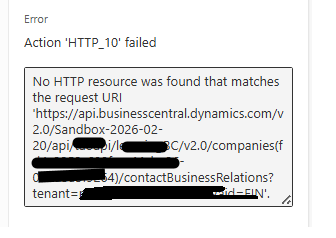
I am trying to create Contact Business Relations using a custom API page in Microsoft Dynamics 365 Business Central. I have created and published the API page in a sandbox environment, but when I try to call the endpoint I receive the following error:

No HTTP resource was found that matches the request URI

Request URL used:

https://api.businesscentral.dynamics.com/v2.0/Sandbox-2026-02-20/api/xxxapi/xxxxgBC/v2.0/companies(fxxxxx-xxxx-xxxx-xxxx-xxxxxxxxxxx)/contactBusinessRelations


AL Code for Custom API Page:

page 50122 BusinessRelationship
{
    APIGroup = 'xxxxxxxBC';
    APIPublisher = 'xxxapi';
    APIVersion = 'v2.0';
    ApplicationArea = All;
    Caption = 'businessRelationship';
    DelayedInsert = true;
    EntityName = 'ContactBusinessRelation';
    EntitySetName = 'ContactBusinessRelations';
    PageType = API;
    SourceTable = "Contact Business Relation";

    layout
             {
area(content)
{
repeater(Group)
{
field(contactNo; "Contact No.")
{
}
field(linkToTable; "Link to Table")
{
}
field(no; "No.")
{
}
field(businessRelationCode; "Business Relation Code")
{
}
}
}
}
}


The Body of HTTP request is as follow

{
  "no""xxxxx",
  "contactNo""xxxxx",
  "businessRelationCode""Vendor",
  "linkToTable""Vendor"
}

The extension is published successfully and other custom APIs in the same extension are working correctly. However, this API for the Contact Business Relation table is not accessible through the endpoint.

Is there anything special required when exposing the Contact Business Relation table through a custom API (for example adding fields like SystemId or defining ODataKeyFields), or could the issue be related to the API endpoint URL format or the EntitySetName?

Any suggestions or guidance would be appreciated.
I have the same question (0)
  • Manish Sharma Profile Picture
    107 on at
    Not sure on the table if that can be used in API.
    What method are you using? GET, POST or PATCH.
     
    Can you try these,
    Entity Name should be in camel case.
    Try adding ODataKeyFields property and systemid field.
     
     
  • Sghotekar Profile Picture
    112 on at
    Hi, @Manish Sharma 
    I am using POST method.
    I tried adding ODataKeyFields in the custom API, but it did not resolve the issue. I am still getting the same error.
  • Suggested answer
    YUN ZHU Profile Picture
    99,966 Super User 2026 Season 1 on at
    Hi, I looked at the table and there's nothing unusual. I suspect it's still an endpoint issue. Are there no problems getting the data?
     
    Thanks
    ZHU
  • Suggested answer
    OussamaSabbouh Profile Picture
    14,461 Super User 2026 Season 1 on at
    Hello,
    This error usually means the API route does not match the API page definition, not an issue with the Contact Business Relation table itself. In custom Business Central APIs, the endpoint must exactly match APIPublisher / APIGroup / APIVersion / EntitySetName, and Microsoft recommends defining ODataKeyFields = SystemId and exposing the SystemId field as the key. So verify the URL structure, ensure the last segment matches EntitySetName = contactBusinessRelations, add ODataKeyFields = SystemId, republish the extension, and test the endpoint with GET first to confirm the entity set appears in the API metadata.
     
    Regards,
    Oussama Sabbouh

Under review

Thank you for your reply! To ensure a great experience for everyone, your content is awaiting approval by our Community Managers. Please check back later.

Helpful resources

Quick Links

Introducing the 2026 Season 1 community Super Users

Congratulations to our 2026 Super Stars!

Meet the Microsoft Dynamics 365 Contact Center Champions

We are thrilled to have these Champions in our Community!

Congratulations to the March Top 10 Community Leaders

These are the community rock stars!

Leaderboard > Small and medium business | Business Central, NAV, RMS

#1
OussamaSabbouh Profile Picture

OussamaSabbouh 1,831 Super User 2026 Season 1

#2
YUN ZHU Profile Picture

YUN ZHU 1,122 Super User 2026 Season 1

#3
Khushbu Rajvi. Profile Picture

Khushbu Rajvi. 690 Super User 2026 Season 1

Last 30 days Overall leaderboard

Featured topics

Product updates

Dynamics 365 release plans
