web
You’re offline. This is a read only version of the page.
close
Skip to main content

Announcements

No record found.

News and Announcements icon
Community site session details

Community site session details

Session Id :
Microsoft Dynamics CRM (Archived)

how can we Optimized data from ms crm 365

(0) ShareShare
ReportReport
Posted on by 202

Hello Every one ,

Question1- how can we Optimized data from ms crm 365

Optimized-data.JPG 

Question2- As i have i have two instance type Production and sandbox(for development).

and my total uses becomes more then 54% ..and we do not have much data in instance but still there is showing uses of 54% .

can please tell me what best we can do to optimized data and make free spaces ..

Question3-
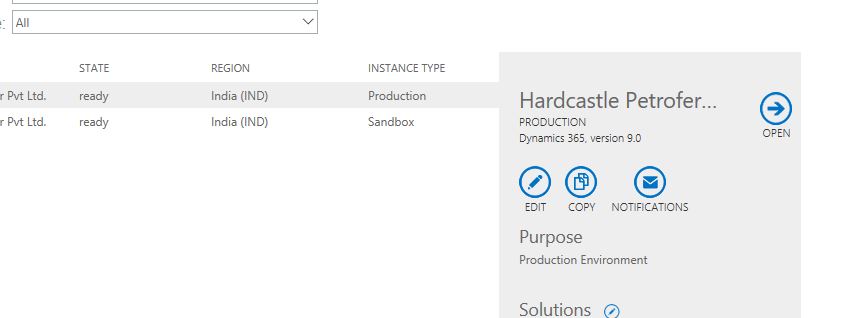
production.JPG

this is production instance ..what this options all about.

Question4-
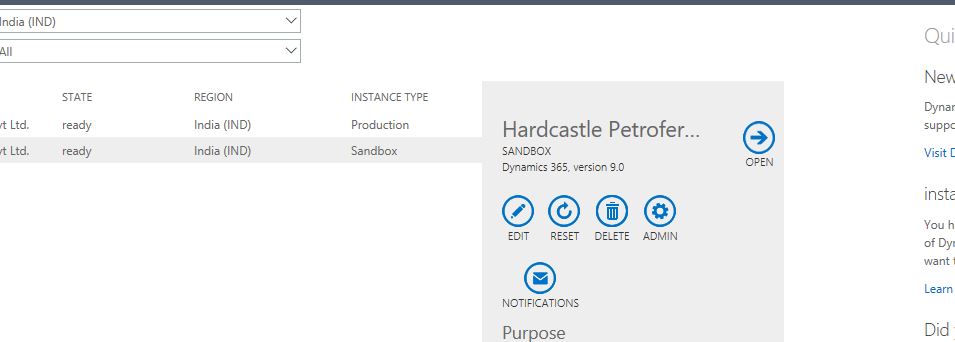
 

7536.sandbox.JPG

This is sandbox instance ..what this options all about.

Question5-  and also can i remove or delete everything from Sandbox and can we copy everything fresh from Production to sandbox

i mean replicate everything same from production to sandbox...

Question6and what an all possibility to clear unnecessarily data from the instance to make free spaces ..

please help my queries .

thanks

amit 

Email-amitamity81@gmail.com

*This post is locked for comments

I have the same question (0)
  • Suggested answer
    Alex Fun Wei Jie Profile Picture
    33,628 on at

    Hi,

    below article is very useful in your scenario, use his suggestion to identify which table acquire most of the storage first.

    [View:https://community.dynamics.com/365/b/learncrminfingertips/archive/2018/09/13/save-dynamics-crm-online-storage-space]

  • Verified answer
    Kokulan Profile Picture
    18,054 on at

    Hi Amity

    The answer for question 1: You will have to develop a plan as to how you are going to clean up storage and please see the methods below and follow the link below for full details of steps.

    Method 1: Delete bulk email and workflow instances using a bulk deletion job
    Method 2: Evaluate and delete suspended workflows
    Method 3: Remove email attachments using Advanced Find
    Method 4: Remove email messages with attachments using a bulk deletion job
    Method 5: Remove notes with attachments using Advanced Find
    Method 6: Remove notes with attachments using a bulk deletion job
    Method 7: Remove bulk duplicate detection jobs and associated copies of duplicate records
    Method 8: Delete bulk import instances using a bulk deletion job
    Method 9: Delete bulk deletion job instances using a bulk deletion job
    Method 10: Delete audit logs

     https://docs.microsoft.com/en-us/dynamics365/customer-engagement/admin/free-storage-space

    Answer for Question 2: We all so have the same issue.  Most of the storage space is not consumed by your data. It is consumed by audit logs, email, notes attachments, and system job and workflow sessions and logs.  You will have to have a routine maintenance job or plan to clean these to free up storage using methods described in Answer 1.

    You can use the Power Admin Center Analytics page to see which entities are taking up the most storage space, it will most likely not your data entity it's the above-mentioned entities. Please see the following link to see how you can check this in power admin centre

    https://blogs.msdn.microsoft.com/crm/2018/09/25/introducing-the-power-platform-admin-center/

    The answer to Question 3: Please see below screenshot and also follow the links below for more details

    5635.ScreenClip-_5B00_105_5D00_.png

    https://docs.microsoft.com/en-us/dynamics365/customer-engagement/admin/manage-online-instances

    https://docs.microsoft.com/en-us/dynamics365/customer-engagement/admin/edit-properties-instance

    https://docs.microsoft.com/en-us/dynamics365/customer-engagement/admin/new-instance-management

    docs.microsoft.com/.../copy-instance

    The answer to Question 4: Please see below screenshot and also follow the links below for more details

    5635.ScreenClip-_5B00_105_5D00_.png

    docs.microsoft.com/.../delete-instance

    https://docs.microsoft.com/en-us/dynamics365/customer-engagement/admin/manage-sandbox-instances

    The answer to your question 5: Yes. If you copy your production to Sandbox, everything in your sandbox will be deleted. Your sandbox db will be deleted and a new db will be created. You do not have to delete or reset first to copy your production.  If you just copy production to sandbox it will handle all for you. 

    https://docs.microsoft.com/en-us/dynamics365/customer-engagement/admin/copy-instance

    The answer to your question 6:  As explained in Answer 1 and 2, you have to follow these steps to clean up space and also make sure you have a routine maintenance plan to do these cleanups because as users use the system, data in above mentioned entities will build up. If you do not do the cleanup, eventually your storage will hit 100% and at that point, all instances in your tenant will be made read-only. Users will not be able to make any updates or changes to data. 

    Hope this helps 

  • amity Profile Picture
    202 on at

    thanks for reply brother ...it helped me

Under review

Thank you for your reply! To ensure a great experience for everyone, your content is awaiting approval by our Community Managers. Please check back later.

Helpful resources

Quick Links

Introducing the 2026 Season 1 community Super Users

Congratulations to our 2026 Super Stars!

Meet the Microsoft Dynamics 365 Contact Center Champions

We are thrilled to have these Champions in our Community!

Congratulations to the March Top 10 Community Leaders

These are the community rock stars!

Leaderboard > 🔒一 Microsoft Dynamics CRM (Archived)

#1
JS-09031509-0 Profile Picture

JS-09031509-0 3

#2
AS-17030037-0 Profile Picture

AS-17030037-0 2

#2
Mark Eckert Profile Picture

Mark Eckert 2

Last 30 days Overall leaderboard

Featured topics

Product updates

Dynamics 365 release plans
