web
You’re offline. This is a read only version of the page.
close
Skip to main content

Announcements

No record found.

News and Announcements icon
Community site session details

Community site session details

Session Id :
Microsoft Dynamics CRM (Archived)

Data encryption confusion

(0) ShareShare
ReportReport
Posted on by

Hi, we put one of our crm 2013 server in https to be used with ADFS.

After it, for other reason, I discover that Data encryption were activated on some of our Orgs. My collegues are saying that none of them activated it. Even if normally I do not believe the classic "I've done nothing" and "Probably someone else done it" and "Probably Harry Potter done it with magic wand", I've to say that something strange there is.


I checked the key of a organization that was opened and never user, and this is what I see:
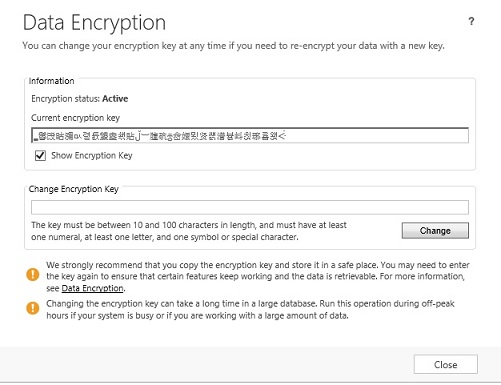
 

Now, since we didn't installed japan Language pack and we are in Italy, I'm starting to believe that no one put that strage key inside.

So, encryption activated automatically if I put CRM2013 in https ?!!! There is no way to avoid it?

*This post is locked for comments

I have the same question (0)
  • Suggested answer
    Nuno Costa Profile Picture
    1,300 on at

    Hi Axtolf,

    Data encryption is enabled by default, and the key you see is not related with the language you have installed it's simply the encryption key generated by CRM at the time of installation.

    you see this key because you using HTTPS, have a look at this article for further info:

    dynamicscrmgirl.wordpress.com/.../crm-2013-crm-and-sql-encryption

  • axtolf Profile Picture
    on at

    Hi, according to MS, is NOT activated by default:

    For on-premises versions of Microsoft Dynamics CRM 2013, data encryption is not active by default for new or upgraded organizations. However, data encryption may be activated at any time.

    (page 137 CRMIGv6_AdministrationGuide ).

    At the same page is wrote that to activate encryption you must have SSL activated. And there is no place where I found that with SSL you have to use data encryption .

  • Suggested answer
    Nuno Costa Profile Picture
    1,300 on at

    it's page 98 on my document.

    if is activated at any time, it could mean that it starts encrypting data at same point for performance reasons or it starts encrypting data when you use the specific fields that are encrypted password fields, server-side synch etc... as far I can see there are no references to enable encryption and when you create or import organizations you are alerted that enceryption will be enabled.

    Also on the Data encryption menu you don't see an option to enable it which means it must gets enabled by default at same point. see other notes on other guides, specially page 153 of the installation guide...

    "All new and upgrade organizations use data encryption"

    also all references say to copy the encryption key, I don't see any references to Copy the encryption key if you enable encryption?

    installation guide page: 153

    All new and upgraded organizations use data encryption that uses a encryption key to secure data such as user passwords for email mailboxes and Yammer accounts. This encryption key may be required to use Microsoft Dynamics CRM after a redeployment or failure recovery. We strongly recommend that you make a copy of the encryption key and save it to a secure location. For more information, see Copy your organization data encryption key.

    On the planning guide page 16:

    Database encryption. Organization database encryption is enabled for a set of default entity attributes that contain sensitive information, such as user names and email passwords. This feature can help organizations meet FIPS 140-2 compliance. Encryption keys can be viewed and changed in Microsoft Dynamics CRM. More information: Data Encryption

    installation guide page: 40

    New for Microsoft Dynamics CRM 2013, some organization data is encrypted using encryption keys that should be copied as part of your failure recovery procedures. More information: Data Encryption

  • axtolf Profile Picture
    on at

    Sorry Nuno I didn't understrood you reply.

    You're saying that if I use any kind of fields that is using encryption, the CRM enable it automatically?

    We try to use some encrypt fields on a ORG that has encryption disabled, and infact we got an error that is saying that to use encrypt fileds, we have to activate encryption.

    And encryption will slow down the db, so if its enabled by default, on large org I have to think About it.

    Well, I'm now more confused than before.

    Ps. the link of you blog is not working

  • Nuno Costa Profile Picture
    1,300 on at

    you right, is confusing and is not very clear from the documentation...

    my understanding is that this is enabled by default, I haven't come across a pop-up saying to use this fields you need to use encryption, unless you referring to using HTTPS?

  • axtolf Profile Picture
    on at

    I have one server with https. On that server all the organization created new are now with data encryption enbaled. The orgs that come from 2011 (backup/restore Db. Import) are not with data encryption enabled (I have option to ativate). So if this is related to https, I have to say that all org must be enabled o not enabled, not only some.

    On the crm where I have http , I have no encryption enabled and I can't enabled it (correct, because, and this is clear, I need to enable https).

    No popup appers for me when we put CRM in https.

    If this is bug, is a very bad one.

    If is not a bug, I cant see the logic in this situation.

  • 6f67491abd1542c698959499bd40d24b Profile Picture
    on at

    Hi,

    same here german crm 2013:

    social.msdn.microsoft.com/.../crm-2013-chinesischer-encryption-key

Under review

Thank you for your reply! To ensure a great experience for everyone, your content is awaiting approval by our Community Managers. Please check back later.

Helpful resources

Quick Links

Introducing the 2026 Season 1 community Super Users

Congratulations to our 2026 Super Stars!

Meet the Microsoft Dynamics 365 Contact Center Champions

We are thrilled to have these Champions in our Community!

Congratulations to the March Top 10 Community Leaders

These are the community rock stars!

Leaderboard > 🔒一 Microsoft Dynamics CRM (Archived)

#1
JS-09031509-0 Profile Picture

JS-09031509-0 3

#2
AS-17030037-0 Profile Picture

AS-17030037-0 2

#2
Mark Eckert Profile Picture

Mark Eckert 2

Last 30 days Overall leaderboard

Featured topics

Product updates

Dynamics 365 release plans
