web
You’re offline. This is a read only version of the page.
close
Skip to main content

Announcements

No record found.

News and Announcements icon
Community site session details

Community site session details

Session Id :
Supply chain | Supply Chain Management, Commerce
Answered

Not able to add directive code to Purchase order work type- Put

(0) ShareShare
ReportReport
Posted on by 920 Moderator

we have a scenario where we are keeping an incoming stock to intermediate location and then transfer to Bulk location in warehouse. I am trying to set up work template and facing below issue:

Not able to add directive code to purchase order type - Put.

pastedimage1665567032355v1.png

Can any one help me out?

I have the same question (0)
  • Suggested answer
    Grygory.Ivanov Profile Picture
    160 on at

    Sagar,

    I believe this is behavior by design. In such cases you would want to keep your put directive for the last step last in your list of location directives. When everything else is evaluated (every other directive code), last one with no directive comes into play. This makes sense as you would want to have generic no-directive code instruction for cases when nothing else matching, and for cases like yours, too.

  • sagar_patil Profile Picture
    920 Moderator on at

    Grygory, I din't understand what you are saying...can u please elaborate more?

  • Grygory.Ivanov Profile Picture
    160 on at

    What I was trying to get to is:

    - Work templates must have last step without directive code - otherwise it is intermediate step;

    - When this last step is evaluated, system is trying to find generic location directive (without directive code);

    - Using generic location directive for Put action is usually a good thing as you will always have a location rule, which you can override if you want;

    So, lets imagine this is your work template:
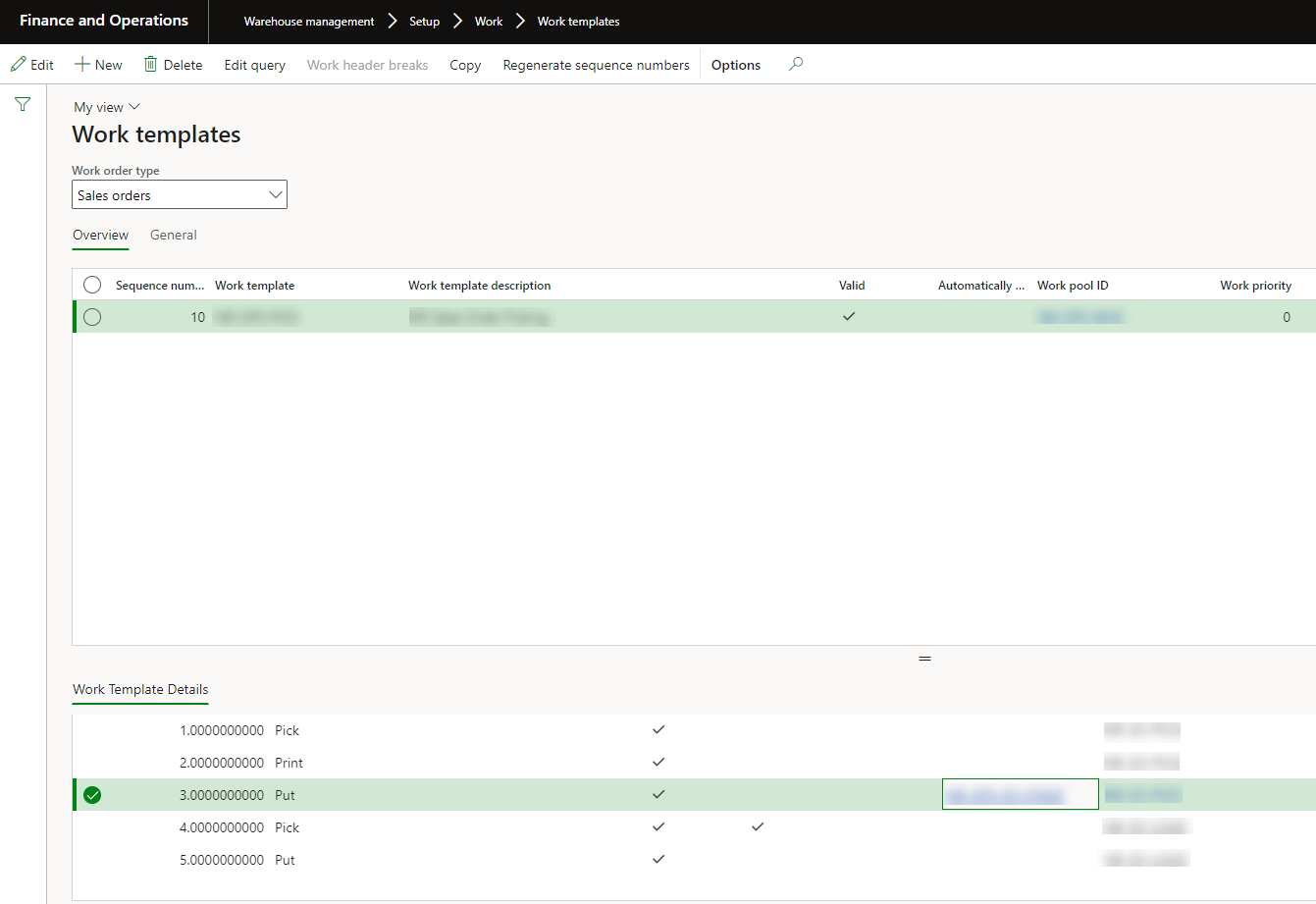
    work-templates.png

    Step 5 will not have directive code as this is the last step.

    However, system will loop through all Put directives anyway. Here is, for example, what you might have:

    location-directives.png

    so step 3 in the work template will be evaluated and location directive with specific directive code will be found. All PUT location directives except the last one (#50) have directive code. #50 does not have anything as shown above.

    Step 5 will loop through all location directives - and will stop at #50 only. This kind of setup allows getting staging steps addressed always first, and last step will be always a final location. If you have multiple rules for final locations - there is a query that you can build on top of that, too.

  • sagar_patil Profile Picture
    920 Moderator on at

    Hi Grygory, This approach work fine in case of Sales order. But my ask is for Purchase order. Without linking Directive code on work template to directive code on location directive, system is not giving me final put location.

    pastedimage1665634871404v1.png

  • Verified answer
    Grygory.Ivanov Profile Picture
    160 on at

    OK, but it is still the same even in case of POs. You need to use no disposition code location directive.

    Example of the work template is:

    work-templates_2D00_2.png

    Location directives are:

    1411.location-directives_2D00_2.png

    It will give you the location in your work if you set at least one location directive with empty directive code. You may have more than one location directive with empty directive code! But you can also use other fields, like disposition code - to specify pallet size, for example, and specific locations that must be assigned in such case.

    P.S. In my example of location directives above, empty directive code record goes first before other more specific ones. This is done to identify the final location first, and then assign proper staging area (low-bay). 

    If you still get empty final location with this setup - it is a good idea to check work creation history log and check if locations in the empty directive can be picked for the work.

  • sagar_patil Profile Picture
    920 Moderator on at

    Thank you so much. It worked for me.

Under review

Thank you for your reply! To ensure a great experience for everyone, your content is awaiting approval by our Community Managers. Please check back later.

Helpful resources

Quick Links

Introducing the 2026 Season 1 community Super Users

Congratulations to our 2026 Super Stars!

Congratulations to our 2025 Community Spotlights

Thanks to all of our 2025 Community Spotlight stars!

Leaderboard > Supply chain | Supply Chain Management, Commerce

#1
Mallesh Deshapaga Profile Picture

Mallesh Deshapaga 254

#2
Laurens vd Tang Profile Picture

Laurens vd Tang 188 Super User 2026 Season 1

#3
André Arnaud de Calavon Profile Picture

André Arnaud de Cal... 131 Super User 2026 Season 1

Last 30 days Overall leaderboard

Product updates

Dynamics 365 release plans
