web
You’re offline. This is a read only version of the page.
close
Skip to main content

Notifications

Announcements

No record found.

Community site session details

Community site session details

Session Id :
Microsoft Dynamics CRM (Archived)

CRM 2013 - Modifying chart colors

(0) ShareShare
ReportReport
Posted on by

Hi CRM community,

When designing a chart is it possible to keep the color and field name consistent?

Example.

I have 3 leads in 3 different categories (Cross Selling Opp, Corporate Sales Line....). Take note that Corporate Sales Line is currently the colour purple.
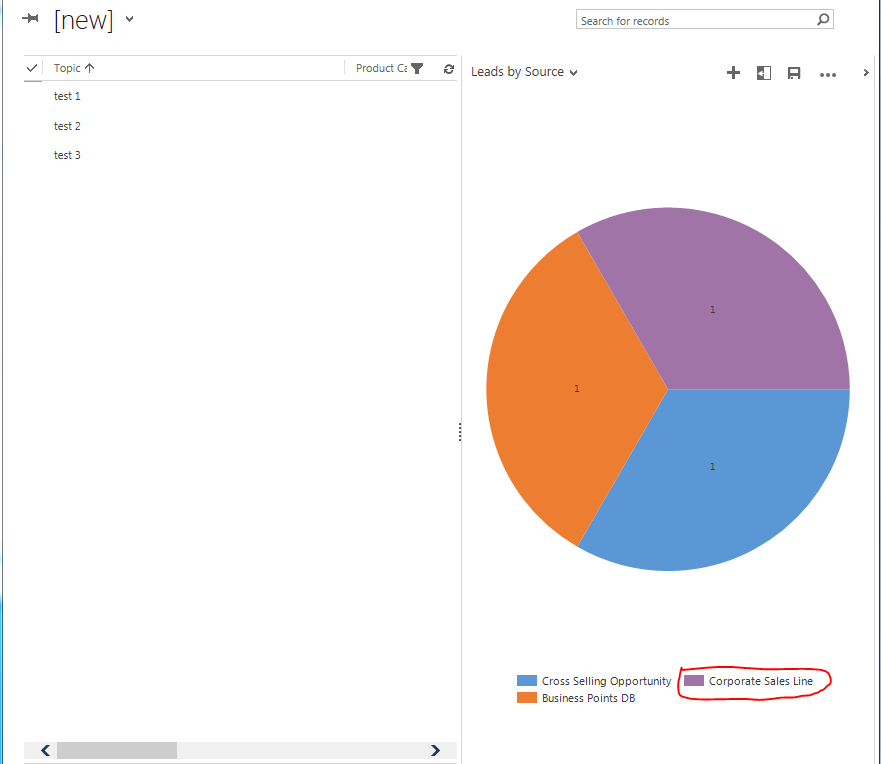
3056.11.PNG

When I delete a lead (which had a particular category) the graph changes and Corporate Sales Line's color changes

from purple to orange.
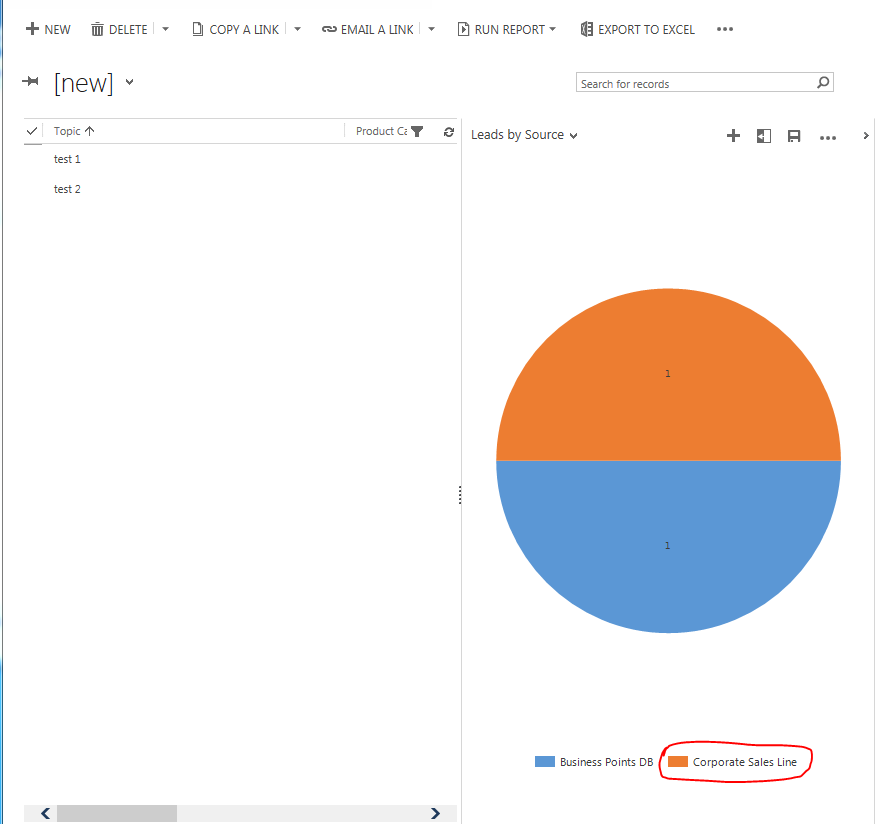
Is it possible to keep the color of Corporate Sales Line 'purple' regardless of how many other different categories are displayed. I.e if Lead 'test 2' category: Corporate Sales Line was the only record in the view then the view still remains purple.

From my research http://www.powerobjects.com/blog/2013/11/01/modifying-chart-xml-in-crm-2013the-basics/ and http://www.powerobjects.com/blog/2012/12/05/customize-colors-indynamics-crm-charts/ it appears that the color's for a chart are filled following a specific order eg. first blue then orange then purple...In this case I'm trying to map a field to a color for the sake of consistency. I tried modifying the XML with no luck.

What are my options?

Cheers,

VVG.

*This post is locked for comments

I have the same question (0)
  • Bruno Lucas Profile Picture
    5,421 on at

    it is not possible though the UI.

    if you can't do it though the UI you will need to edit the solution

    check this out

    changing colors

    http://crmchartguy.wordpress.com/2012/08/23/palette-custom-colors-in-charts/

    more on pie

    crmchartguy.wordpress.com/.../all-things-pie-chart-in-dynamics-crm

  • Verified answer
    Community Member Profile Picture
    on at

    Hi VVG,

    Per the very wise CRM Chart Guy, you will need to:

    • Create a set of dummy records. Three records, one for each type
    • Adjust the View to include the dummy records
    • Modify the CRM Chart xml to not show them, but only create them in the Legend

    See Step 3 of this post: http://crmchartguy.wordpress.com/2013/02/24/specify-exact-colors-for-each-priority-in-the-microsoft-dynamics-crm-2011-case-chart/

    Good Luck!


  • Suggested answer
    ZackaryTX Profile Picture
    161 on at

    VVG,

    Megan is correct with her response, but I wanted to share a resource I have used in the past for updating chart colors.

    PowerObjects: Modifying Chart XML in CRM 2013 — The Basics

    www.powerobjects.com/.../modifying-chart-xml-in-crm-2013the-basics

    Regards,

    Zackary

Under review

Thank you for your reply! To ensure a great experience for everyone, your content is awaiting approval by our Community Managers. Please check back later.

Helpful resources

Quick Links

Responsible AI policies

As AI tools become more common, we’re introducing a Responsible AI Use…

Neeraj Kumar – Community Spotlight

We are honored to recognize Neeraj Kumar as our Community Spotlight honoree for…

Leaderboard > 🔒一 Microsoft Dynamics CRM (Archived)

#1
SA-08121319-0 Profile Picture

SA-08121319-0 4

#1
Calum MacFarlane Profile Picture

Calum MacFarlane 4

#3
Alex Fun Wei Jie Profile Picture

Alex Fun Wei Jie 2

Last 30 days Overall leaderboard

Featured topics

Product updates

Dynamics 365 release plans
