web
You’re offline. This is a read only version of the page.
close
Skip to main content

Announcements

No record found.

News and Announcements icon
Community site session details

Community site session details

Session Id :
Microsoft Dynamics CRM (Archived)

Qualified Lead not showing up in the correct Opportunity stage on the Sales funnel graphic

(0) ShareShare
ReportReport
Posted on by 2

Just got upgraded from CRM2011 to CRM2013.

Our sales process is defined as ENGAGE > CAPTURE (Develop) > CAPTURE (Propose) > CAPTURE (Secure). Engage is a Lead whereas all the Capture stages are termed as Opportunity.

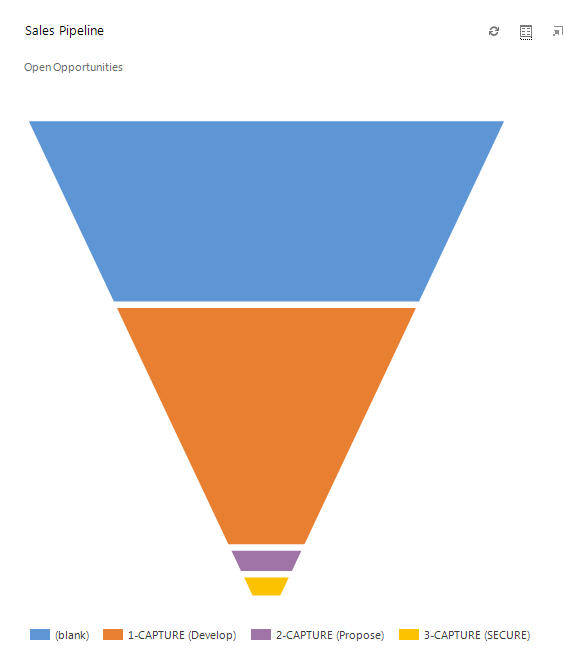
After qualifying the Lead which becomes an Opportunity, the lead should move from ENGAGE to CAPTURE (Develop), but this is not reflected in the sales funnel graph. The front-end works fine, but the sales funnel graph is not. There is a new stage defined by the system as '(blank)' and all my qualified leads are getting into this stage on getting qualified. Don't know from where this (blank) is coming from and why the qualified leads are sitting here.

Regards,

Dominic.
*This post is locked for comments

I have the same question (0)
  • Suggested answer
    ScottDurow Profile Picture
    21 on at

    This is because your sales stage is not being set on your Opportunity. The chart will categorise opportunities with no sales stage as (blank). 

    What field is your funnel chart using as the Horizontal Axis Label? The standard CRM2013 Sales Pipeline Chart uses the Pipeline Stage field that is set by the Business Process Flow stage name.

    hth,

    Scott

  • Dominic CARVALHO Profile Picture
    2 on at

    Thanks Scott for your reply.

    I've tried to set the Stage Category in the 'edit process' option, but the system gives me an error from both the Lead & Opportunity pages. You can see the errors below. Is it because of existing running processes that I am not allowed to change the business flow? This was not the case in CRM 2011. Do I have to stop some services, do the changes & then restart services?

    Also I checked the funnel chart and it's using the Pipeline Stage field as the Horizontal Axis Label. Does this need to be changed?

    5861.2.jpg


    Thanks,

    Dominic.

  • Dominic CARVALHO Profile Picture
    2 on at

    I have been trying this out for months now without any success. I cannot edit any details of the old process which got migrated from CRM 2011 to CRM 2013. This migration was done automatically by Microsoft. There was no 'Sales Category' field in the old process which is now a part of the new process and it seems that this field is responsible for the sales funnel chart. The 'blank' issue also appears to be due to this field.

    Why can't I edit the old process to set this 'Sales Category' field for each stage? When I try to edit, it gives the error which does not give any meaningful details.The 'Download Log File' button is also greyed out. In fact, just clicking 'Save' on the process page without doing any modifications also generates the same error. What is this error?

    I have created new sales processes in CRM 2013 and they work fine without any errors when modifying the process from time to time. The issue appears only on the old process of CRM 2011 which is now in CRM 2013.

    Thanks,

    Dominic.

  • Saumil Sh Profile Picture
    1,365 on at

    Hi,

    First of all deactivate the business process flow.

    Than you can edit it.

    And to create more stage category in the option set -> stage category add different stages.

    and select in the business process flow.

    hope this will help you.

  • Dominic CARVALHO Profile Picture
    2 on at

    Hi Saumil,

    I deactivated the process and tried to select a value in the Stage Category field, but still get the same error message when saving. There is no difference.

    Regards,

    Dominic.

  • Suggested answer
    James Reinhardt Profile Picture
    222 on at

    Dominic-

    I'm sure you have already fixed this, or found a work around (or just given up).

    We had the same issue, and Microsoft's "Solution" was to create new BPFs. There was nothing that could be found that was preventing the editing of existing ones.

  • Dominic CARVALHO Profile Picture
    2 on at

    James,

    We created new BPFs for it to work and then manually switched the old processes to the new process flow. Luckily there weren't too many, so the whole process took just a few hours to complete and we are on track now.

    So weird, but this was the only possible workaround.

Under review

Thank you for your reply! To ensure a great experience for everyone, your content is awaiting approval by our Community Managers. Please check back later.

Helpful resources

Quick Links

Introducing the 2026 Season 1 community Super Users

Congratulations to our 2026 Super Stars!

Congratulations to our 2025 Community Spotlights

Thanks to all of our 2025 Community Spotlight stars!

Leaderboard > 🔒一 Microsoft Dynamics CRM (Archived)

#1
JS-09031509-0 Profile Picture

JS-09031509-0 3

#2
AS-17030037-0 Profile Picture

AS-17030037-0 2

#2
Mark Eckert Profile Picture

Mark Eckert 2

Last 30 days Overall leaderboard

Featured topics

Product updates

Dynamics 365 release plans
