web
You’re offline. This is a read only version of the page.
close
Skip to main content

Notifications

Announcements

Community site session details

Community site session details

Session Id :
Small and medium business | Business Central, N...
Answered

Transfer Order Won't Close after receipt

(0) ShareShare
ReportReport
Posted on by 105

Hi Community,

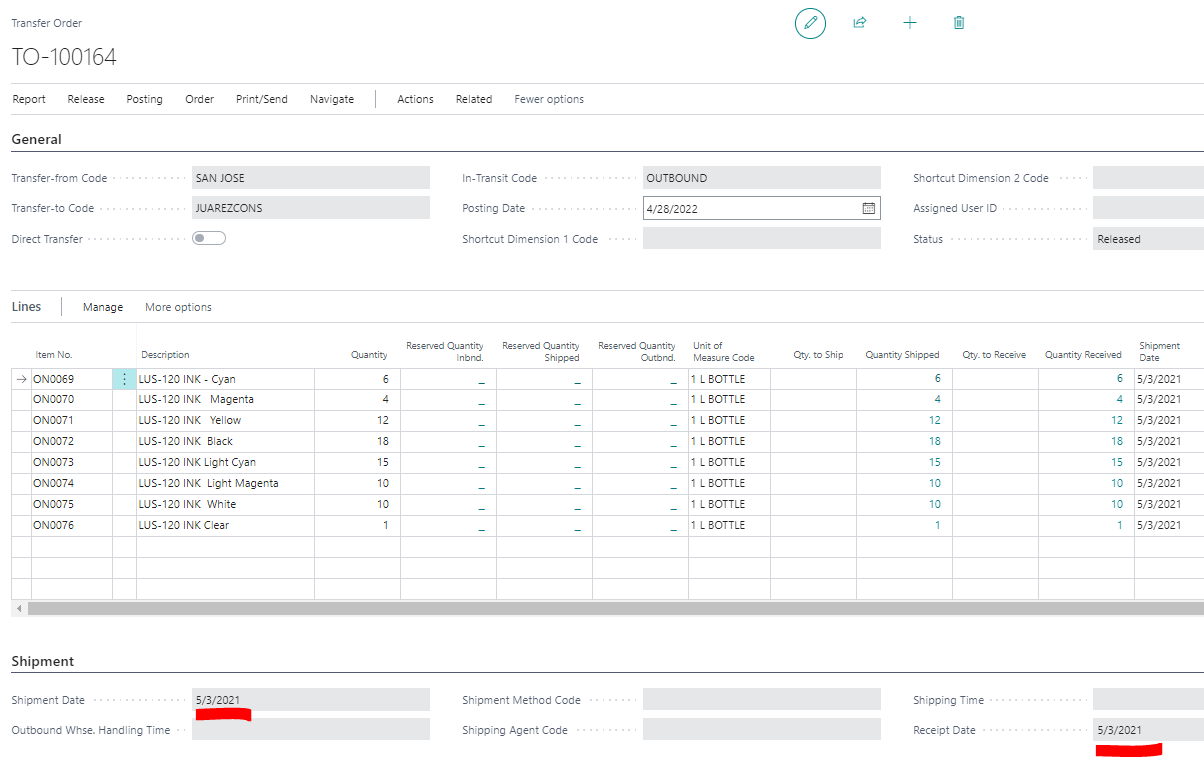
I have a released transfer order that won't move to the Posted Transfer Receipts page. The QTY is fully received (see below image).

Any idea on how to complete this transfer order so that it becomes closed and moved to the Posted Transfer Receipt page? 
pastedimage1651258489593v1.png

I have the same question (0)
  • Suggested answer
    Inge M. Bruvik Profile Picture
    1,111 Moderator on at

    Are you sure it is not already visible among the posted transfer orders?

    Would be very weird if there is no trace from anything being posted.

  • BobbyHelp Profile Picture
    105 on at

    Hi Inge, thank you for your reply. For this transfer order, there are two post for this transfer order. However, there isn't a Posted Transfer Receipt. Not sure why this is.

    1. Posted Whse. Receipt Lines

    pastedimage1651268891279v2.png

    2. Posted Transfer Shipment

    pastedimage1651268835261v1.png

  • Suggested answer
    Dallefeld Profile Picture
    211 User Group Leader on at

    I don't believe you will be able to get a Posted Transfer Receipt as you have the Posted Warehouse Receipt. My suggestion is to delete the Transfer Order

  • Verified answer
    Community Member Profile Picture
    on at

    Bobby,

    Adding to what Kim replied... I agree with Kim that since the Transfer Order is fully received and shipped, delete the Transfer Order document.

    Hope this helps.

    Thanks,

    Steve

  • Verified answer
    Teddy Herryanto (That NAV Guy) Profile Picture
    14,284 Super User 2025 Season 2 on at

    Like Kim and Steven said, if it is fully shipped and received, you can safely delete transfer order.

    Although it is weird that you don't have any Posted Transfer Receipt for that order, I would suggest to just delete and check if this is just one off. If this issue keeps happening, there might be a customization that is causing this issue.

  • Verified answer
    YUN ZHU Profile Picture
    96,256 Super User 2025 Season 2 on at

    Hi, it is weird, It seems that you have used the Warehouse features (Warehouse Shipment and Warehouse Receipt). I think you can delete this transfer order..
    PS: If you post directly on the Transfer Order, this document will be automatically deleted.
    This is the same as the sales/purchase order. And for Sales/Purchase document, there is a feature of batch deletion, Transfer Order does not.

    pastedimage1651454373436v1.png

    Hope this also helps.

    Thanks.

    ZHU

Under review

Thank you for your reply! To ensure a great experience for everyone, your content is awaiting approval by our Community Managers. Please check back later.

Helpful resources

News and Announcements

Season of Giving Solutions is Here!

Quick Links

Responsible AI policies

As AI tools become more common, we’re introducing a Responsible AI Use…

Neeraj Kumar – Community Spotlight

We are honored to recognize Neeraj Kumar as our Community Spotlight honoree for…

Leaderboard > Small and medium business | Business Central, NAV, RMS

#1
OussamaSabbouh Profile Picture

OussamaSabbouh 1,703

#2
YUN ZHU Profile Picture

YUN ZHU 803 Super User 2025 Season 2

#3
Khushbu Rajvi. Profile Picture

Khushbu Rajvi. 750 Super User 2025 Season 2

Last 30 days Overall leaderboard

Featured topics

Product updates

Dynamics 365 release plans
