web
You’re offline. This is a read only version of the page.
close
Skip to main content

Announcements

No record found.

News and Announcements icon
Community site session details

Community site session details

Session Id :
Small and medium business | Business Central, N...
Suggested Answer

Reverse transactions imported via the payment reconciliation journal

(0) ShareShare
ReportReport
Posted on by 318

We've accidentally posted a transaction that has been incorrectly mapped via the payment reconciliation journal and we can't seem to reverse it.

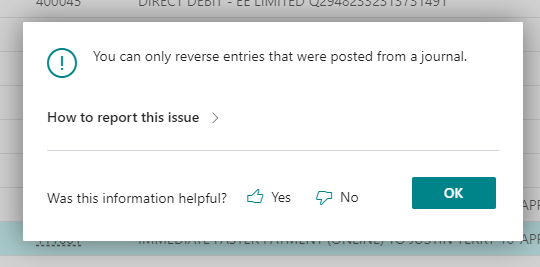
When I try to reverse the transaction through the general ledger or bank account ledger I get a message saying "You can only reverse entries that were posted from a journal".

I also tried to reverse it using the G/L Register, but the "reverse register" button was grayed out.

What is the correct way to go about this?

Attached is the error I get when I attempt to reverse it through the general ledger entries screen.
4760.Screenshot_5F00_17.png

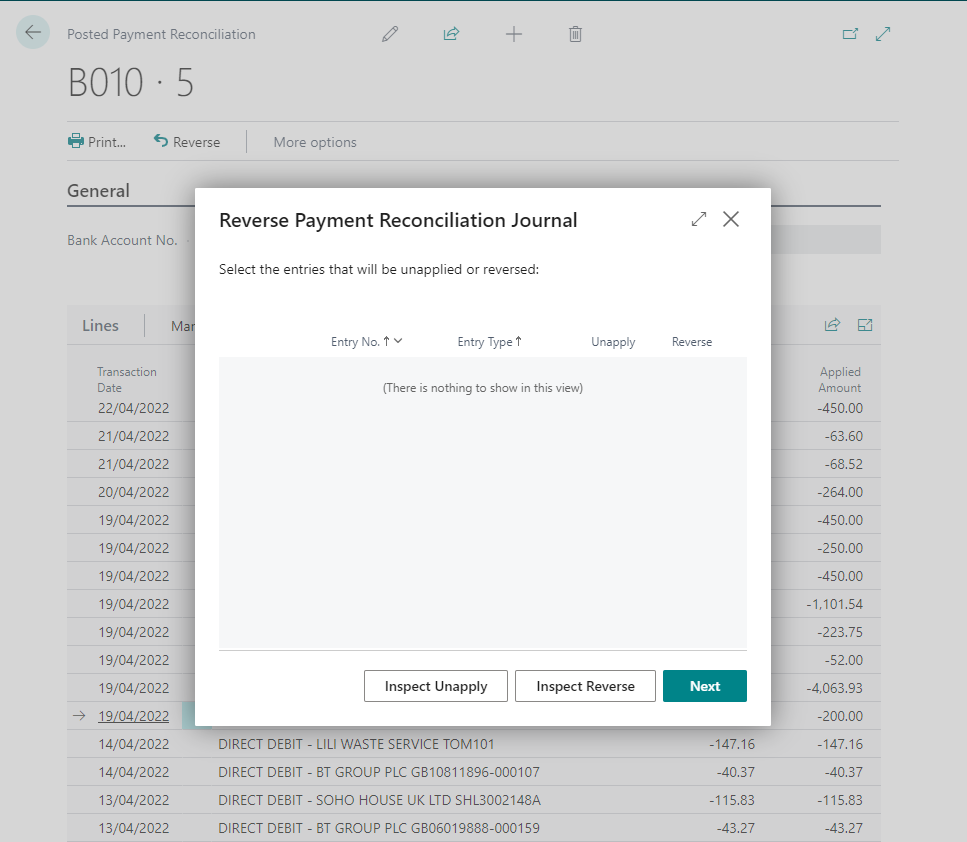
When I attempt to reverse it using the posted payment reconciliation screen, I can see it in the list, but when I select it and click reverse nothing shows up.
Screenshot_5F00_18.png

I have the same question (0)
  • DianeB13 Profile Picture
    5 on at

    This cannot be reversed as it was in the setup at implementation. We need to discuss this in-house.

  • Yumiko Profile Picture
    318 on at

    n the G/L Registers page the “Reverse Register” button is greyed out and not selectable.

    Screenshot-2023_2D00_03_2D00_23-141855.jpg

    I don’t seem to have any entries in the posted general journal.

    Screenshot-2023_2D00_03_2D00_23-142008.jpg

    And I cannot select the entries to revers in the posted payment reconciliation page.

    Screenshot-2023_2D00_03_2D00_23-142052.jpg

    Any idea pls

  • Suggested answer
    Marco Mels Profile Picture
    Microsoft Employee on at

    Hello,

    You can press Next in the screen above. In standard, you will be asked if you want to create another payment reconciliation after reversing it. When the payment reconciliation is created, you can delete the incorrect one.

    Thanks.

  • Yumiko Profile Picture
    318 on at

    I was able to press Next on that screen and it said that "0 entries would be unapplied and 0 entries will be reversed". I went ahead and clicked finalise with the "create new payment reconciliation" option ticked.

    This appears to have marked the statement I wanted to reverse as "reversed", but it hasn't made any reversal postings.

    Do I have to post them manually in the newly created payment reconcilition?

  • Yumiko Profile Picture
    318 on at

    I was able to press Next on that screen and it said that "0 entries would be unapplied and 0 entries will be reversed". I went ahead and clicked finalise with the "create new payment reconciliation" option ticked.

    This appears to have marked the statement I wanted to reverse as "reversed", but it hasn't made any reversal postings.

    Do I have to post them manually in the newly created payment reconcilition?

  • Suggested answer
    Marco Mels Profile Picture
    Microsoft Employee on at

    Hello,

    Feel free to raise this as an issue so we can take a look at it together.

    Thank you.

Under review

Thank you for your reply! To ensure a great experience for everyone, your content is awaiting approval by our Community Managers. Please check back later.

Helpful resources

Quick Links

Introducing the 2026 Season 1 community Super Users

Congratulations to our 2026 Super Stars!

Congratulations to our 2025 Community Spotlights

Thanks to all of our 2025 Community Spotlight stars!

Leaderboard > Small and medium business | Business Central, NAV, RMS

#1
OussamaSabbouh Profile Picture

OussamaSabbouh 1,946 Super User 2026 Season 1

#2
YUN ZHU Profile Picture

YUN ZHU 1,177 Super User 2026 Season 1

#3
Khushbu Rajvi. Profile Picture

Khushbu Rajvi. 555 Super User 2026 Season 1

Last 30 days Overall leaderboard

Featured topics

Product updates

Dynamics 365 release plans
