web
You’re offline. This is a read only version of the page.
close
Skip to main content

Notifications

Announcements

No record found.

Community site session details

Community site session details

Session Id :
Microsoft Dynamics CRM (Archived)

Business Process Flow Issue in new Dynamics 365 online. (Cant move Stages)

(0) ShareShare
ReportReport
Posted on by

Good day. I am experiencing a issue with one of my business process flows. The BPF moves from a Vendor entity into a bank entity, then into vendor approval and then into bank approval.

The first stage is fine (Capture Vendor Details)

5086.BPF.PNG

The second stage is fine (Capture Bank Details)

BPF-2.PNG

From the second stage when I click on next stage it jumps back to the first stage and doesn't go to the third stage. The active stage stays on the second stage.

BPF-3.PNG

When it jumps back to the first stage and click on "Set Active" I get the following error:
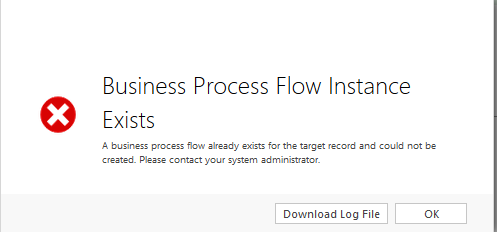
50578.Error.PNG

Have anyone else had this problem and were able to sort it out? Any input will be much appreciated.

Log File:

Unhandled Exception: System.ServiceModel.FaultException`1[[Microsoft.Xrm.Sdk.OrganizationServiceFault, Microsoft.Xrm.Sdk, Version=8.0.0.0, Culture=neutral, PublicKeyToken=31bf3856ad364e35]]: A business process flow already exists for the target record and could not be created. Please contact your system administrator.Detail:
<OrganizationServiceFault xmlns:i="http://www.w3.org/2001/XMLSchema-instance" xmlns="http://schemas.microsoft.com/xrm/2011/Contracts">
  <ErrorCode>-2147089513</ErrorCode>
  <ErrorDetails xmlns:d2p1="http://schemas.datacontract.org/2004/07/System.Collections.Generic" />
  <Message>A business process flow already exists for the target record and could not be created. Please contact your system administrator.</Message>
  <Timestamp>2016-11-15T13:41:12.4402022Z</Timestamp>
  <ExceptionSource i:nil="true" />
  <InnerFault i:nil="true" />
  <OriginalException i:nil="true" />
  <TraceText>

[Microsoft.Crm.ObjectModel: Microsoft.Crm.ObjectModel.GlobalActiveStagePlugin]
[bb48066e-f22f-412f-a530-91f72e4b859b: GlobalActiveStagePlugin]


</TraceText>
</OrganizationServiceFault>

*This post is locked for comments

I have the same question (0)
  • Community Member Profile Picture
    on at

    Hi

    Has this issue been resolved? If not, then I would like to recommend using Tenfold to integrate with your MS Dynamics to Office 365. Its really easy and will only take a few minutes to set up. Here's the link if your interested www.tenfold.com/.../dynamics

  • Corey Sutton Profile Picture
    15 on at

    Hi Estiaanvdm,

    We are facing an almost identical issue with an identical error message, but on the BPF on an Agreement for Field Services. By clicking "Next Stage" we are also taken back to the first stage, and get an error when going back a stage.

    We are also working on a D365 instance.

    If you find a solution can you please post here so I can attempt to implement it :-).

  • Suggested answer
    Nithya Gopinath Profile Picture
    17,078 on at

    Hi Estiaanvdm,

    Please refer the following blog about stage movement in business process flows.

    community.dynamics.com/.../business-process-flows-in-dynamics-365-part-ii

  • Community Member Profile Picture
    on at

    Hi  Nithya Gopinath

    Thank you for the link. This doesn't address my problem though.

  • Community Member Profile Picture
    on at

    Hi Corey Sutton.

    I have a open case for this at Microsoft. They are busy trying to help me to resolve the issue. I will give an update if they find the solution

  • JimmyMunoz Profile Picture
    20 on at


    Hello, the same happens to me, after the update to Dynamics 365 the custom workflow stopped working ... have managed to find the solution?

  • Community Member Profile Picture
    on at

    Hi JimmyMunoz

    I am still busy with Microsoft to figure out what the cause is and how to fix it. I will keep you updated.

  • PS Profile Picture
    23,577 on at

    Deactivate Business Process Flows already existing for Vendor Approval entity

  • Community Member Profile Picture
    on at

    Hi Estiaanvdm,

    I have also an identical problem with the Opportunity Sales Process. Do you have any new information from Microsoft?

    Deactivating this BPF is also not possible since this throws an unspecified error (Other BPFs on the Opportunity can be deactivated).

  • Community Member Profile Picture
    on at

    roughly how long we had to wait for a solution to this case?, already one week this annoying problem in our business processes.

Under review

Thank you for your reply! To ensure a great experience for everyone, your content is awaiting approval by our Community Managers. Please check back later.

Helpful resources

Quick Links

Responsible AI policies

As AI tools become more common, we’re introducing a Responsible AI Use…

Neeraj Kumar – Community Spotlight

We are honored to recognize Neeraj Kumar as our Community Spotlight honoree for…

Leaderboard > 🔒一 Microsoft Dynamics CRM (Archived)

#1
SA-08121319-0 Profile Picture

SA-08121319-0 4

#1
Calum MacFarlane Profile Picture

Calum MacFarlane 4

#3
Alex Fun Wei Jie Profile Picture

Alex Fun Wei Jie 2

Last 30 days Overall leaderboard

Featured topics

Product updates

Dynamics 365 release plans


