web
You’re offline. This is a read only version of the page.
close
Skip to main content

Announcements

No record found.

News and Announcements icon
Community site session details

Community site session details

Session Id :
Microsoft Dynamics CRM (Archived)

Display Ribbon Button If record is selected in Associated View inside a form

(0) ShareShare
ReportReport
Posted on by 3,355

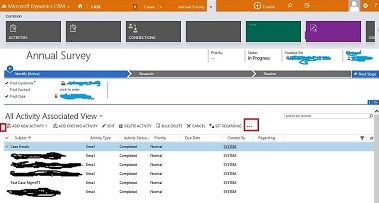
Hello Expert, I would like to add a ribbon button in command bar which is displaying inside a record. I have tried everything but no luck. Please suggest where I am missing. Here is the screen shot below for better understanding of scenario.
caseRibbon1.jpg

I want to add the button in the Command Bar (Red square mark) or in the beginning of the menu (Red Mark).

Please suggest.

Best Regards,

Saroj

*This post is locked for comments

I have the same question (0)
  • Suggested answer
    Community Member Profile Picture
    on at

    Hi Saroj,

    can i ask you the functionality of the button you want to add? Do you want to do it for several elements at the same time or just one? If that action can be done with a WF or dialog maybe could be an easier option.

    Otherwise, if you have the option to open the form you can easily add a button on it.

  • ScottDurow Profile Picture
    21 on at

    Hi, I have an article that shows how to do this in CRM2011 and it is essential the same in 2013 &2015.

    See ribbonworkbench.uservoice.com/.../129783-pass-the-currently-selected-grid-row-s-to-a-custo

    Hope this helps

  • Saroj Das Profile Picture
    3,355 on at

    hi Alvaro, Thank you for your reply. Could you please explain how can I achieve this. In Ribbon Workbench, I can see 3 section, Form, SubGrid and Home. So I added button in all. but not able to display.

    Please suggest.

    Thanks.

  • Saroj Das Profile Picture
    3,355 on at

    Hi Scott, thank you for your reply. I have already gone through your article. It is getting selected record detail in View which I can do. But right now the view is coming inside record. Please help me to add the button in command bar which is displaying for the view inside record. You can see my screen shot I have posted.

    Please suggest.

    Thanks

  • Suggested answer
    Rajkumar Rajaraman Profile Picture
    on at

    Hi Saroj,

    Try customizing "Open Associated Grid view" command and add javascript to open required grid view.

    To customize Open Associated grid view.. you can  use Ribbon workbench..

    When you open your entity customization in ribbon workbench, then click on "Open Associated Grid view" and customize command.

    Refer the following links:

    msdn.microsoft.com/.../gg328483.aspx

    community.dynamics.com/.../134363.aspx

    community.dynamics.com/.../137607.aspx

    Hope this helps.

    Regards,

    R.Rajkumar

    "Please mark my answer as verified if you found it helpful"

  • Suggested answer
    Rajkumar Rajaraman Profile Picture
    on at
  • Saroj Das Profile Picture
    3,355 on at

    HI Rajkumar, Thanks for your reply. As per your suggestion, I customized Open Associated Grid view button but the button is not displaying. I have done it for Incident entity. As you can see in my screen shot, I am in Incident record, and I am selecting Activities, So Please suggest shall I customize the incident form button or activitypointer form button.

    Thanks.

  • Verified answer
    Rajkumar Rajaraman Profile Picture
    on at

    Hi Saroj,

    I'm not sure, but try to customize activitypointer and see the result.

    Regards,

    R.Rajkumar

  • Verified answer
    ScottDurow Profile Picture
    21 on at

    Yes - you will need to add your button to the 'activity pointer' entity Sub-Grid ribbon. Otherwise the process is exactly the same.

  • Saroj Das Profile Picture
    3,355 on at

    Thank you scott and Rajkumar for your valuable solution.

Under review

Thank you for your reply! To ensure a great experience for everyone, your content is awaiting approval by our Community Managers. Please check back later.

Helpful resources

Quick Links

Introducing the 2026 Season 1 community Super Users

Congratulations to our 2026 Super Stars!

Meet the Microsoft Dynamics 365 Contact Center Champions

We are thrilled to have these Champions in our Community!

Congratulations to the March Top 10 Community Leaders

These are the community rock stars!

Leaderboard > 🔒一 Microsoft Dynamics CRM (Archived)

Last 30 days Overall leaderboard

Featured topics

Product updates

Dynamics 365 release plans
