web
You’re offline. This is a read only version of the page.
close
Skip to main content

Notifications

Announcements

No record found.

Community site session details

Community site session details

Session Id :
Small and medium business | Business Central, N...
Answered

Planning Worksheet Recommend Pull in PO earlier than Lead Time

(0) ShareShare
ReportReport
Posted on by 15,529

Hi

We are in BC 18 SaaS

Can you please help me with the following scenario/question? I realized if Fixed Reorder QTY selected for an item and item has an open PO that fall in lead time when I run Planning Worksheet BC does not recommend any action for that item even if I have 0 on hand. My question is what other methods are available that BC warns the purchase that she/he needs to do something to pull in (ask for earlier delivery somehow) for the PO

When we run Planning worksheet for the following example it does not suggest anything about Item A. We want to know what we can do to notify our buyer that this item needs attention and she/he should work with vendor for quicker delivery. 

Example: 

Today date: 4/22/2021

Item A 

Fixed Reorder QTY  20

Lead Time 8 Weeks

Open PO for 40 - Delivery date 5/5/2021

QTY on hand on 4/22/2021 -  0 (zero)

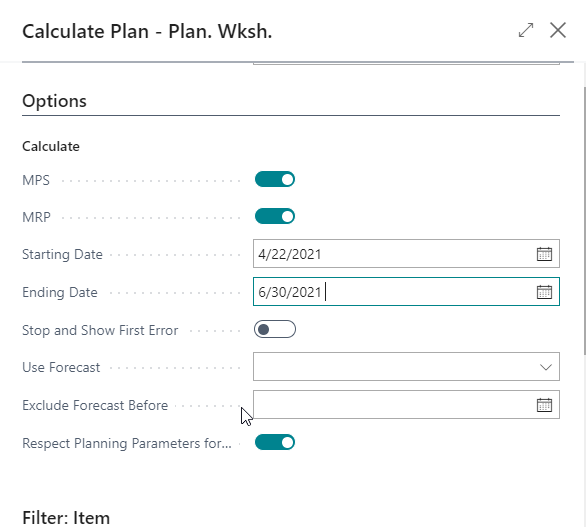
Planning worksheet parameters: 

Start Date  4/22/2021

End Date   6/30/2021
pastedimage1619115630689v1.png

I have the same question (0)
  • Suggested answer
    Community Member Profile Picture
    on at

    MahGah,

    I can write for awhile here about all the planning parameters but I am attaching my handout I use to explain Planning to my customers...

    Hope this helps.

    Thanks,

    Steve

    Planning-wPROD-Overview.pdf

  • MahGah Profile Picture
    15,529 on at

    Hi Steven

    thanks for the great handout. It is really great and helpful.

    Based on what I learned form you handbook I cannot use Lot Accumulation Period and Rescheduling Period with Fixed Reorder QTY.

    I only can use Dampener Period/QTY or Safety Lead Time/QTY. But none of them are helping with my situation (at least when I tried It did not help with my situation).

    Am I missing something?

    Thanks again for your help

  • Suggested answer
    Community Member Profile Picture
    on at

    MahGah,

    You are expecting BC in the Planning Worksheet to throw a Warning that the PO is running late based on Expected Receipt Date? If yes, you will not get this from the Planning Worksheet. This can be achieved by go to the Purchase Order List and creating a View like this:

    pastedimage1619127852904v1.png

    You can also create a Notification where PO's that are past Requested Receipt Date auto-notify specific users. I have seen this in Power Automate.

    docs.microsoft.com/.../

    Hope this helps.

    Thanks,

    Steve

  • MahGah Profile Picture
    15,529 on at

    Hi Steve 

    Thank you for your help with this question. 

    In this scenario PO is not late from BC standpoint and vendor. But MFG is out of supply. Planning worksheet does not recommend anything since the PO is in the range of lead time. 

    In general, if for Fixed Order QTY BC has a open PO in the range of lead time it does not recommend anything to buyer even though if inventory has 0 on hand. What is the best method that BC can notify buyer that inventory is out of material or running short and buyer need to do something (call vendor and ask for partial or urgent shipment). Something like a warning message, report, etc. 

    I hope this makes sense. 

    Thanks 

  • Verified answer
    Community Member Profile Picture
    on at

    MahGah,

    I would implement Safety Stock. This will allow the Item to have a Safety Stock quantity and Lead Time to maintain some inventory on-hand, before running out. This Safety Stock is normally set aside and the non-safety stock quantity utilized for consumption/use. This would provide visibility when you run into your Safety Stock Planning will generate a PO for Safety replenishment.

    Another idea would be to create a Power BI or Jet Report to show Inventory = 0 On-Hand, Purchase Order Qty and Requested Receipt Date with tracking. You could think about taking the Planning Availability Report and adding a filter for Quantity on Hand so you can enter 0 and see those Items with 0 inventory but planned receipts.

    pastedimage1619197052774v1.png

    Hope this helps.

    Thanks,

    Steve

  • MahGah Profile Picture
    15,529 on at

    Hi Steve

    Thank you for your response. I designed JetReport and that is working for now. I will test safety stock. Also, will work with out partner for your other suggestion which will help our buyer.

    Thanks again

Under review

Thank you for your reply! To ensure a great experience for everyone, your content is awaiting approval by our Community Managers. Please check back later.

Helpful resources

Quick Links

Responsible AI policies

As AI tools become more common, we’re introducing a Responsible AI Use…

Neeraj Kumar – Community Spotlight

We are honored to recognize Neeraj Kumar as our Community Spotlight honoree for…

Leaderboard > Small and medium business | Business Central, NAV, RMS

#1
OussamaSabbouh Profile Picture

OussamaSabbouh 2,238

#2
YUN ZHU Profile Picture

YUN ZHU 773 Super User 2025 Season 2

#3
Sumit Singh Profile Picture

Sumit Singh 630

Last 30 days Overall leaderboard

Featured topics

Product updates

Dynamics 365 release plans
