Hi,
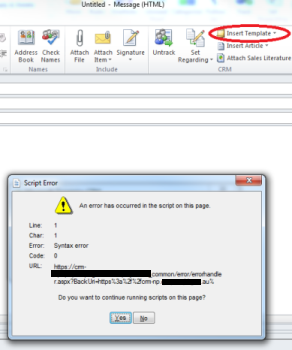
We have currently upgraded CRM 2011 to CRM 2013 for a client. After the upgrade, we are facing an issue when the user tries to Insert template (using outlook client) into an Email.
This works fine from the browser, but when using from Outlook client, it gives a JavaScript error as given in image below.
Also the error log from event viewer is given below.
Has anyone faced a similar issue ?
Thanks in advance
Event xmlns="http://schemas.microsoft.com/win/2004/08/events/event">
- <System>
<Provider Name="ASP.NET 4.0.30319.0" />
<EventID Qualifiers="32768">1309</EventID>
<Level>3</Level>
<Task>3</Task>
<Keywords>0x80000000000000</Keywords>
<TimeCreated SystemTime="2015-03-17T06:30:59.000000000Z" />
<EventRecordID>504906</EventRecordID>
<Channel>Application</Channel>
<Computer>SRVCRMNP02.gso.internal</Computer>
<Security />
</System>
- <EventData>
<Data>3005</Data>
<Data>An unhandled exception has occurred.</Data>
<Data>17/03/2015 4:30:59 PM</Data>
<Data>17/03/2015 6:30:59 AM</Data>
<Data>7710691c7c64492d8a613cdb654cb709</Data>
<Data>41974</Data>
<Data>101</Data>
<Data>0</Data>
<Data>/LM/W3SVC/1/ROOT-1-130709873401592631</Data>
<Data>Full</Data>
<Data>/</Data>
<Data>D:\Program Files\Microsoft Dynamics CRM\CRMWeb\</Data>
<Data>SRVCRMNP02</Data>
<Data />
<Data>4048</Data>
<Data>w3wp.exe</Data>
<Data>GSO\XS-CRM2013-APP-NP</Data>
<Data>ArgumentException</Data>
<Data>An item with the same key has already been added. at System.Collections.Generic.Dictionary`2.Insert(TKey key, TValue value, Boolean add) at Microsoft.Crm.Application.Pages.Common.RibbonTrimsRenderControl.PopulateControlGroupInfo(XPathNodeIterator controlGroups, Boolean isForGroups) at Microsoft.Crm.Application.Pages.Common.RibbonLayoutPage.BuildRibbonResponse() at Microsoft.Crm.Application.Pages.Common.RibbonLayoutPage.ConfigurePage() at Microsoft.Crm.Application.Controls.AppUIPage.OnPreRender(EventArgs e) at System.Web.UI.Control.PreRenderRecursiveInternal() at System.Web.UI.Page.ProcessRequestMain(Boolean includeStagesBeforeAsyncPoint, Boolean includeStagesAfterAsyncPoint)</Data>
<Data>/_controls/ribbon/RibbonLayout.js.aspx?hierarchy=0d1e47ff-12b2-4f53-9090-bee951b98cb4&id=EntityTemplateTab.email.NoRelationship.Form.Mscrm.Form.email.MainTab&ie=1&ise=1&lcid=1033&mver=514578866&oc=1&rver=31722856&ver=-2099963470</Data>
<Data>/EmployerPS/_controls/ribbon/RibbonLayout.js.aspx</Data>
<Data>10.191.111.109</Data>
<Data>GSO\Jobrow</Data>
<Data>True</Data>
<Data>Negotiate</Data>
<Data>GSO\XS-CRM2013-APP-NP</Data>
<Data>74</Data>
<Data>GSO\XS-CRM2013-APP-NP</Data>
<Data>False</Data>
<Data>at System.Collections.Generic.Dictionary`2.Insert(TKey key, TValue value, Boolean add) at Microsoft.Crm.Application.Pages.Common.RibbonTrimsRenderControl.PopulateControlGroupInfo(XPathNodeIterator controlGroups, Boolean isForGroups) at Microsoft.Crm.Application.Pages.Common.RibbonLayoutPage.BuildRibbonResponse() at Microsoft.Crm.Application.Pages.Common.RibbonLayoutPage.ConfigurePage() at Microsoft.Crm.Application.Controls.AppUIPage.OnPreRender(EventArgs e) at System.Web.UI.Control.PreRenderRecursiveInternal() at System.Web.UI.Page.ProcessRequestMain(Boolean includeStagesBeforeAsyncPoint, Boolean includeStagesAfterAsyncPoint)</Data>
</EventData>
</Event>


